
Scout All Hands Bingo Cards - Print Free or Customize
Print free Scout All Hands bingo cards or alter them, unlimited cards! Select from 41,500+ designs or use the bingo card generator. Add numbers, phrases, photos, or all of them. Play using PDF prints, virtual bingo cards, and the virtual bingo caller, or combine all formats.
About: This bingo card is designed for a lively team-building or networking event, perfect for students or members of a creative organization like Scout. Its activities encourage social interaction, playful challenges, and getting to know new people in fun and unexpected ways. Expect lots of laughter, creative icebreakers, and memorable conversations that strengthen community bonds.
How To: To get a PDF to print, click the Print button. You can modify the number of cards and other printing preferences on the Print tab. Grid items and free space content can be changed on the Basic tab. Appearance can be completely customized on the corresponding tabs, or you can quickly search any setting using the 🔍 tab.
How to play Scout All Hands Bingo Cards?
- Paper Caller: Print PDF calling list & calling slips and physically choose the slips.
- Online Players: Click on the Play button above, and then click on the 🎫 button.
- Paper Players: Print PDF bingo cards and physically mark the cards.
- Online Caller: Click on the Play button above.
- Combo Play: Pick any combination above. For instance, caller can be either Printed or Online. And players can be Printed or Online or a combination of both.
Step-By-Step:
- Start by saving the Scout All Hands Bingo PDF by clicking on the "Print" button above.
- Open the PDF and print it.
- For random drawing, you can print another copy of the call list, cut, fold and then pick them randomly at play time.
- Cut the bingo cards at the cut lines if there are more than 1 bingo cards per page.
- Distribute one card per player. For marking, you can use pencils. Crayons cost the least.
- Pick one person to be the caller. If you are playing in a small group, the caller may as well play along with their own Bingo card.
- The caller starts the play by randomly pulling an item from the call list and saying it to all players.
- The players scan their cards to see if they have the announced word. If they do, they cross off that word.
- The first player to complete a horizontal, vertical, or a diagonal line of crossed items shouts "Bingo!" and wins the game.
- The caller verifies that the items marked form a proper line as per the Bingo card and call list.
- You can play for varied patterns or a full card blackout for a longer game.
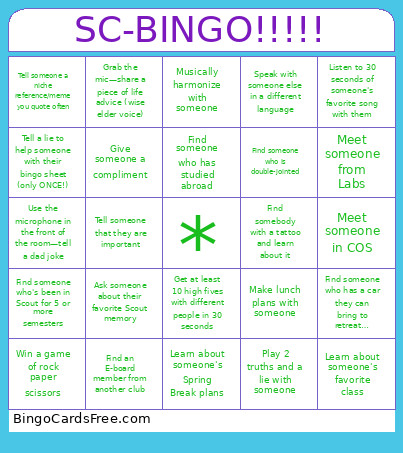 This Scout All Hands Bingo Cards Game contains following Words or Phrases: Talk to someone about a recent concert they've been to, Find a musician, Get 5 LinkedIn connections, Give someone a compliment, Find someone from your hometown (or state :p), Find someone who has studied abroad, Create a secret handshake, Laugh REALLY loudly for 5 seconds!!, Find someone who can speak 2+ languages, Meet someone from Studio, Meet someone from Labs, Meet someone from M+E, Meet someone from Community, Meet someone from Media, Meet someone from Conference, Meet a left-handed person, Meet someone from Management, Meet someone from Operations, Meet someone who is exactly one inch taller or shorter than you, Find someone who has a car they can bring to retreat…, Yell out your weekend plans, Draw a robot on the whiteboard, Shake someone's hand when the minutes on the clock are divisible by 2, Find someone wearing glasses, Win a game of rock paper scissors, Lose a game of rock paper scissors, Write a life goal on the board, Win a staring contest with someone across the room, Get someone's best celebrity impression, Find someone who is double-jointed, Whistle, Find an E-board member from another club, Turn this bingo card into a paper crane, Learn about someone's secret talent, Tell a lie to help someone with their bingo sheet (only ONCE!), Ask someone about their childhood dream job, Find someone with the same amount of siblings as you, Start a wave and get it across the room, Find someone who's been to an HQ Hangout, Swap bingo cards with someone who is wearing same colored shoes as you, Meet someone in DMSB, Meet someone in COS, Tell someone a niche reference/meme you quote often, Use the microphone in the front of the room—tell a dad joke, Meditate with someone for 30 seconds, Ask someone about their favorite show/movie/book, Make lunch plans with someone, Share your favorite recipe with someone, Show someone a photo from your favorites album, Find someone on co-op, Find someone who has a pet, yell out their pet's name, Find someone who shares your birth month, Find someone wearing Northeastern merch, Listen to 30 seconds of someone's favorite song with them, Ask someone about a recent dream they had, Find someone who's been in Scout for 5 or more semesters, Meet someone who's new to Scout this semester, Show someone a silly dance!, Gather in the back right corner of the room with 5 other people, Tell someone that they are important, Grab the mic—share a piece of life advice (wise elder voice), Exchange photos of yourself from 5+ years ago with someone else, Blow someone's mind, someway, somehow, Draw another Scout member on the whiteboard, Recreate a famous art piece and get it photographed, Get at least 10 high fives with different people in 30 seconds, Find an athlete and learn what they do, Swap phones with someone and scroll on their favorite social media app, Rub your belly and pat your head in front of someone until they do the same, Pitch the next big business idea to someone, Musically harmonize with someone, Learn about someone's Spring Break plans, Start a chant, Coordinate with 9 other people to clap in unison, Stay hydrated with a friend (there's a fountain on the second floor), Find someone who knows the HQ code, Play 2 truths and a lie with someone, Find somebody with a tattoo and learn about it, Speak with someone else in a different language, Find someone who's been to a Scout retreat and learn their favorite part, Get a restaurant recommendation, Ask someone what they're currently working on in Scout, Learn about someone's favorite class, Ask someone about their favorite Scout memory, Exchange social media profiles with someone (Instagram, Beli, Letterboxd, etc.), Assign each other spirit animals based on vibes.