Print free Scout Cub bingo cards or customize,
limitless cards! Pick from 42,200+ designs or use our bingo card generator.
Add numbers, words, images, or any combination.
Play using printed PDF, virtual bingo cards,
and our virtual bingo caller, or combine all formats.
About: This bingo card is perfect for Scout meetings, camps, or social events, giving Scouts a fun way to celebrate their skills and adventures. It taps into classic experiences and achievements that define the Scouting spirit, from outdoor challenges to teamwork and leadership milestones. It’s a great way to bring Scouts together and spark stories about their journeys.
How To: To download a printable PDF, click the Print button.
You can change the card count and other
print settings on the Print tab.
Grid items and free space content can be added on the Basic tab.
Appearance can be fully customized on the
corresponding tabs, or you can easily find any option
on the 🔍 tab.
How to play Scout Cub Bingo Cards?
Printed Players: Print PDF bingo cards and physically write on the cards.
Printed Caller: Print PDF calling list & calling slips and physically choose the slips.
Virtual Players: Click on the Play button above, and then click on the 🎫 button.
Virtual Caller: Click on the Play button above.
Mixed Mode: Select any combination above.
For instance, caller can be either Offline or Virtual.
And players can be Offline or Virtual or a combination of both.
Step-By-Step:
Start by getting the Scout Cub Bingo PDF by clicking on the "Print" button above.
Open the PDF and print it.
For random drawing, you can print another copy of the call list, cut, fold and then draw them randomly at play time.
Cut the bingo cards at the cut lines if there are more than 1 bingo cards per page.
Give one card to each player. For marking, you can use markers. Crayons cost the least.
Select one person to be the caller. If you are playing in a small group, the caller can also play along with their own Bingo card.
The caller starts the play by randomly picking an item from the call list and calling out it to everyone.
The players check their cards to see if they have the called word. If they do, they mark that word.
The first player to finish a horizontal, vertical, or a diagonal line of marked items announces "Bingo!" and wins the game.
The caller checks that the items marked form a correct line according to the Bingo card and call list.
You can play for multiple patterns or a full card blackout for an extended game.
This Scout Cub Bingo Cards Game contains following Words or Phrases: Has been to a Jamboree or Cuboree, Knows the Scout Promise off by heart, Has cooked marshmallows over a fire, Has tied a Siberian hitch knot, Has been to more than 5 camps, Has been in Scouts for more than 2 years, Has slept in a tent in Winter, Has earned Alpine level 3, Is in milestone 3, Has been a PL or APL, Can play a musical instrument, Has played "capture the flag", Can tie a alpine butterfly, Owns a pocketknife, Can light a fire without matches, Can do 15 push-ups in a row, Can identify 3 native Australian animals, Has made a campfire damper, Has performed in a Scout talent show, Has done a hike longer than 5km, Has been on a ride longer than 40km, Can name all the knots they know, Has completed a first aid course, Has helped build something out of wood and rope, Can sing a Cub or Scout song, Has a sibling in Cubs or Scouts, Sews their own badges on, Has caught a fish before, Can name a star constellation, Knows how to take a compass bearing, Has done a good turn today, Has been outdoor rock climbing, Has been abseiling, Has been on an Adventurous Journey, Has been on 5 Adventurous Journeys, Knows what "linking" means, Has been in a ANZAC service, Knows who Baden-Powell is, Has been to another Scout hall or group.

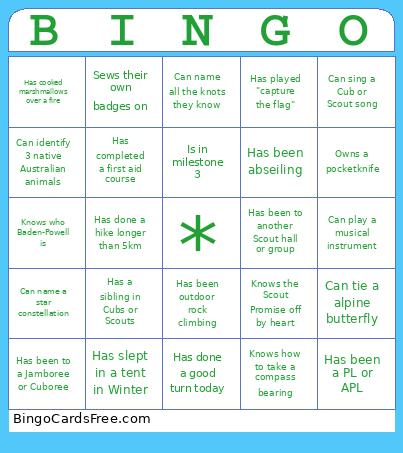 This Scout Cub Bingo Cards Game contains following Words or Phrases: Has been to a Jamboree or Cuboree, Knows the Scout Promise off by heart, Has cooked marshmallows over a fire, Has tied a Siberian hitch knot, Has been to more than 5 camps, Has been in Scouts for more than 2 years, Has slept in a tent in Winter, Has earned Alpine level 3, Is in milestone 3, Has been a PL or APL, Can play a musical instrument, Has played "capture the flag", Can tie a alpine butterfly, Owns a pocketknife, Can light a fire without matches, Can do 15 push-ups in a row, Can identify 3 native Australian animals, Has made a campfire damper, Has performed in a Scout talent show, Has done a hike longer than 5km, Has been on a ride longer than 40km, Can name all the knots they know, Has completed a first aid course, Has helped build something out of wood and rope, Can sing a Cub or Scout song, Has a sibling in Cubs or Scouts, Sews their own badges on, Has caught a fish before, Can name a star constellation, Knows how to take a compass bearing, Has done a good turn today, Has been outdoor rock climbing, Has been abseiling, Has been on an Adventurous Journey, Has been on 5 Adventurous Journeys, Knows what "linking" means, Has been in a ANZAC service, Knows who Baden-Powell is, Has been to another Scout hall or group.