Print free Services bingo cards or modify,
limitless cards! Pick from 42,200+ templates or use our bingo card generator.
Add numbers, words, pictures, or mix them all.
Play using PDF printouts, online bingo cards,
and our online bingo caller, or go hybrid.
About: This bingo card is perfect for an Apple-themed event or staff training focused on digital services and devices. With a fun mix of the latest gadgets and service bundles, it encourages players to spot creative product-service pairings. It’s ideal for tech enthusiasts or Apple store teams looking to engage with new releases in a playful way.
How To: To get a PDF to print, click the Print button.
You can change the number of cards and other
printing settings on the Print tab.
Grid items and free space text can be edited on the Basic tab.
Appearance can be entirely personalized on the
corresponding tabs, or you can easily locate any option
on the 🔍 tab.
How to play Services Bingo Cards?
Online Players: Click on the Play button above, and then click on the 🎫 button.
Printed Caller: Print PDF calling list & calling slips and physically draw the slips.
Printed Players: Print PDF bingo cards and physically write on the cards.
Online Caller: Click on the Play button above.
Mixed Mode: Choose any combination above.
For instance, caller can be either Paper or Online.
And players can be Paper or Online or a combination of both.
Step-By-Step:
Start by saving the Services PDF by clicking on the "Print" button above.
Open the PDF and print it.
For random drawing, you can print another copy of the call list, cut, fold and then pick them randomly at play time.
Cut the bingo cards at the cut lines if there are greater than 1 bingo cards per page.
Distribute one card per player. For marking, you can use crayons. Crayons cost the least.
Choose one person to be the caller. If you are playing in a small group, the caller can as well play along with their own Bingo card.
The caller starts the play by randomly picking an item from the call list and announcing it to all players.
The players look at their cards to see if they have the called word. If they do, they dab that word.
The first player to complete a horizontal, vertical, or a diagonal line of crossed items announces "Bingo!" and wins the play.
The caller verifies that the items crossed off form a proper line as per the Bingo card and call list.
You can play for multiple patterns or a full card blackout for a longer play.
This Services Bingo Cards Game contains following Words or Phrases: AirPods with Music, HomePod with Music, iPhone Air with Music, iPad mini with News, Apple Music after AirPods Demo, iPhone with 5 Services, Beats with Fitness and Music, iPad 13" with TV (Air or Pro), AirPods with Fitness, Fitness, News & Arcade in 1 Transaction, EDU Customer with Arcade, Apple TV 4K with Arcade, iPhone 17 Pro Max with News, Apple TV 4K with Apple TV Service, MacBook Neo with Creator Studio, AirPods with both Music and Fitness, MacBook Air with Apple News, EDU Customer with Creator Studio, iPad with Creator Studio, iPad with Arcade, EDU Customer with TV, Apple Watch with both Music and Fitness, Mac with Arcade, EDU Customer with Music.

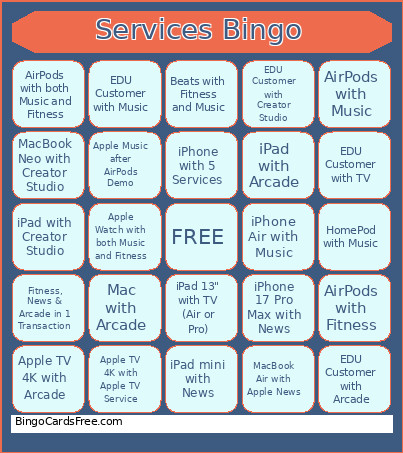 This Services Bingo Cards Game contains following Words or Phrases: AirPods with Music, HomePod with Music, iPhone Air with Music, iPad mini with News, Apple Music after AirPods Demo, iPhone with 5 Services, Beats with Fitness and Music, iPad 13" with TV (Air or Pro), AirPods with Fitness, Fitness, News & Arcade in 1 Transaction, EDU Customer with Arcade, Apple TV 4K with Arcade, iPhone 17 Pro Max with News, Apple TV 4K with Apple TV Service, MacBook Neo with Creator Studio, AirPods with both Music and Fitness, MacBook Air with Apple News, EDU Customer with Creator Studio, iPad with Creator Studio, iPad with Arcade, EDU Customer with TV, Apple Watch with both Music and Fitness, Mac with Arcade, EDU Customer with Music.