Sesame Bingo 12.31.25-1.6.26 Cards - Print Free or Customize
Print free Sesame bingo 12.31.25-1.6.26 cards or alter them,
unlimited prints! Select from 41,500+ templates or use the bingo card generator.
Add numbers, phrases, images, or any combination.
Play using printable PDF, digital bingo cards,
and the digital bingo caller, or mix physical and digital.
About: This bingo card is perfect for Sesame Street performers and crew, capturing all the quirky moments and backstage shenanigans that make working at a theme park unforgettable. The tone is fun and lighthearted, spotlighting inside jokes, team traditions, character mishaps, and surprise guest appearances—ideal for a cast party, staff meeting, or just sharing laughs during a long show week.
How To: To get a printable PDF, click the Print button.
You can modify the card quantity and other
print options on the Print tab.
Grid items and free space content can be edited on the Basic tab.
Appearance can be exactly personalized on the
corresponding tabs, or you can easily locate any option
on the 🔍 tab.
How to play Sesame Bingo 12.31.25-1.6.26 Cards?
Digital Players: Click on the Play button above, and then click on the 🎫 button.
Printed Caller: Print PDF calling list & calling slips and physically select the slips.
Printed Players: Print PDF bingo cards and physically mark the cards.
Digital Caller: Click on the Play button above.
Hybrid Play: Pick any combination above.
For instance, caller can be either Offline or Digital.
And players can be Offline or Digital or a combo of both.
Step-By-Step:
Start by getting the Sesame Bingo 12.31.25-1.6.26 PDF by clicking on the "Print" button above.
Open the PDF and print it.
For random drawing, you can print another copy of the call list, cut, fold and then pick them randomly at play time.
Cut the bingo cards at the cut lines if there are more than 1 bingo cards per page.
Give one card to each player. For marking, you can use pencils. Crayons are the cheapest.
Pick one person to be the caller. If you are playing in a small group, the caller may as well play along with their own Bingo card.
The caller opens the game by randomly pulling an item from the call list and calling out it to everyone.
The players check their cards to see if they have the announced word. If they do, they dab that word.
The first player to complete a horizontal, vertical, or a diagonal line of crossed items shouts "Bingo!" and wins the play.
The caller verifies that the items marked form a correct line as per the Bingo card and call list.
You can play for varied patterns or a full card blackout for an extended play.
This Sesame Bingo 12.31.25-1.6.26 Cards Game contains following Words or Phrases: Kid on stage BEFORE show, Kid rushes stage DURING show, M&G Kid tries to go backstage, M&G Kid climbs up or jumps off extension, Prop drop /malfunction, Mech malfunction DURING set, Show Delay, Code Purple lifted right before set, Guest gives Cookie food, 4 or more Sesame Crew Sweaters Worn, Wiggle Wednesday, Random Busch worker walks through breakspace, Guest sticks hand in mouth of character, Parent tries to get character to hold baby, Kellan asks hypothetical, Joslyn "Borrows" something, Ian purchases a diet coke, Lillie eats kitkats, Brooklyn streams a show while eating grill food, Krista brings food from another venue, Kalyn brings Hawaiian Rolls, Kalyn gives theme park trivia, Massage gun shenanigans, DJ Slurpee makes an appearance, Full Show, Spotlight, No Zoe, No Grover, No Cookie, Sanya gets hurt, First Aid gets called, Linda says "Oh my Lanta", Someone off the clock is in audience, Low brings pizza to eat, Castmember in costume 3 days in a row, Mikey shakes his "tail feathers", Something gets added to the "Quote Book", Krista decorates for Sesame., Guest gives a hug longer than 10 seconds, Tessa finishes a crochet piece at work, 3 or more originally scheduled switched that day, Someone leaves radio on overnight, Both Brosita's in costume together., Sean mentions where he is from, Jenifer and her Nephew at same M&G, Caroline does ECW Choreo, Rachel asks for backrubs, Dimirtri wears his Abby Hoodie to work., Baked Beans (Eliya, Robyn, Kellan) present.

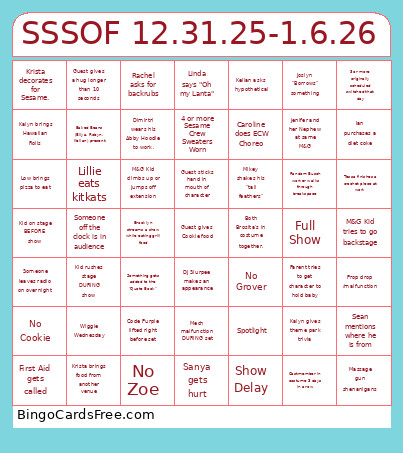 This Sesame Bingo 12.31.25-1.6.26 Cards Game contains following Words or Phrases: Kid on stage BEFORE show, Kid rushes stage DURING show, M&G Kid tries to go backstage, M&G Kid climbs up or jumps off extension, Prop drop /malfunction, Mech malfunction DURING set, Show Delay, Code Purple lifted right before set, Guest gives Cookie food, 4 or more Sesame Crew Sweaters Worn, Wiggle Wednesday, Random Busch worker walks through breakspace, Guest sticks hand in mouth of character, Parent tries to get character to hold baby, Kellan asks hypothetical, Joslyn "Borrows" something, Ian purchases a diet coke, Lillie eats kitkats, Brooklyn streams a show while eating grill food, Krista brings food from another venue, Kalyn brings Hawaiian Rolls, Kalyn gives theme park trivia, Massage gun shenanigans, DJ Slurpee makes an appearance, Full Show, Spotlight, No Zoe, No Grover, No Cookie, Sanya gets hurt, First Aid gets called, Linda says "Oh my Lanta", Someone off the clock is in audience, Low brings pizza to eat, Castmember in costume 3 days in a row, Mikey shakes his "tail feathers", Something gets added to the "Quote Book", Krista decorates for Sesame., Guest gives a hug longer than 10 seconds, Tessa finishes a crochet piece at work, 3 or more originally scheduled switched that day, Someone leaves radio on overnight, Both Brosita's in costume together., Sean mentions where he is from, Jenifer and her Nephew at same M&G, Caroline does ECW Choreo, Rachel asks for backrubs, Dimirtri wears his Abby Hoodie to work., Baked Beans (Eliya, Robyn, Kellan) present.