Shadow the hedgehog randomizer Bingo Cards - Print Free or Customize
Print free Shadow the hedgehog randomizer bingo cards or modify,
unlimited cards! Choose from 41,500+ templates or use the bingo card generator.
Add numbers, phrases, photos, or all of them.
Play using PDF printouts, virtual bingo cards,
and the virtual bingo caller, or go hybrid.
About: This bingo card is a fun and quirky take on the world of Shadow the Hedgehog, filled with references to partners, missions, and some of the series’ most memorable moments. Perfect for a gaming marathon with friends or a fan event, it’s designed for those who love the game’s wild twists and unexpected challenges.
How To: To download a PDF to print, click the Print button.
You can adjust the card count and other
printing settings on the Print tab.
Grid items and free space content can be changed on the Basic tab.
Appearance can be highly personalized on the
relevant tabs, or you can quickly locate any setting
using the 🔍 tab.
How to play Shadow the hedgehog randomizer Bingo Cards?
Printed Players: Print PDF bingo cards and manually cross off the cards.
Digital Players: Click on the Play button above, and then click on the 🎫 button.
Digital Caller: Click on the Play button above.
Printed Caller: Print PDF calling list & calling slips and manually choose the slips.
Mixed Mode: Select any combination above.
For example, caller can be either Paper or Digital.
And players can be Paper or Digital or a mix of both.
Step-By-Step:
Start by saving the Shadow the hedgehog randomizer PDF by clicking on the "Print" button above.
Open the PDF and print a hard copy.
For random drawing, you can print another copy of the call list, cut, fold and then draw them randomly at play time.
Cut the bingo cards at the cut lines if there are greater than 1 bingo cards per page.
Give one card to each player. For marking, you can use pencils. Crayons are the cheapest.
Select one person to be the caller. If you are playing in a small group, the caller may as well play along with their own Bingo card.
The caller initiates the game by randomly pulling an item from the call list and saying it to all players.
The players look at their cards to see if they have the called word. If they do, they cross off that word.
The first player to finish a horizontal, vertical, or a diagonal line of marked items announces "Bingo!" and wins the play.
The caller checks that the items crossed off form a correct line as per the Bingo card and call list.
You can play for multiple patterns or a full card blackout for an extended play.
This Shadow the hedgehog randomizer Bingo Cards Game contains following Words or Phrases: Partner Amy, Partner Sonic, Partner Vector, Partner Charmy, Partner Tails, Partner Rouge, Partner Espio, Partner Eggman, Partner Knuckles, Partner Omega, Partner Maria, Partner Black Doom, Kill an enemy with a Melee Weapon, Beat a level gunless, Revive a Gun Soldier, Kill Artificial Chaos with C.B., Get an Evil A Rank, Get a Good A Rank, Get 400 Rings, Beat Sonic & Diablon, Beat Black Doom, Beat Egg Dealer, Fight any Two Minibosses, Die to Jank, Die to Shadow Android, Kill a Chao, Weapon Vacuum, Weapon Eggman, Weapon Shadow, Weapon Doom, Weapon Explosive, "Find the computer room", Break a Turret, Racism, "The more the merrier", Commit a crime while driving, Become a firefighter, Find 8 keys, Counting chaos emeralds with shadow, Forced to restart a mission, Spend 10 minutes stuck in level, "Don't touch the red fruit", "Hey look it's a balloon", "Top Secret Disc", Eggman says "What!?", Rage quit an ARK Level, Pick up a shield, Slide down a pole sensually, Alliteration, Red Chaos Emerald, Blue Chaos Emerald, Cyan Chaos Emerald, Purple Chaos Emerald, Yellow Chaos Emerald, Green Chaos Emerald, White Chaos Emerald, B Rank, C Rank, D Rank, E Rank, Get all Save Points in a level, Beat a Timed Mission.

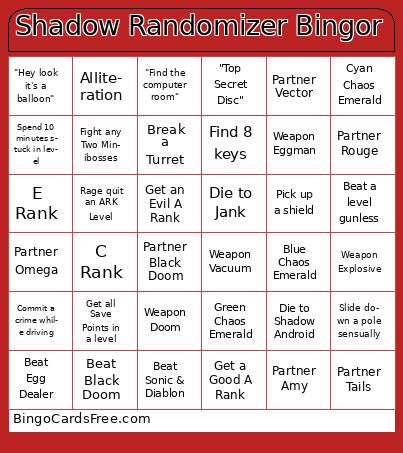 This Shadow the hedgehog randomizer Bingo Cards Game contains following Words or Phrases: Partner Amy, Partner Sonic, Partner Vector, Partner Charmy, Partner Tails, Partner Rouge, Partner Espio, Partner Eggman, Partner Knuckles, Partner Omega, Partner Maria, Partner Black Doom, Kill an enemy with a Melee Weapon, Beat a level gunless, Revive a Gun Soldier, Kill Artificial Chaos with C.B., Get an Evil A Rank, Get a Good A Rank, Get 400 Rings, Beat Sonic & Diablon, Beat Black Doom, Beat Egg Dealer, Fight any Two Minibosses, Die to Jank, Die to Shadow Android, Kill a Chao, Weapon Vacuum, Weapon Eggman, Weapon Shadow, Weapon Doom, Weapon Explosive, "Find the computer room", Break a Turret, Racism, "The more the merrier", Commit a crime while driving, Become a firefighter, Find 8 keys, Counting chaos emeralds with shadow, Forced to restart a mission, Spend 10 minutes stuck in level, "Don't touch the red fruit", "Hey look it's a balloon", "Top Secret Disc", Eggman says "What!?", Rage quit an ARK Level, Pick up a shield, Slide down a pole sensually, Alliteration, Red Chaos Emerald, Blue Chaos Emerald, Cyan Chaos Emerald, Purple Chaos Emerald, Yellow Chaos Emerald, Green Chaos Emerald, White Chaos Emerald, B Rank, C Rank, D Rank, E Rank, Get all Save Points in a level, Beat a Timed Mission.