
Signature Bingo Cards - Print Free or Customize
Print free Signature bingo cards or modify, limitless cards! Pick from 41,900+ designs or use our bingo card generator. Add numbers, words, photos, or mix them all. Play using PDF printouts, online bingo cards, and our online bingo caller, or combine all formats.
About: This bingo card is all about discovering fun facts and quirky favorites among a group, making it perfect for workplace mixers, team-building events, or social gatherings. The prompts spark conversations about hobbies, tastes, and backgrounds, creating a relaxed and engaging way for people to get to know each other better in any community or corporate setting.
How To: To get a PDF to print, click the Print button. You can alter the number of cards and other printing options on the Print tab. Grid items and free space content can be edited on the Basic tab. Appearance can be completely personalized on the corresponding tabs, or you can quickly find any preference on the 🔍 tab.
How to play Signature Bingo Cards?
- Printed Caller: Print PDF calling list & calling slips and manually select the slips.
- Printed Players: Print PDF bingo cards and manually scratch the cards.
- Online Caller: Click on the Play button above.
- Online Players: Click on the Play button above, and then click on the 🎫 button.
- Mixed Mode: Pick any combination above. For example, caller can be either Offline or Online. And players can be Offline or Online or a combination of both.
Step-By-Step:
- Start by downloading the Signature Bingo PDF by clicking on the "Print" button above.
- Open the PDF and print it.
- For random drawing, you can print another copy of the call list, cut, fold and then draw them randomly at play time.
- Cut the bingo cards at the cut marks if there are greater than 1 bingo cards per page.
- Distribute one card per player. For marking, you can use markers. Crayons cost the least.
- Pick one person to be the caller. If you are playing in a small group, the caller may as well play along with their own Bingo card.
- The caller begins the play by randomly picking an item from the call list and calling out it to all players.
- The players look at their cards to see if they have the called word. If they do, they mark that word.
- The first player to complete a horizontal, vertical, or a diagonal line of marked items shouts "Bingo!" and wins the game.
- The caller verifies that the items crossed off form a proper line as per the Bingo card and call list.
- You can play for varied patterns or a full card blackout for a longer game.
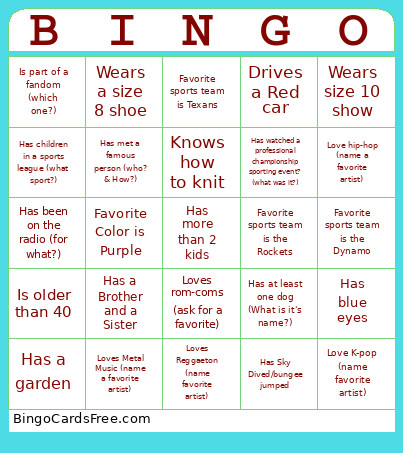 This Signature Bingo Cards Game contains following Words or Phrases: Born outside of the Country, Collects something (what is it?), Drives a Red car, Favorite candy is chocolate, Favorite candy is gummies, Favorite Color is Black, Favorite color is blue, Favorite Color is green, Favorite Color is Orange, Favorite color is Pink, Favorite Color is Purple, Favorite Color is red, Favorite Color is yellow, Favorite food is pizza (fav toppings?), Favorite sports team is Texans, Favorite sports team is the Astros, Favorite sports team is the Dash, Favorite sports team is the Dynamo, Favorite sports team is the Rockets, Has 2 or more animals, Has a Brother and a Sister, Has a favorite comic books character (which one?), Has a garden, Has a side business? (what is it?), Has an unsual pet (what is it?), Has at least one cat (What it's name?), Has at least one dog (What is it's name?), Has been on a stage in front of at least 100 people (how did they get there?), Has been on the radio (for what?), Has been on TV (for what?), Has been out of the Country in the last year, Has been to Hawaii, Has blue eyes, Has children in a sports league (what sport?), Has met a famous person (who? & How?), Has more than 2 kids, Has no gotten Covid, Has seasonal allergy, Has Sky Dived/bungee jumped, Has watched a professional championship sporting event? (what was it?), Hates chocolate, Is Left Handed, Is left handed, Is older than 40, Is part of a fandom (which one?), Is younger than 30, Knows how to knit, Lives in an apartment, Love hip-hop (name a favorite artist), Love K-pop (name favorite artist), Loves Country Music (name a favorite artist), Loves Horror (ask for a favorite), Loves Metal Music (name a favorite artist), Loves Pop music (name a favorite artist), Loves Reggaeton (name favorite artist), Loves rom-coms (ask for a favorite), Loves sci-fi movies (ask for a favorite), Loves to eat Spaghetti, Loves to go camping (fav camp spot?), Loves to Read, Plays guitar, Plays Piano, This is their 1st job, Wears a size 8 shoe, Wears size 10 show, Worked at legacy more than Ten Years.