Silang Christmas Bingo Cards - Print Free or Customize
Print free Silang Christmas bingo cards or customize,
limitless cards! Choose from 41,500+ templates or use our bingo card generator.
Add numbers, words, pictures, or any combination.
Play using PDF printouts, online bingo cards,
and our online bingo caller, or mix physical and digital.
About: This bingo card perfectly captures the fun, chaos, and familiar moments at a big Filipino family gathering. With plenty of witty nods to classic tita and tito comments, party mishaps, and playful teasing, it’s a great way to keep everyone laughing during a reunion or holiday get-together with the whole clan.
How To: To save a PDF to print, click the Print button.
You can change the number of cards and other
printing settings on the Print tab.
Grid items and free space content can be edited on the Basic tab.
Appearance can be exactly personalized on the
relevant tabs, or you can quickly search any preference
on the 🔍 tab.
How to play Silang Christmas Bingo Cards?
Paper Players: Print PDF bingo cards and physically write on the cards.
Digital Caller: Click on the Play button above.
Digital Players: Click on the Play button above, and then click on the 🎫 button.
Paper Caller: Print PDF calling list & calling slips and physically draw the slips.
Combo Play: Pick any combination above.
For instance, caller can be either Offline or Digital.
And players can be Offline or Digital or a combination of both.
Step-By-Step:
Start by downloading the Silang Christmas PDF by clicking on the "Print" button above.
Open the PDF and print it.
For random calling, you can print another copy of the call list, cut, fold and then draw them randomly at play time.
Cut the bingo cards at the cut lines if there are more than 1 bingo cards per page.
Give one card to each player. For marking, you can use pens. Crayons are the cheapest.
Pick one person to be the caller. If you are playing in a small group, the caller can as well play along with their own Bingo card.
The caller begins the play by randomly pulling an item from the call list and calling out it to all players.
The players check their cards to see if they have the announced word. If they do, they dab that word.
The first player to complete a horizontal, vertical, or a diagonal line of marked items announces "Bingo!" and wins the game.
The caller confirms that the items marked form a correct line according to the Bingo card and call list.
You can play for multiple patterns or a full card blackout for a longer game.
This Silang Christmas Bingo Cards Game contains following Words or Phrases: Tita Ana gives unsolicited relationship advice, Tita Ana suggests a group photo, Tita Tina comments on someone's weight, Tita Tina says she's too lazy to get up, Tito Jerome mentions being busy with work, David mentions being busy with work, Lola Marina gives unsolicited life advice, Lola Marina says something completely on-brand, Tita Apple spills food or drink, Tita Apple makes a memorable comment, Ysa gets called out for "walang ligo na naman", David spills food or drink, David reacts way too loudly during a game, David shows off a talent or party trick, David debates the rules during a game, David gets pulled into organizing something, David becomes part of the chaos, Gabo sneaks extra dessert, Gabo reacts way too loudly during a game, Gabo shows off a talent or party trick, Gabo disappears during cleanup, Matthew sneaks extra dessert, Matthew becomes overly competitive, Matthew attempts a high note he shouldn't, Matthew vanishes when help is needed, Rhys does something chuckles after being complimented, Rhys quietly helps with something, Someone asks Rhen about love, marriage, or future plans, Someone insists Darryl eat more, Someone insists Rhys eat more, Someone complains about how expensive everything is now, Someone retells a story everyone already knows.

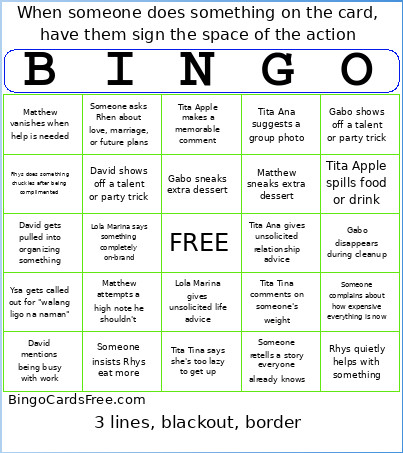 This Silang Christmas Bingo Cards Game contains following Words or Phrases: Tita Ana gives unsolicited relationship advice, Tita Ana suggests a group photo, Tita Tina comments on someone's weight, Tita Tina says she's too lazy to get up, Tito Jerome mentions being busy with work, David mentions being busy with work, Lola Marina gives unsolicited life advice, Lola Marina says something completely on-brand, Tita Apple spills food or drink, Tita Apple makes a memorable comment, Ysa gets called out for "walang ligo na naman", David spills food or drink, David reacts way too loudly during a game, David shows off a talent or party trick, David debates the rules during a game, David gets pulled into organizing something, David becomes part of the chaos, Gabo sneaks extra dessert, Gabo reacts way too loudly during a game, Gabo shows off a talent or party trick, Gabo disappears during cleanup, Matthew sneaks extra dessert, Matthew becomes overly competitive, Matthew attempts a high note he shouldn't, Matthew vanishes when help is needed, Rhys does something chuckles after being complimented, Rhys quietly helps with something, Someone asks Rhen about love, marriage, or future plans, Someone insists Darryl eat more, Someone insists Rhys eat more, Someone complains about how expensive everything is now, Someone retells a story everyone already knows.