
Singo Bingo Cards - Print Free or Customize
Print free Singo bingo cards or modify, unlimited cards! Choose from 42,600+ templates or use our bingo card generator. Add numbers, phrases, images, or mix them all. Play using PDF printouts, online bingo cards, and our online bingo caller, or go hybrid.
About: This bingo card is a nostalgic celebration of classic hits from the 60s and 70s, bringing together legendary songs that defined a generation. Perfect for music-themed parties, trivia nights, or retro gatherings, it's designed to get everyone singing along and reminiscing about the golden age of rock, pop, soul, and disco. Expect lots of smiles and spontaneous singalongs!
How To: To get a printable PDF, click the Print button. You can modify the card quantity and other printing options on the Print tab. Grid items and free space text can be added on the Basic tab. Appearance can be entirely customized on the corresponding tabs, or you can quickly locate any setting using the 🔍 tab.
How to play Singo Bingo Cards?
- Printed Caller: Print PDF calling list & calling slips and physically draw the slips.
- Digital Caller: Click on the Play button above.
- Printed Players: Print PDF bingo cards and physically write on the cards.
- Digital Players: Click on the Play button above, and then click on the 🎫 button.
- Hybrid Mode: Choose any combination above. For instance, caller can be either Printed or Digital. And players can be Printed or Digital or a combination of both.
Step-By-Step:
- Start by getting the Singo PDF by clicking on the "Print" button above.
- Open the PDF and print it.
- For random calling, you can print another copy of the call list, cut, fold and then draw them randomly at play time.
- Cut the bingo cards at the cut lines if there are greater than 1 bingo cards per page.
- Give one card to each player. For marking, you can use pens. Crayons cost the least.
- Choose one person to be the caller. If you are playing in a small group, the caller may also play along with their own Bingo card.
- The caller initiates the play by randomly pulling an item from the call list and saying it to everyone.
- The players look at their cards to see if they have the called word. If they do, they dab that word.
- The first player to complete a horizontal, vertical, or a diagonal line of crossed items shouts "Bingo!" and wins the game.
- The caller checks that the items marked form a proper line according to the Bingo card and call list.
- You can play for multiple patterns or a full card blackout for a longer game.
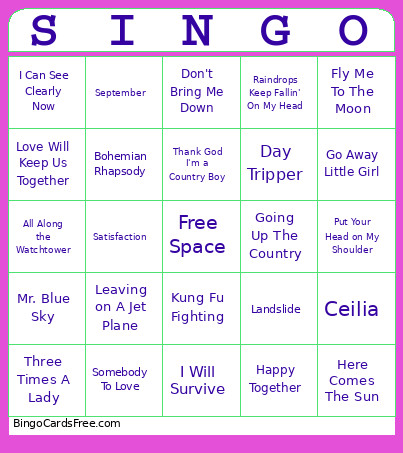 This Singo Bingo Cards Game contains following Words or Phrases: The Twist, Hey Jude, Sugar, Sugar, Aquarius, Oh, Pretty Woman, Crocodile Rock, Piano Man, I Want You to Want Me, Copacabana, Somebody To Love, Your Song, Only the Good Die Young, Bohemian Rhapsody, Kung Fu Fighting, Rocket Man, Tiny Dancer, Bennie And The Jets, Come and Get Your Love, Lean on Me, Y.M.C.A., Mr. Blue Sky, Crazy Little Thing Called Love, Let it Be, Dancing Queen, Jolene, Don't Go Breaking My Heart, You're The One That I Want, I Will Survive, Landslide, Ceilia, I Can See Clearly Now, Satisfaction, Mama, I'm Coming Home, California Dreamin', Daydream Believer, Mellow Yellow, My Girl, Brown Eyed Girl, Jumpin'Jack Flash, My Generation, Voodoo Child, Piece of My Heart, See Emily Play, Somebody to Love, Light My Fire, All Along the Watchtower, Foxey Lady, You Really Got Me, Day Tripper, Going Up The Country, Dreams, A Horse with No Name, September, Fame, Play That Funky Music, Ring My Bell, Boogie Wonderland, Ladies Night, Let's Stay Together, Harper Valley P.T.A., Mrs. Robinson, Maggie May, Sweet Caroline, Aint' No Mountain High Enough, Surfin' U.S.A., Good Vibrations, Here Comes The Sun, Wouldn't It Be Nice, Build Me Up Buttercup, Do Wah Diddy Diddy, Fly Me To The Moon, Do You Believe in Magic?, You Can't Hurry Love, Happy Together, God Only Knows, Put Your Head on My Shoulder, Yesterday, What A Wonderful World, My Way, Everlasting Love, I Got You Babe, You Lost That Loving Feelin', Hang on Sloopy, Walk on By, Leader of The Pack, My Sharona, Da Ya Think I'm Sexy?, You Don't Bring Me Flowers, I Want You to Want Me, The Devil Went Down to Georgia, We Are Family, Renegade, Don't Bring Me Down, Double Vision, Bridge Over Troubled Water, Stand By Me, American Woman, You Light Up My Life, Tie a Yellow Ribbon Round the Ole Oak Tree, Sittin' On the Dock of the Bay, Best of My Love, Raindrops Keep Fallin' On My Head, War, I Think I Love You, Go Away Little Girl, Babe, Don't Stop 'Til You Get Enough, Heart of Glass, Hot Child in The City, Kiss You All Over, Three Times A Lady, Rhinestone Cowboy, Get Down Tonight, Love Will Keep Us Together, Thank God I'm a Country Boy, "Please Mr. Postman", Lucy in The Sky With Diamonds, I Shot the Sheriff, Are You Lonesome Tonight?, Big Girls Don't Cry, When a Man Loves a Woman, Good Vibrations, I Heard It Though The Grapevine, Leaving on A Jet Plane.