Print free YRCJC bingo cards or alter them,
unlimited prints! Choose from 41,500+ designs or use our bingo card generator.
Add numbers, phrases, pictures, or mix them all.
Play using printed PDF, virtual bingo cards,
and our virtual bingo caller, or mix physical and digital.
About: This bingo card is perfect for a bridal shower or wedding-related gathering, bringing together friends and family in a fun, interactive way. The prompts encourage guests to mingle, share stories, and discover surprising connections. It's designed to spark laughter, conversation, and a sense of community among people celebrating the bride and groom.
How To: To get a PDF to print, click the Print button.
You can modify the card count and other
print preferences on the Print tab.
Grid items and free space text can be added on the Basic tab.
Appearance can be highly personalized on the
relevant tabs, or you can quickly locate any preference
using the 🔍 tab.
How to play YRCJC Bingo Cards?
Digital Players: Click on the Play button above, and then click on the 🎫 button.
Printed Players: Print PDF bingo cards and manually mark the cards.
Printed Caller: Print PDF calling list & calling slips and manually choose the slips.
Digital Caller: Click on the Play button above.
Hybrid Play: Pick any combination above.
For example, caller can be either Paper or Digital.
And players can be Paper or Digital or a mix of both.
Step-By-Step:
Start by downloading the YRCJC PDF by clicking on the "Print" button above.
Open the PDF and print it.
For random calling, you can print another copy of the call list, cut, fold and then pick them randomly at play time.
Cut the bingo cards at the cut lines if there are greater than 1 bingo cards per page.
Distribute one card per player. For marking, you can use pens. Crayons are the cheapest.
Pick one person to be the caller. If you are playing in a small group, the caller may as well play along with their own Bingo card.
The caller opens the play by randomly pulling an item from the call list and calling out it to everyone.
The players check their cards to see if they have the announced word. If they do, they dab that word.
The first player to finish a horizontal, vertical, or a diagonal line of marked items announces "Bingo!" and wins the game.
The caller checks that the items crossed off form a proper line as per the Bingo card and call list.
You can play for multiple patterns or a full card blackout for a longer game.
This YRCJC Bingo Cards Game contains following Words or Phrases: Can make Maple do tricks, Can name a food that pairs well with wine, Complimented someone's outfit tonight, Drinks coffee everyday, Has 2+ grandchildren, Has a birthday this month, Has been on a cruise, Has gone on double date with bride and the groom, Has known the bride for 5+ years, Has known the groom for 5+ years, Has met someone famous, Has met the bride prior to today, Has more than 2 kids, Has same nail color as you, Has traveled to 5+ countries, Is a morning person, Knows the name of the couple's dog, Knows where the couple went on their first date, Married for 20+ years, Plays a musical instrument, Prefers cocktail over wine, Prefers white wine over red, Shares a birthday month with the goom, Speaks 2+ languages, Took a photo at this party, Traveled from another state to be here, Wearing something blue, Wearing something purple, Wearing something red, Went to the same middle school as the bride, Works/worked in the hospitality industry, Youngest person at the party, Is a great cook/baker, Works/worked in the legal field, Knows what bride and the groom majored in college.

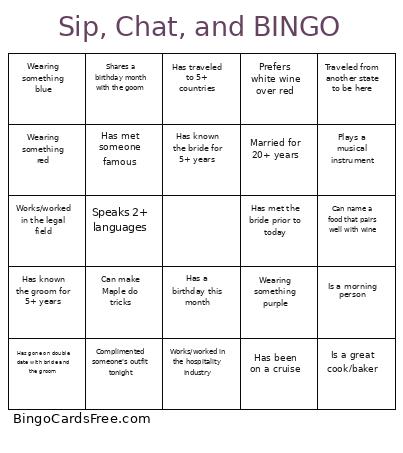 This YRCJC Bingo Cards Game contains following Words or Phrases: Can make Maple do tricks, Can name a food that pairs well with wine, Complimented someone's outfit tonight, Drinks coffee everyday, Has 2+ grandchildren, Has a birthday this month, Has been on a cruise, Has gone on double date with bride and the groom, Has known the bride for 5+ years, Has known the groom for 5+ years, Has met someone famous, Has met the bride prior to today, Has more than 2 kids, Has same nail color as you, Has traveled to 5+ countries, Is a morning person, Knows the name of the couple's dog, Knows where the couple went on their first date, Married for 20+ years, Plays a musical instrument, Prefers cocktail over wine, Prefers white wine over red, Shares a birthday month with the goom, Speaks 2+ languages, Took a photo at this party, Traveled from another state to be here, Wearing something blue, Wearing something purple, Wearing something red, Went to the same middle school as the bride, Works/worked in the hospitality industry, Youngest person at the party, Is a great cook/baker, Works/worked in the legal field, Knows what bride and the groom majored in college.