Print free sirsi bingo cards or customize,
unlimited prints! Select from 41,500+ templates or use the bingo card generator.
Add numbers, phrases, images, or any combination.
Play using PDF prints, online bingo cards,
and the online bingo caller, or go hybrid.
About: This bingo card is all about everyday tasks and skills for library staff working with patrons and library management systems. Perfect for staff training sessions or team-building activities, it brings a fun twist to learning key workflows like holds, checkouts, account updates, and troubleshooting. It’s a great way to energize new hires or refresh veteran librarians on best practices.
How To: To save a printable PDF, click the Print button.
You can change the card count and other
printing preferences on the Print tab.
Grid items and free space text can be changed on the Basic tab.
Appearance can be highly customized on the
relevant tabs, or you can easily search any setting
using the 🔍 tab.
How to play sirsi Bingo Cards?
Printed Players: Print PDF bingo cards and manually scratch the cards.
Printed Caller: Print PDF calling list & calling slips and manually pick the slips.
Virtual Caller: Click on the Play button above.
Virtual Players: Click on the Play button above, and then click on the 🎫 button.
Combo Play: Select any combination above.
For example, caller can be either Paper or Virtual.
And players can be Paper or Virtual or a mix of both.
Step-By-Step:
Start by downloading the sirsi PDF by clicking on the "Print" button above.
Open the PDF and print a hard copy.
For random drawing, you can print another copy of the call list, cut, fold and then draw them randomly at play time.
Cut the bingo cards at the cut marks if there are more than 1 bingo cards per page.
Give one card to each player. For marking, you can use pencils. Crayons cost the least.
Select one person to be the caller. If you are playing in a small group, the caller may as well play along with their own Bingo card.
The caller opens the play by randomly drawing an item from the call list and saying it to everyone.
The players check their cards to see if they have the announced word. If they do, they cross off that word.
The first player to complete a horizontal, vertical, or a diagonal line of marked items yells "Bingo!" and wins the game.
The caller checks that the items crossed off form a correct line according to the Bingo card and call list.
You can play for multiple patterns or a full card blackout for an extended game.
This sirsi Bingo Cards Game contains following Words or Phrases: Register a New Patron, cancel a hold, Place a Hold Using the Place Hold Wizard, Place a Hold in the Discovery layer, Place a hold on an Overdrive Item in the Discovery Layer, Change your pin in the Discovery Layer, Find a Patron's hold position in the queue, Renew a Patron hold, Check out a book, Check in a book, Check in a book using Dropbox mode, Mark an item lost, Pay a users bill, Update a User's address (and Pstat), Check out a book with a modified due date, Renew items for a user, Pay a partial payment for an item, Pring out the details of a User's account, Register a child by duplicating a parent's card, Replace a user's library card, Print a list of checkouts for a user, Extend a user's privellege, Search for a user by address, search for a user by email.

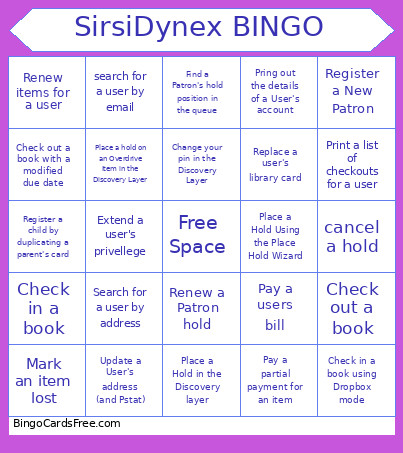 This sirsi Bingo Cards Game contains following Words or Phrases: Register a New Patron, cancel a hold, Place a Hold Using the Place Hold Wizard, Place a Hold in the Discovery layer, Place a hold on an Overdrive Item in the Discovery Layer, Change your pin in the Discovery Layer, Find a Patron's hold position in the queue, Renew a Patron hold, Check out a book, Check in a book, Check in a book using Dropbox mode, Mark an item lost, Pay a users bill, Update a User's address (and Pstat), Check out a book with a modified due date, Renew items for a user, Pay a partial payment for an item, Pring out the details of a User's account, Register a child by duplicating a parent's card, Replace a user's library card, Print a list of checkouts for a user, Extend a user's privellege, Search for a user by address, search for a user by email.