
Skyrim Bingo Cards - Print Free or Customize
Print free Skyrim bingo cards or customize, limitless cards! Select from 41,500+ designs or use our bingo card generator. Add numbers, phrases, images, or any combination. Play using printed PDF, digital bingo cards, and our digital bingo caller, or go hybrid.
About: This bingo card is tailored for hardcore Skyrim fans looking to test their skills and knowledge of the game. With squares covering epic battles, treasure hunts, quest completions, and exploration across Tamriel, it’s perfect for game night streams, friendly competitions, or personal challenges for anyone eager to experience everything Skyrim has to offer.
How To: To download a printable PDF, click the Print button. You can alter the card quantity and other print options on the Print tab. Grid items and free space content can be changed on the Basic tab. Appearance can be entirely personalized on the relevant tabs, or you can quickly search any setting on the 🔍 tab.
How to play Skyrim Bingo Cards?
- Paper Players: Print PDF bingo cards and physically scratch the cards.
- Online Players: Click on the Play button above, and then click on the 🎫 button.
- Paper Caller: Print PDF calling list & calling slips and physically pick the slips.
- Online Caller: Click on the Play button above.
- Mixed Mode: Pick any combination above. For example, caller can be either Paper or Online. And players can be Paper or Online or a combo of both.
Step-By-Step:
- Start by saving the Skyrim Bingo PDF by clicking on the "Print" button above.
- Open the PDF and print a hard copy.
- For random calling, you can print another copy of the call list, cut, fold and then pick them randomly at play time.
- Cut the bingo cards at the cut lines if there are greater than 1 bingo cards per page.
- Distribute one card per player. For marking, you can use pencils. Crayons cost the least.
- Pick one person to be the caller. If you are playing in a small group, the caller can also play along with their own Bingo card.
- The caller opens the play by randomly pulling an item from the call list and saying it to all players.
- The players check their cards to see if they have the announced word. If they do, they cross off that word.
- The first player to complete a horizontal, vertical, or a diagonal line of crossed items shouts "Bingo!" and wins the play.
- The caller validates that the items crossed off form a proper line according to the Bingo card and call list.
- You can play for varied patterns or a full card blackout for a longer play.
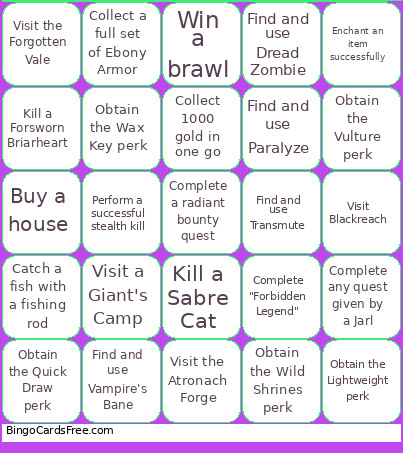 This Skyrim Bingo Cards Game contains following Words or Phrases: Kill a Frost Troll, Kill a Draugr Deathlord, Kill a Mammoth, Kill a Giant, "Kill a named Dragon (e.g., Mirmulnir, Paarthurnax, Alduin)", Kill a Sabre Cat, Kill a Bear (any kind), Kill a Bandit Chief, Kill a Mudcrab, Kill a Thalmor Justiciar, Kill a Vampire Master, Kill a Werewolf, Kill a Chaurus Reaper, Kill a Spriggan Matron, Kill a Dwarven Centurion, Kill a Forsworn Briarheart, Kill an Ice Wraith, Kill a Hagraven, Kill an Ancient Dragon, Collect 10 different types of alchemy ingredients, Collect a Daedric Artifact, Collect 5 Black Soul Gems, Collect 3 different Dragon Priest Masks, Collect 10 Firewood, Collect a full set of Ebony Armor, Collect 5 unique enchanted weapons, Collect 20 Nirnroot, Collect a flawless diamond, Collect 5 Dwemer Ingots, Collect a book from the 'Lost Legends' series, Collect a full set of Imperial Armor, Collect 5 Troll Fat, Collect 3 Elder Scrolls, Collect all 24 Stones of Barenziah, Collect a unique item from the Thieves Guild, Collect 5 different types of meat, Collect 3 different types of fish, Collect 1000 gold in one go, Collect a shout word from any Word Wall, Complete "The Golden Claw", Complete "The Book of Love", Complete "Unfathomable Depths", Complete "The Man Who Cried Wolf", Complete "In My Time of Need", Complete a Dark Brotherhood contract, Complete "A Night to Remember", Complete a Daedric quest, Complete "The Mind of Madness", Complete "Waking Nightmare", Complete any College of Winterhold quest, Complete "Lights Out!", Complete "Forbidden Legend", Complete a side quest in Solitude, Complete a radiant bounty quest, Complete a Civil War quest (any side), Complete "Blood on the Ice", Complete a Companions quest, Complete "Dragon Rising", Complete any quest given by a Jarl, Visit High Hrothgar, Visit Blackreach, Visit the top of the Throat of the World, Visit the Midden beneath the College of Winterhold, Visit the Bard's College in Solitude, Visit the Ragged Flagon, Visit Labyrinthian, Visit the Twilight Sepulcher, Visit the abandoned house in Markarth, Visit the Atronach Forge, Visit the Shrine of Azura, Visit a Giant's Camp, Visit Fort Dawnguard, Visit the Forgotten Vale, Visit Riften's jail, Visit the Blue Palace, Visit all 9 hold capitals, Visit a random Hunter's camp, Visit a secret Word Wall, Learn a new shout, Get married, Adopt a child (Hearthfire), Buy a house, Enchant an item successfully, Pickpocket a Jarl, Craft a potion of Invisibility, Cure yourself from vampirism or lycanthropy, Catch a fish with a fishing rod, Eat 10 different foods in one session, Escape from jail, Ride a horse up a mountain, Become a Thane in any hold, Read 5 different skill books, Become a Vampire Lord or Werewolf, Pick a master-level lock, Win a brawl, Survive a dragon attack in a town, Complete a bounty for a dragon or giant, Perform a successful stealth kill, Obtain the Dual Flurry perk, Obtain the Overrun perk, Obtain the Quick Draw perk, Obtain the Imposing Presence perk, Obtain the Lightweight perk, Obtain the Smithing Mastery perk, Obtain the Poisoned Edge perk, Obtain the Witchmaster perk, Obtain the Wild Shrines perk, Obtain the World Serpent perk, Obtain the Mnemonic perk, Obtain the Shatter Soul perk, Obtain the Wild Magic perk, Obtain the Alchemist perk, Obtain the Vulture perk, Obtain the Wax Key perk, Obtain the Black Market perk, Obtain the Ambush Predator perk, Find and use Fireball, Find and use Chain Lightning, Find and use Ice Storm, Find and use Wall of Flames, Find and use Thunderbolt, Find and use Close Wounds, Find and use Turn Undead, Find and use Circle of Protection, Find and use Vampire's Bane, Find and use Flame Atronach, Find and use Dread Zombie, Find and use Conjure Dremora Lord, Find and use Soul Trap, Find and use Invisibility, Find and use Calm, Find and use Fury, Find and use Muffle, Find and use Transmute, Find and use Detect Life, Find and use Ebonyflesh, Find and use Paralyze, Find and use Bound Sword, Find and use Clairvoyance.