
Slightly Snarky Librarian Bingo Cards - Print Free or Customize
Print free Slightly Snarky Librarian bingo cards or adjust them, unlimited prints! Select from 41,500+ templates or use our bingo card generator. Add numbers, words, photos, or all of them. Play using printed PDF, online bingo cards, and our online bingo caller, or combine all formats.
About: This bingo card captures the delightful chaos and everyday surprises of working in a public library, especially in the children's department. It's perfect for staff meetings, team-building events, or just to lighten the mood among librarians and front desk workers who know all too well the unpredictable adventures that each day can bring.
How To: To get a printable PDF, click the Print button. You can change the card quantity and other print options on the Print tab. Grid items and free space text can be added on the Basic tab. Appearance can be totally customized on the corresponding tabs, or you can quickly locate any preference using the 🔍 tab.
How to play Slightly Snarky Librarian Bingo Cards?
- Virtual Players: Click on the Play button above, and then click on the 🎫 button.
- Paper Players: Print PDF bingo cards and physically scratch the cards.
- Virtual Caller: Click on the Play button above.
- Paper Caller: Print PDF calling list & calling slips and physically select the slips.
- Combo Mode: Select any combination above. For example, caller can be either Paper or Virtual. And players can be Paper or Virtual or a mix of both.
Step-By-Step:
- Start by saving the Slightly Snarky Librarian Bingo PDF by clicking on the "Print" button above.
- Open the PDF and print a hard copy.
- For random calling, you can print another copy of the call list, cut, fold and then pull them randomly at play time.
- Cut the bingo cards at the cut marks if there are more than 1 bingo cards per page.
- Give one card to each player. For marking, you can use crayons. Crayons cost the least.
- Select one person to be the caller. If you are playing in a small group, the caller may as well play along with their own Bingo card.
- The caller initiates the play by randomly drawing an item from the call list and announcing it to all players.
- The players look at their cards to see if they have the announced word. If they do, they dab that word.
- The first player to complete a horizontal, vertical, or a diagonal line of marked items shouts "Bingo!" and wins the play.
- The caller checks that the items marked form a proper line according to the Bingo card and call list.
- You can play for varied patterns or a full card blackout for an extended play.
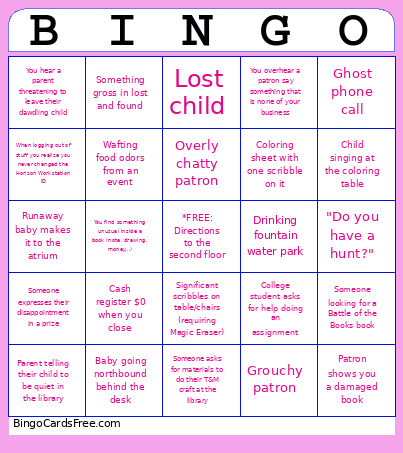 This Slightly Snarky Librarian Bingo Cards Game contains following Words or Phrases: Baby going northbound behind the desk, Baby going southbound behind the desk, Bodily fluids, Cash register $0 when you close, Cash register greater than $0 when you close, Child asks for a guest pass by saying, "Guest pass." No niceties., Child climbs on the front of the desk, Child needs an emotional support Bandaid, Child singing at the coloring table, Child singing in the bathroom, Child walking around barefoot, College student asks for help doing an assignment, Coloring sheet that is a work of art, Coloring sheet with one scribble on it, "Do you have a hunt?", Drinking fountain water park, Ghost phone call, Grouchy patron, Lost child, Lost keys, Lost wedding guest, Overly chatty patron, Patron looking for the next book in the series (it has not been published yet), Patron enters the children's department after the five minute closing announcement, Patron guiltily tells you it's been X amount of time since they've been to the library, PDA patrons, Picky sticker picker, Rambunctious game of tag, Runaway baby makes it to the atrium, Screaming tantrum (at least one full minute), Significant scribbles on table/chairs (requiring Magic Eraser), Someone asks for materials to do their T&M craft at the library, Someone expresses their disappointment in a prize, Someone leaves out a big stack of books, Someone looking for a Battle of the Books book, Parent telling their child to be quiet in the library, Patron shows you a damaged book, Something gross in lost and found, Wafting food odors from an event, When logging out of stuff you realize you never changed the Horizon Workstation ID, Windowsill sitter, You are overly smiley and available when the patron just needs a tissue, You find an orphaned piece from a Ref. Desk Box, You find something unusual inside a book (note, drawing, money...), You get stuck in the Duo Mobile loop with someone else's number, You hear a parent threatening to leave their dawdling child, You overhear a patron say something that is none of your business, Young adults reading picture books on a date.