Smithsgiving Bingo Cards - Print Free or Customize
Print free Smithsgiving bingo cards or modify,
unlimited prints! Pick from 41,500+ designs or use our bingo card generator.
Add numbers, words, photos, or mix them all.
Play using printed PDF, digital bingo cards,
and our digital bingo caller, or go hybrid.
About: This bingo card perfectly captures the chaos, hilarity, and unique family quirks that can only happen at a big holiday gathering like Thanksgiving. Packed with inside jokes, recurring characters, and classic mishaps, it’s ideal for a family reunion or friendsgiving where everyone will recognize these unforgettable moments as they unfold.
How To: To download a PDF to print, click the Print button.
You can adjust the card quantity and other
printing settings on the Print tab.
Grid items and free space text can be changed on the Basic tab.
Appearance can be completely personalized on the
corresponding tabs, or you can quickly find any preference
on the 🔍 tab.
How to play Smithsgiving Bingo Cards?
Paper Players: Print PDF bingo cards and physically scratch the cards.
Online Caller: Click on the Play button above.
Online Players: Click on the Play button above, and then click on the 🎫 button.
Paper Caller: Print PDF calling list & calling slips and physically draw the slips.
Hybrid Mode: Pick any combination above.
For example, caller can be either Paper or Online.
And players can be Paper or Online or a combo of both.
Step-By-Step:
Start by downloading the Smithsgiving PDF by clicking on the "Print" button above.
Open the PDF and print a hard copy.
For random drawing, you can print another copy of the call list, cut, fold and then pull them randomly at play time.
Cut the bingo cards at the cut lines if there are greater than 1 bingo cards per page.
Give one card to each player. For marking, you can use pencils. Crayons cost the least.
Pick one person to be the caller. If you are playing in a small group, the caller may as well play along with their own Bingo card.
The caller begins the game by randomly drawing an item from the call list and saying it to all players.
The players scan their cards to see if they have the announced word. If they do, they cross off that word.
The first player to complete a horizontal, vertical, or a diagonal line of crossed items shouts "Bingo!" and wins the game.
The caller verifies that the items crossed off form a correct line as per the Bingo card and call list.
You can play for different patterns or a full card blackout for a longer game.
This Smithsgiving Bingo Cards Game contains following Words or Phrases: Abi shows up on FaceTime, Alex breaks a sweat with James, Alexander eats a shockingly large piece of pie, Andrew's Black Friday from hell is brought up, Broken dish, Carol has solo cup of wine, Clark interrupts the prayer, Dolly Parton is mentioned, Donald Trump is mentioned, Emily says a phrase that includes "Chill", Jack's dish takes longer than anticipated to make, James says "Puppy?" 7 times or more, Johnny wears sunglasses indoors, Kali slips on her paws, Kim brings up how hot it is inside, Kim says "that is so precious", Kim says "whatever", KJ brings up bone broth, Over 5 people in kitchen, Reb drinks a glass of wine, Reb says "this is just great", Recipe criticism, Reville secret gravy is served, Rick Roll, Someone cries, Something burns, Sophie Gets poisoned, Sophie poisons herself, Stephen pisses off KJ, Steven and Sophie sneak off, Uncle Mike goes "Wellllllllllll", Unintentional serious innuendo, We don't eat within 15 mins of projected time, Will does his snort thing, Will makes a comment about Johnny.

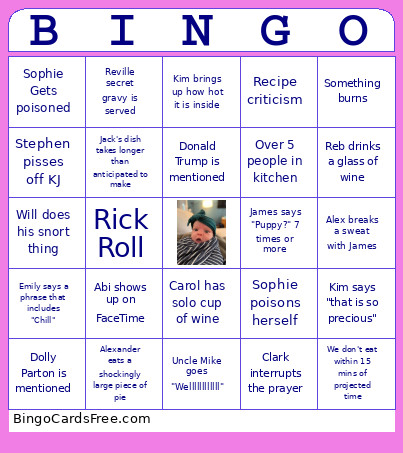 This Smithsgiving Bingo Cards Game contains following Words or Phrases: Abi shows up on FaceTime, Alex breaks a sweat with James, Alexander eats a shockingly large piece of pie, Andrew's Black Friday from hell is brought up, Broken dish, Carol has solo cup of wine, Clark interrupts the prayer, Dolly Parton is mentioned, Donald Trump is mentioned, Emily says a phrase that includes "Chill", Jack's dish takes longer than anticipated to make, James says "Puppy?" 7 times or more, Johnny wears sunglasses indoors, Kali slips on her paws, Kim brings up how hot it is inside, Kim says "that is so precious", Kim says "whatever", KJ brings up bone broth, Over 5 people in kitchen, Reb drinks a glass of wine, Reb says "this is just great", Recipe criticism, Reville secret gravy is served, Rick Roll, Someone cries, Something burns, Sophie Gets poisoned, Sophie poisons herself, Stephen pisses off KJ, Steven and Sophie sneak off, Uncle Mike goes "Wellllllllllll", Unintentional serious innuendo, We don't eat within 15 mins of projected time, Will does his snort thing, Will makes a comment about Johnny.