Print free Road Trip 1 bingo cards or alter them,
limitless prints! Choose from 41,500+ designs or use the bingo card generator.
Add numbers, phrases, photos, or mix them all.
Play using PDF printouts, virtual bingo cards,
and the virtual bingo caller, or mix physical and digital.
About: This bingo card captures all the quirky sights and hidden gems along a classic road trip through Minnesota and South Dakota, especially across the Badlands and Black Hills. Perfect for families or friends exploring these iconic highways, it’s an invitation to enjoy roadside attractions, natural wonders, and local Americana with a sense of curiosity and adventure.
How To: To get a printable PDF, click the Print button.
You can modify the number of cards and other
printing preferences on the Print tab.
Grid items and free space content can be edited on the Basic tab.
Appearance can be highly personalized on the
relevant tabs, or you can quickly locate any setting
on the 🔍 tab.
How to play Road Trip 1 Bingo Cards?
Online Players: Click on the Play button above, and then click on the 🎫 button.
Printed Caller: Print PDF calling list & calling slips and manually choose the slips.
Online Caller: Click on the Play button above.
Printed Players: Print PDF bingo cards and manually mark the cards.
Hybrid Play: Select any combination above.
For example, caller can be either Paper or Online.
And players can be Paper or Online or a combination of both.
Step-By-Step:
Start by downloading the Road Trip 1 PDF by clicking on the "Print" button above.
Open the PDF and print it.
For random calling, you can print another copy of the call list, cut, fold and then pull them randomly at play time.
Cut the bingo cards at the cut lines if there are greater than 1 bingo cards per page.
Distribute one card per player. For marking, you can use crayons. Crayons are the cheapest.
Select one person to be the caller. If you are playing in a small group, the caller can as well play along with their own Bingo card.
The caller initiates the game by randomly picking an item from the call list and announcing it to all players.
The players look at their cards to see if they have the called word. If they do, they cross off that word.
The first player to complete a horizontal, vertical, or a diagonal line of crossed items announces "Bingo!" and wins the game.
The caller verifies that the items crossed off form a proper line as per the Bingo card and call list.
You can play for varied patterns or a full card blackout for an extended game.
This Road Trip 1 Bingo Cards Game contains following Words or Phrases: Jolly Green Giant (Blue Earth, MN), SPAM Museum (Austin, MN), Corn Palace (Mitchell, SD), Dignity Statue (Chamberlain, SD), Missouri River, Wall Drug sign, Murdo Sign, 1880 Town, Prairie Dog Town, Giant Prairie Dog statue, Badlands National Park Sign, -c-, Badlands formations / eroded buttes, Badlands Loop Road (Hwy 240), I-90 highway signs, South Dakota welcome sign, Mount Rushmore license plates / stickers, Bumper sticker (Wall Drug), Cattle / ranch land, Wind turbines or farms, Semi trucks / RV caravans, "Free Ice Water" sign, Tourist shop / souvenir, -c-, Buffalo / bison crossing sign, Sunset over Badlands or Hills, Car with out-of-state plates, Ice cream / donuts (Wall Drug), Jackalope photo, Tunnels (Needles or Iron Mountain), Pigtail bridges, Granite spires / needles, Historic barn or silo, American flag display, Roadside diner or cafe, -c-, Motorcycle group (Sturgis area vibe), Cowboy / Western statue or sign, Fossil or rock formation, Picnic area or rest stop, Junior Ranger badge / booklet, Campground or lodge, Scenic byway sign, "Welcome to the Black Hills", Custer State Park bison center, Begging wildlife, Starry night sky (dark skies area), -c-, Hiking trailhead, Visitor center, Gift shop magnet or postcard, Roberts Prairie Dog Town, Bison in Badlands, Sage Creek area, Minuteman Missile Site / visitor center, Notch Trail or Door Trail, Scenic overlooks, Striated rock layers.

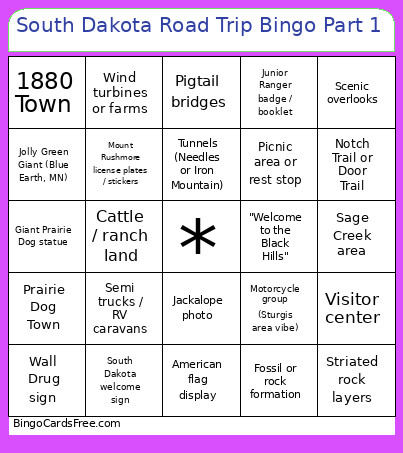 This Road Trip 1 Bingo Cards Game contains following Words or Phrases: Jolly Green Giant (Blue Earth, MN), SPAM Museum (Austin, MN), Corn Palace (Mitchell, SD), Dignity Statue (Chamberlain, SD), Missouri River, Wall Drug sign, Murdo Sign, 1880 Town, Prairie Dog Town, Giant Prairie Dog statue, Badlands National Park Sign, -c-, Badlands formations / eroded buttes, Badlands Loop Road (Hwy 240), I-90 highway signs, South Dakota welcome sign, Mount Rushmore license plates / stickers, Bumper sticker (Wall Drug), Cattle / ranch land, Wind turbines or farms, Semi trucks / RV caravans, "Free Ice Water" sign, Tourist shop / souvenir, -c-, Buffalo / bison crossing sign, Sunset over Badlands or Hills, Car with out-of-state plates, Ice cream / donuts (Wall Drug), Jackalope photo, Tunnels (Needles or Iron Mountain), Pigtail bridges, Granite spires / needles, Historic barn or silo, American flag display, Roadside diner or cafe, -c-, Motorcycle group (Sturgis area vibe), Cowboy / Western statue or sign, Fossil or rock formation, Picnic area or rest stop, Junior Ranger badge / booklet, Campground or lodge, Scenic byway sign, "Welcome to the Black Hills", Custer State Park bison center, Begging wildlife, Starry night sky (dark skies area), -c-, Hiking trailhead, Visitor center, Gift shop magnet or postcard, Roberts Prairie Dog Town, Bison in Badlands, Sage Creek area, Minuteman Missile Site / visitor center, Notch Trail or Door Trail, Scenic overlooks, Striated rock layers.