
Speed networking Bingo Cards - Print Free or Customize
Print free Speed networking bingo cards or adjust them, limitless prints! Pick from 41,500+ templates or use our bingo card generator. Add numbers, words, pictures, or all of them. Play using PDF printouts, digital bingo cards, and our digital bingo caller, or go hybrid.
How To: To download a PDF to print, click the Print button. You can change the card count and other printing preferences on the Print tab. Grid items and free space content can be added on the Basic tab. Appearance can be highly personalized on the relevant tabs, or you can quickly search any preference on the 🔍 tab.
How to play Speed networking Bingo Cards?
- Printed Players: Print PDF bingo cards and physically cross off the cards.
- Online Caller: Click on the Play button above.
- Printed Caller: Print PDF calling list & calling slips and physically choose the slips.
- Online Players: Click on the Play button above, and then click on the 🎫 button.
- Combo Play: Select any combination above. For instance, caller can be either Paper or Online. And players can be Paper or Online or a combo of both.
Step-By-Step:
- Start by saving the Speed networking Bingo PDF by clicking on the "Print" button above.
- Open the PDF and print a hard copy.
- For random calling, you can print another copy of the call list, cut, fold and then draw them randomly at play time.
- Cut the bingo cards at the cut lines if there are more than 1 bingo cards per page.
- Give one card to each player. For marking, you can use markers. Crayons are the cheapest.
- Select one person to be the caller. If you are playing in a small group, the caller may also play along with their own Bingo card.
- The caller initiates the game by randomly picking an item from the call list and calling out it to everyone.
- The players check their cards to see if they have the announced word. If they do, they cross off that word.
- The first player to complete a horizontal, vertical, or a diagonal line of crossed items announces "Bingo!" and wins the game.
- The caller checks that the items marked form a correct line as per the Bingo card and call list.
- You can play for varied patterns or a full card blackout for a longer game.
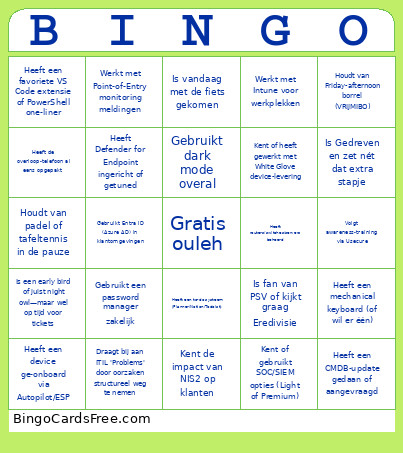 This Speed networking Bingo Cards Game contains following Words or Phrases: Toont zich Energiek in klantcontact, Neemt Verantwoordelijkheid voor het resultaat, ook als het buiten de scope ligt, Handelt Menselijk—denkt mee met de klant in plaats van direct naar het contract te grijpen, Communiceert Helder en concreet richting klanten, Is Gedreven en zet nét dat extra stapje, Geeft proactieve updates bij wijzigingen of incidenten, Is wel eens technische sparringpartner geweest in een roadmap‑sessie, Werkt kort op klant‑verantwoordelijke(n) om snel te schakelen, Heeft een pre‑ en recap gedaan met een klant met eigen systeembeheer, Draagt bij aan ITIL 'Problems' door oorzaken structureel weg te nemen, Heeft eens escaleer‑aanspreekpunt gespeeld voor de Servicedesk, Heeft een upgrade/update geïnitieerd om beheer te verbeteren, Heeft de overloop‑telefoon al eens opgepakt, Heeft een Leapsome 1‑op‑1 gehad, Was bij een Scaling‑Up dag op kantoor, Heeft een CMDB‑update gedaan of aangevraagd, Voert audits op (automatische) processen uit, Houdt backup/server/patch‑controles bij volgens checklist, Werkt met Point‑of‑Entry monitoring meldingen, Heeft dispatch/overdracht voor tickets netjes gedaan, Heeft een Userhandler‑check op errors opgezet of uitgevoerd, Kent of heeft gewerkt met White Glove device‑levering, Heeft een printissue opgelost via OneDrive‑aanmelding, Heeft een huddle/daily recap ingevuld met leerpunten, Werkt aantoonbaar volgens ISO‑27001, Houdt CVE's actief bij, Speurt naar Shadow IT binnen klantomgevingen, Heeft meegewerkt aan Secure Score‑verbetering, Kent de impact van NIS2 op klanten, Volgt awareness‑training via Usecure, Heeft Defender for Endpoint ingericht of getuned, Gebruikt Defender for Office 365 features, Heeft Verified Login/AitM‑bescherming geactiveerd, Kent of gebruikt SOC/SIEM opties (Light of Premium), Testte M365/Server back‑ups of deed een restore‑test, Gebruikt een password manager zakelijk, Werkt dagelijks met Microsoft 365 beheer, Beheert accounts op Windows/Mac/smartphones/tablets, Heeft Teams audiovergaderingen ingesteld/gebruikt, Heeft een device ge‑onboard via Autopilot/ESP, Werkt met Intune voor werkplekken, Gebruikt Entra ID (Azure AD) in klantomgevingen, Werkt met Azure‑hosting of cloud resources, Heeft routers/switches/servers beheerd, Heeft Office 365 incidenten opgelost, Heeft back‑ups gemonitord en teruggezet wanneer nodig, Is vandaag met de fiets gekomen, Drinkt liever koffie dan thee, Heeft een mechanical keyboard (of wil er één), Houdt van padel of tafeltennis in de pauze, Is fan van PSV of kijkt graag Eredivisie, Heeft een thuis‑setup met 2+ monitors, Gebruikt dark mode overal, Houdt van Friday‑afternoon borrel (VRIJMIBO), Heeft een favoriete VS Code extensie of PowerShell one‑liner, Komt met lunch‑tips of deelt snacks, Heeft ooit een hackathon of game‑jam gedaan, Heeft een to‑do systeem (Planner/Notion/Todoist), Is een early bird of juist night owl—maar wel op tijd voor tickets, Heeft een speur‑neus voor bugs en deelt fixes in Teams.