
Spongebob Bingo Cards - Print Free or Customize
Print free Spongebob bingo cards or customize, unlimited prints! Pick from 42,200+ templates or use our bingo card generator. Add numbers, phrases, photos, or all of them. Play using printed PDF, online bingo cards, and our online bingo caller, or combine all formats.
About: This SpongeBob bingo card is packed with all the quirks, laughs, and unforgettable moments fans love about Bikini Bottom. Perfect for a themed party, watch-along, or trivia night, it captures classic character gags, running jokes, and the show’s signature silliness. Both longtime fans and casual viewers will have a blast marking off these iconic SpongeBob moments!
How To: To download a PDF to print, click the Print button. You can adjust the card count and other print preferences on the Print tab. Grid items and free space text can be edited on the Basic tab. Appearance can be completely personalized on the relevant tabs, or you can easily search any setting on the 🔍 tab.
How to play Spongebob Bingo Cards?
- Printed Players: Print PDF bingo cards and physically mark the cards.
- Online Caller: Click on the Play button above.
- Online Players: Click on the Play button above, and then click on the 🎫 button.
- Printed Caller: Print PDF calling list & calling slips and physically pick the slips.
- Mixed Play: Select any combination above. For instance, caller can be either Printed or Online. And players can be Printed or Online or a combo of both.
Step-By-Step:
- Start by downloading the Spongebob PDF by clicking on the "Print" button above.
- Open the PDF and print it.
- For random calling, you can print another copy of the call list, cut, fold and then pull them randomly at play time.
- Cut the bingo cards at the cut lines if there are more than 1 bingo cards per page.
- Give one card to each player. For marking, you can use crayons. Crayons cost the least.
- Select one person to be the caller. If you are playing in a small group, the caller can also play along with their own Bingo card.
- The caller begins the game by randomly picking an item from the call list and saying it to everyone.
- The players look at their cards to see if they have the announced word. If they do, they dab that word.
- The first player to finish a horizontal, vertical, or a diagonal line of marked items yells "Bingo!" and wins the game.
- The caller verifies that the items crossed off form a proper line as per the Bingo card and call list.
- You can play for different patterns or a full card blackout for an extended game.
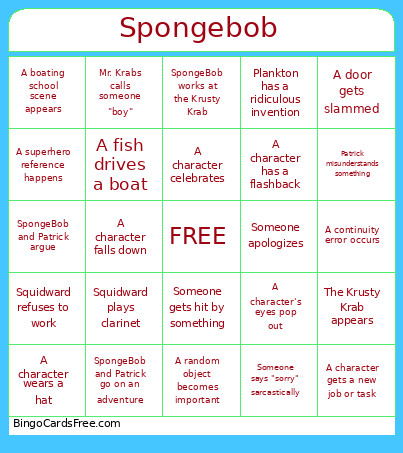 This Spongebob Bingo Cards Game contains following Words or Phrases: SpongeBob Bingo Ideas, SpongeBob laughs loudly, Patrick says something unintelligent, Squidward looks annoyed, Mr. Krabs mentions money, Plankton tries to steal the formula, Sandy uses science, Gary meows, Someone says "SpongeBob!", A jellyfish appears, A Krabby Patty is shown, The Krusty Krab appears, The Chum Bucket appears, A character screams, A character falls down, SpongeBob cries dramatically, Patrick eats something, Squidward plays clarinet, A boating school scene appears, Mrs. Puff is frustrated, A bubble transition appears, SpongeBob annoys Squidward, Patrick misunderstands something, Mr. Krabs laughs greedily, Plankton has a ridiculous invention, Karen insults Plankton, Sandy says "y'all", Someone gets flattened or squashed, A character changes size, Someone breaks the fourth wall, A random song starts playing, A close-up of a character's face appears, A gross-out joke happens, A food item is exaggerated, Someone says "idiot" or a similar insult, A character runs away, Someone gets hit by something, A character is covered in something messy, A character wears a disguise, Someone says "imagination", A ridiculous sound effect happens, SpongeBob works at the Krusty Krab, Squidward refuses to work, Mr. Krabs calls someone "boy", Patrick has a strange idea, Sandy fights someone, Plankton gets defeated, A villain appears, A fish citizen complains, Background fish react dramatically, Someone is surprised by something obvious, A character eats a Krabby Patty, The Krusty Krab sign is shown, The Flying Dutchman appears, Mermaid Man and Barnacle Boy appear, A superhero reference happens, A character wears a hat, A character gets angry instantly, Someone apologizes, Someone says "sorry" sarcastically, A character celebrates, SpongeBob does his job too enthusiastically, Squidward insults SpongeBob, Patrick sleeps, SpongeBob and Patrick go on an adventure, Someone misunderstands a simple task, A character has a ridiculous dream sequence, Someone uses a vacuum or cleaning tool, A character gets stuck somewhere, A door gets slammed, Someone says "wait!", A character is embarrassed, Someone acts overly dramatic, A fish drives a boat, A boat crashes, A character loses something important, A character finds something weird, A character is afraid, Someone laughs evilly, A character gets a punishment, Someone breaks a rule, A character dresses formally, A character wears pajamas, A character wears a costume, A character has a flashback, A character says a catchphrase, A character gets a new job or task, Someone says "best day ever", A character misunderstands friendship, SpongeBob and Patrick argue, SpongeBob and Patrick make up, A random object becomes important, An absurd invention appears, A character's eyes pop out, Someone makes a weird face, The narrator appears, A character gets a trophy or award, Someone is extremely excited, Someone is extremely bored, A character learns a lesson, A completely random joke happens, A reference to an earlier episode, A background fish with a memorable reaction, A reference that sounds like a real-life quote, A continuity error occurs, A food item is animated incorrectly, A character's name is used incorrectly, A joke that only adults would understand, A rarely seen character appears, A scene takes place somewhere other than Bikini Bottom, A character breaks the laws of physics.