Spring Picnic Bingo Cards - Print Free or Customize
Print free Spring Picnic bingo cards or modify,
unlimited cards! Select from 42,200+ templates or use our bingo card generator.
Add numbers, phrases, images, or mix them all.
Play using printable PDF, online bingo cards,
and our online bingo caller, or go hybrid.
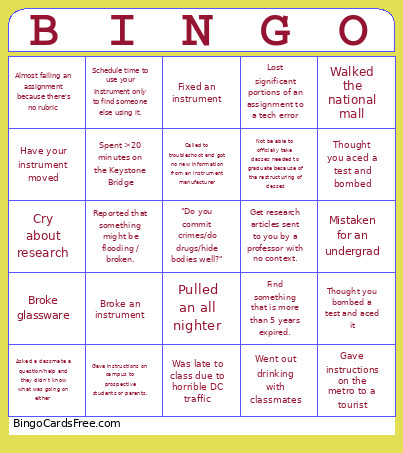
About: This bingo card is perfect for graduate students in forensic science living the DC experience. With a mix of academic struggles, research highs and lows, and classic city moments, it brings all the chaos and camaraderie of grad school in the nation’s capital to life. Great for orientation, department socials, or lab retreats!
How To: To save a PDF to print, click the Print button.
You can adjust the card quantity and other
print settings on the Print tab.
Grid items and free space text can be edited on the Basic tab.
Appearance can be fully personalized on the
corresponding tabs, or you can quickly search any preference
on the 🔍 tab.
How to play Spring Picnic Bingo Cards?
Virtual Players: Click on the Play button above, and then click on the 🎫 button.
Printed Caller: Print PDF calling list & calling slips and physically choose the slips.
Printed Players: Print PDF bingo cards and physically cross off the cards.
Virtual Caller: Click on the Play button above.
Combo Play: Select any combination above.
For example, caller can be either Paper or Virtual.
And players can be Paper or Virtual or a combo of both.
Step-By-Step:
Start by getting the Spring Picnic PDF by clicking on the "Print" button above.
Open the PDF and print it.
For random calling, you can print another copy of the call list, cut, fold and then pull them randomly at play time.
Cut the bingo cards at the cut lines if there are greater than 1 bingo cards per page.
Give one card to each player. For marking, you can use crayons. Crayons are the cheapest.
Select one person to be the caller. If you are playing in a small group, the caller may also play along with their own Bingo card.
The caller opens the play by randomly picking an item from the call list and saying it to all players.
The players scan their cards to see if they have the called word. If they do, they cross off that word.
The first player to complete a horizontal, vertical, or a diagonal line of marked items shouts "Bingo!" and wins the game.
The caller confirms that the items crossed off form a proper line as per the Bingo card and call list.
You can play for different patterns or a full card blackout for a longer game.
This Spring Picnic Bingo Cards Game contains following Words or Phrases: Pulled an all nighter, Broke glassware, Was late to class due to horrible DC traffic, Was asked a capstone "question" that was more comment than question, Picked up a new hobby, Spent >6 hours in the library, Gave instructions on the metro to a tourist, Gave instructions on campus to prospective students or parents., Lost significant portions of an assignment to a tech error, Fixed an instrument, Broke an instrument, Called to troubleshoot and got no new information from an instrument manufacturer, Mistaken for an undergrad, Mistaken for a professor/teacher, Braved the crowds to see cherry blossoms, Spent >20 minutes on the Keystone Bridge, Diverted due to a motorcade, Went out drinking with classmates, Talk excitedly about weird forensics stuff to a non-forensic person and get side-eyed., Not be able to officially take classes needed to graduate because of the restructuring of classes, Cry about research, Have a successful research moment and dance in the lab, Schedule time to use your instrument only to find someone else using it., Have your instrument moved, Find something that is more than 5 years expired., Debated starting drinking games in class, Asked a classmate a question/help and they didn't know what was going on either, Thought you aced a test and bombed, Thought you bombed a test and aced it, Walked the national mall, Almost wiped out on an electric scooter, Almost failing an assignment because there's no rubric, Following up with a professors email and they still dont respond, Get research articles sent to you by a professor with no context., Reported that something might be flooding / broken., Ridden on all 6 metro lines.

 This Spring Picnic Bingo Cards Game contains following Words or Phrases: Pulled an all nighter, Broke glassware, Was late to class due to horrible DC traffic, Was asked a capstone "question" that was more comment than question, Picked up a new hobby, Spent >6 hours in the library, Gave instructions on the metro to a tourist, Gave instructions on campus to prospective students or parents., Lost significant portions of an assignment to a tech error, Fixed an instrument, Broke an instrument, Called to troubleshoot and got no new information from an instrument manufacturer, Mistaken for an undergrad, Mistaken for a professor/teacher, Braved the crowds to see cherry blossoms, Spent >20 minutes on the Keystone Bridge, Diverted due to a motorcade, Went out drinking with classmates, Talk excitedly about weird forensics stuff to a non-forensic person and get side-eyed., Not be able to officially take classes needed to graduate because of the restructuring of classes, Cry about research, Have a successful research moment and dance in the lab, Schedule time to use your instrument only to find someone else using it., Have your instrument moved, Find something that is more than 5 years expired., Debated starting drinking games in class, Asked a classmate a question/help and they didn't know what was going on either, Thought you aced a test and bombed, Thought you bombed a test and aced it, Walked the national mall, Almost wiped out on an electric scooter, Almost failing an assignment because there's no rubric, Following up with a professors email and they still dont respond, Get research articles sent to you by a professor with no context., Reported that something might be flooding / broken., Ridden on all 6 metro lines.