Template 1 Staff Bingo Cards - Print Free or Customize
Print free Template 1 Staff bingo cards or modify,
unlimited prints! Select from 41,500+ designs or use our bingo card generator.
Add numbers, phrases, photos, or mix them all.
Play using PDF prints, digital bingo cards,
and our digital bingo caller, or go hybrid.
About: This bingo card captures all the quirks and classic moments from lively virtual staff meetings. With inside jokes, technical hiccups, and team traditions, it’s perfect for bringing some fun to remote work gatherings or organization-wide calls. Watch as colleagues check off familiar scenarios, adding a playful layer to your next all-staff video meeting.
How To: To get a PDF to print, click the Print button.
You can adjust the number of cards and other
printing preferences on the Print tab.
Grid items and free space content can be edited on the Basic tab.
Appearance can be completely customized on the
corresponding tabs, or you can easily locate any preference
on the 🔍 tab.
How to play Template 1 Staff Bingo Cards?
Virtual Caller: Click on the Play button above.
Virtual Players: Click on the Play button above, and then click on the 🎫 button.
Paper Caller: Print PDF calling list & calling slips and manually pick the slips.
Paper Players: Print PDF bingo cards and manually mark the cards.
Combo Mode: Choose any combination above.
For instance, caller can be either Paper or Virtual.
And players can be Paper or Virtual or a mix of both.
Step-By-Step:
Start by saving the Template 1 Staff PDF by clicking on the "Print" button above.
Open the PDF and print a hard copy.
For random drawing, you can print another copy of the call list, cut, fold and then draw them randomly at play time.
Cut the bingo cards at the cut lines if there are greater than 1 bingo cards per page.
Distribute one card per player. For marking, you can use pencils. Crayons cost the least.
Choose one person to be the caller. If you are playing in a small group, the caller may also play along with their own Bingo card.
The caller initiates the play by randomly drawing an item from the call list and calling out it to everyone.
The players check their cards to see if they have the called word. If they do, they mark that word.
The first player to complete a horizontal, vertical, or a diagonal line of crossed items announces "Bingo!" and wins the play.
The caller validates that the items crossed off form a proper line according to the Bingo card and call list.
You can play for different patterns or a full card blackout for an extended play.
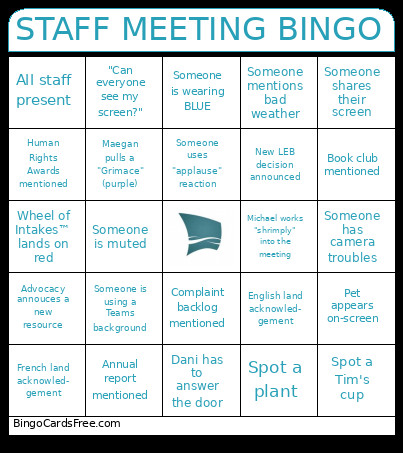
This Template 1 Staff Bingo Cards Game contains following Words or Phrases: Someone shares their screen, Someone has camera troubles, Michael works "shrimply" into the meeting, Dani has to answer the door, Maegan pulls a "Grimace" (purple), Someone uses "applause" reaction, Someone is wearing BLUE, Complaint backlog mentioned, Pet appears on-screen, Advocacy annouces a new resource, Spot a Tim's cup, French land acknowled- gement, English land acknowled- gement, Annual report mentioned, Human Rights Awards mentioned, All staff present, Spot a plant, Someone mentions bad weather, Wheel of Intakes™ lands on red, New LEB decision announced, Book club mentioned, Someone is muted, Someone is using a Teams background, "Can everyone see my screen?".

 This Template 1 Staff Bingo Cards Game contains following Words or Phrases: Someone shares their screen, Someone has camera troubles, Michael works "shrimply" into the meeting, Dani has to answer the door, Maegan pulls a "Grimace" (purple), Someone uses "applause" reaction, Someone is wearing BLUE, Complaint backlog mentioned, Pet appears on-screen, Advocacy annouces a new resource, Spot a Tim's cup, French land acknowled- gement, English land acknowled- gement, Annual report mentioned, Human Rights Awards mentioned, All staff present, Spot a plant, Someone mentions bad weather, Wheel of Intakes™ lands on red, New LEB decision announced, Book club mentioned, Someone is muted, Someone is using a Teams background, "Can everyone see my screen?".