Staff Bingo: Google Meet Ed. Cards - Print Free or Customize
Print free Staff bingo: Google Meet Ed. cards or adjust them,
limitless prints! Choose from 41,500+ designs or use the bingo card generator.
Add numbers, phrases, images, or all of them.
Play using PDF prints, digital bingo cards,
and the digital bingo caller, or combine all formats.
About: This bingo card is perfect for staff meetings where Vernon takes the lead and all the usual quirks make an appearance. It's spot-on for teachers or admin teams looking to add some fun to those sometimes drawn-out video calls. If you've ever sat through a virtual meeting and noticed recurring moments, you'll appreciate the inside jokes and relatable scenarios throughout this game.
How To: To download a PDF to print, click the Print button.
You can alter the number of cards and other
print options on the Print tab.
Grid items and free space text can be edited on the Basic tab.
Appearance can be fully personalized on the
corresponding tabs, or you can easily locate any setting
using the 🔍 tab.
How to play Staff Bingo: Google Meet Ed. Cards?
Digital Caller: Click on the Play button above.
Printed Players: Print PDF bingo cards and physically cross off the cards.
Digital Players: Click on the Play button above, and then click on the 🎫 button.
Printed Caller: Print PDF calling list & calling slips and physically choose the slips.
Mixed Mode: Pick any combination above.
For example, caller can be either Printed or Digital.
And players can be Printed or Digital or a combination of both.
Step-By-Step:
Start by getting the Staff Bingo: Google Meet Ed. PDF by clicking on the "Print" button above.
Open the PDF and print it.
For random calling, you can print another copy of the call list, cut, fold and then draw them randomly at play time.
Cut the bingo cards at the cut marks if there are greater than 1 bingo cards per page.
Give one card to each player. For marking, you can use crayons. Crayons cost the least.
Pick one person to be the caller. If you are playing in a small group, the caller may as well play along with their own Bingo card.
The caller opens the play by randomly drawing an item from the call list and announcing it to everyone.
The players check their cards to see if they have the announced word. If they do, they mark that word.
The first player to finish a horizontal, vertical, or a diagonal line of marked items shouts "Bingo!" and wins the play.
The caller confirms that the items crossed off form a proper line as per the Bingo card and call list.
You can play for varied patterns or a full card blackout for an extended play.
This Staff Bingo: Google Meet Ed. Cards Game contains following Words or Phrases: All admin except Vernon have their cameras off, Someone's mic is on and they don't know it, Vernon goes off topic, Someone asks a question that could be an email, Information is presented that could have been an email, Lawson asks to chime in, Vernon pauses and says "and uhh", Entire staff is blamed or shamed, A particular grade level or person is called out, A male staff member gets a shout out, Vernon says "just one more thing", Vernon says "another thing", Vernon says "folks", "Let's keep up the trend", Brings up/encourages AI use, Mistake or typo on a slide, Vernon skips ahead at the end and has to go back, Vernon tells a story, Vernon makes a weird gendered joke, Good question, vague answer, "We'll have to see about that", "I'll have to look into that", Doc says something confusing about testing, Everyone is asked to turn their cameras on.

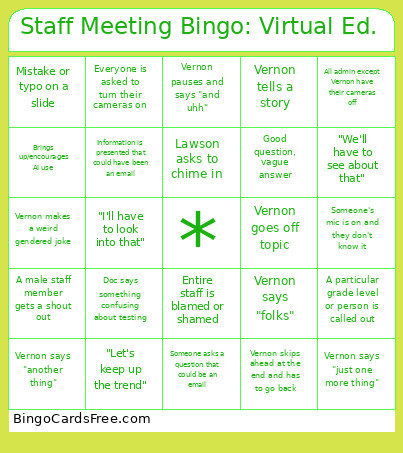 This Staff Bingo: Google Meet Ed. Cards Game contains following Words or Phrases: All admin except Vernon have their cameras off, Someone's mic is on and they don't know it, Vernon goes off topic, Someone asks a question that could be an email, Information is presented that could have been an email, Lawson asks to chime in, Vernon pauses and says "and uhh", Entire staff is blamed or shamed, A particular grade level or person is called out, A male staff member gets a shout out, Vernon says "just one more thing", Vernon says "another thing", Vernon says "folks", "Let's keep up the trend", Brings up/encourages AI use, Mistake or typo on a slide, Vernon skips ahead at the end and has to go back, Vernon tells a story, Vernon makes a weird gendered joke, Good question, vague answer, "We'll have to see about that", "I'll have to look into that", Doc says something confusing about testing, Everyone is asked to turn their cameras on.