Print free Staff PD bingo cards or modify,
limitless prints! Choose from 42,200+ templates or use our bingo card generator.
Add numbers, words, images, or any combination.
Play using PDF printouts, online bingo cards,
and our online bingo caller, or go hybrid.
About: This bingo card captures all the classic moments of a school district professional development or staff training day. From technology glitches to memorable presenter catchphrases, it highlights the quirky and relatable experiences that educators encounter in large meetings. Perfect for teachers or school staff looking to add some fun to their next PD session!
How To: To get a PDF to print, click the Print button.
You can modify the card quantity and other
printing settings on the Print tab.
Grid items and free space text can be added on the Basic tab.
Appearance can be fully personalized on the
relevant tabs, or you can quickly locate any option
using the 🔍 tab.
How to play Staff PD Bingo Cards?
Paper Caller: Print PDF calling list & calling slips and physically select the slips.
Paper Players: Print PDF bingo cards and physically cross off the cards.
Virtual Players: Click on the Play button above, and then click on the 🎫 button.
Virtual Caller: Click on the Play button above.
Hybrid Mode: Pick any combination above.
For instance, caller can be either Paper or Virtual.
And players can be Paper or Virtual or a combination of both.
Step-By-Step:
Start by getting the Staff PD Bingo PDF by clicking on the "Print" button above.
Open the PDF and print a hard copy.
For random drawing, you can print another copy of the call list, cut, fold and then draw them randomly at play time.
Cut the bingo cards at the cut lines if there are greater than 1 bingo cards per page.
Distribute one card per player. For marking, you can use pencils. Crayons are the cheapest.
Pick one person to be the caller. If you are playing in a small group, the caller can as well play along with their own Bingo card.
The caller begins the game by randomly pulling an item from the call list and announcing it to all players.
The players scan their cards to see if they have the announced word. If they do, they cross off that word.
The first player to finish a horizontal, vertical, or a diagonal line of crossed items shouts "Bingo!" and wins the play.
The caller validates that the items marked form a correct line according to the Bingo card and call list.
You can play for different patterns or a full card blackout for a longer play.
This Staff PD Bingo Cards Game contains following Words or Phrases: Break into small groups, Ice breaker game, Presenter says "Data Driven", Slideshow stops working, Speaker / microphone stops working, Presenter reads word for word off slides, Chief of Middle Schools Presents, Presenter says "Hallway behaviors", Typo on slides, Someone leaves early, Presenter says "Lets take a 5 minute break", Someone asks a question already answered, Presenter says "Give me a thumbs up", Watch a video, QR code shared, Someone's phone goes off, AI/ChatGPT comes up, Attendance reminders, Presenter says "Can everyone see the screen?", Someone takes a picture of the slides, Safety procedures reviewed, Admin takes your picture, Someone is secretly lesson planning, "Don't forget to sign in", Someone says, "Can you go back one slide?", Someone drops their water when its silent, Someone says, "Wait...what are we supposed to be doing?".

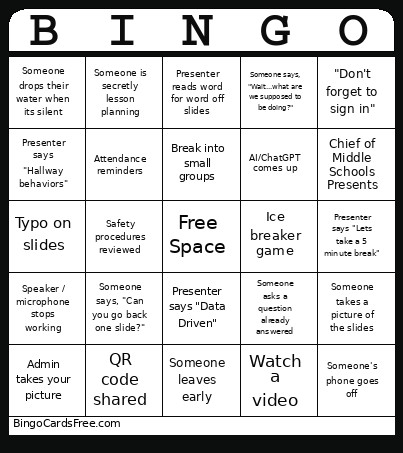 This Staff PD Bingo Cards Game contains following Words or Phrases: Break into small groups, Ice breaker game, Presenter says "Data Driven", Slideshow stops working, Speaker / microphone stops working, Presenter reads word for word off slides, Chief of Middle Schools Presents, Presenter says "Hallway behaviors", Typo on slides, Someone leaves early, Presenter says "Lets take a 5 minute break", Someone asks a question already answered, Presenter says "Give me a thumbs up", Watch a video, QR code shared, Someone's phone goes off, AI/ChatGPT comes up, Attendance reminders, Presenter says "Can everyone see the screen?", Someone takes a picture of the slides, Safety procedures reviewed, Admin takes your picture, Someone is secretly lesson planning, "Don't forget to sign in", Someone says, "Can you go back one slide?", Someone drops their water when its silent, Someone says, "Wait...what are we supposed to be doing?".