
State Farmers Bingo Cards - Print Free or Customize
Print free State Farmers bingo cards or modify, limitless cards! Select from 42,200+ designs or use our bingo card generator. Add numbers, phrases, photos, or any combination. Play using PDF prints, digital bingo cards, and our digital bingo caller, or combine all formats.
About: This bingo card is all about connecting people through fun, personal discoveries. Perfect for icebreakers at school events, team-building sessions, or social mixers, it encourages everyone to mingle and share unique facts about themselves. Expect a lively, upbeat atmosphere as players seek out fascinating stories, hidden talents, and shared hobbies within the group.
How To: To save a printable PDF, click the Print button. You can change the card quantity and other print settings on the Print tab. Grid items and free space text can be edited on the Basic tab. Appearance can be completely personalized on the relevant tabs, or you can easily find any setting on the 🔍 tab.
How to play State Farmers Bingo Cards?
- Digital Players: Click on the Play button above, and then click on the 🎫 button.
- Paper Caller: Print PDF calling list & calling slips and manually choose the slips.
- Paper Players: Print PDF bingo cards and manually write on the cards.
- Digital Caller: Click on the Play button above.
- Hybrid Play: Choose any combination above. For example, caller can be either Offline or Digital. And players can be Offline or Digital or a mix of both.
Step-By-Step:
- Start by saving the State Farmers PDF by clicking on the "Print" button above.
- Open the PDF and print it.
- For random calling, you can print another copy of the call list, cut, fold and then pick them randomly at play time.
- Cut the bingo cards at the cut marks if there are more than 1 bingo cards per page.
- Distribute one card per player. For marking, you can use markers. Crayons cost the least.
- Choose one person to be the caller. If you are playing in a small group, the caller can as well play along with their own Bingo card.
- The caller begins the play by randomly picking an item from the call list and saying it to everyone.
- The players scan their cards to see if they have the announced word. If they do, they mark that word.
- The first player to complete a horizontal, vertical, or a diagonal line of crossed items yells "Bingo!" and wins the game.
- The caller verifies that the items crossed off form a proper line as per the Bingo card and call list.
- You can play for varied patterns or a full card blackout for a longer game.
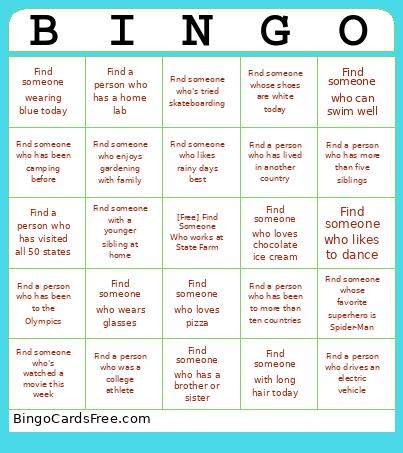 This State Farmers Bingo Cards Game contains following Words or Phrases: Find a person who has a degree in Information Security, Find a person who has been to Antarctica, Find someone wearing blue today, Find someone who can play an instrument, Find someone who can ride a bicycle, Find someone who can swim well, Find someone who can whistle loudly, Find someone who collects something interesting, Find someone who enjoys drawing or painting, Find someone who has a birthday this month, Find someone who has a brother or sister, Find someone who has a pet at home, Find someone who has been camping before, Find someone who has traveled to another country, Find someone who likes to dance, Find someone who likes to read books, Find someone who likes to sing, Find someone who loves chocolate ice cream, Find someone who loves pizza, Find someone who plays a sport, Find someone who speaks more than one language, Find someone who wears glasses, Find someone who's been on an airplane before, Find someone who's tried skateboarding, Find someone who's visited the zoo recently, Find someone who's watched a movie this week, Find someone whose favorite color is green, Find someone whose favorite food is spaghetti, Find someone whose favorite fruit is an apple, Find someone whose favorite holiday is Halloween, Find someone whose favorite subject is math, Find someone whose favorite superhero is Spider-Man, Find someone whose shoes are white today, Find someone with a pet cat or dog, Find someone with a younger sibling at home, Find someone with curly hair, Find someone with freckles on their face, Find someone with long hair today, Find someone with the same favorite animal as you, Find someone who can do a cartwheel, Find someone who has been in a school play, Find someone who has read the Harry Potter books, Find someone who knows how to bake cookies, Find someone who likes rainy days best, Find someone who likes to build Lego sets, Find someone who enjoys gardening with family, Find someone whose favorite animal is a dog, Find a person who has lived in another country, Find a person who drives an electric vehicle, Find a person who has tattoos hidden by clothing, Find a person who has eaten insects (e.g., fried grasshoppers, chocolate-covered crickets), Find a person who has been to the Olympics, Find a person who is fluent in two languages, Find a person who has a home garden, Find a person who has a home lab, Find a person who has gone skydiving, Find a person who served in the military, Find a person who has more than five siblings, Find a person who has been to more than ten countries, Find a person who is an only child, Find a person who dislikes chocolate, Find a person who has a pet other than a cat or a dog, Find a person who has visited all 50 states, Find a person who was a college athlete, Find a person who has saved a life.