STEAM Vocabulary Bingo Cards - Print Free or Customize
Print free STEAM Vocabulary bingo cards or modify,
limitless cards! Select from 41,500+ templates or use the bingo card generator.
Add numbers, phrases, photos, or any combination.
Play using PDF printouts, digital bingo cards,
and the digital bingo caller, or combine all formats.
About: This bingo card blends technology, design, and basic electronics terms, making it perfect for a classroom or workshop focused on STEM education. The tone is approachable and fun, encouraging participants to spot familiar words related to circuits, programming, and digital tools. It’s great for students or tech enthusiasts looking to reinforce learning in an interactive way.
How To: To save a PDF to print, click the Print button.
You can modify the card count and other
print options on the Print tab.
Grid items and free space content can be changed on the Basic tab.
Appearance can be entirely personalized on the
relevant tabs, or you can easily find any preference
using the 🔍 tab.
How to play STEAM Vocabulary Bingo Cards?
Paper Caller: Print PDF calling list & calling slips and manually pick the slips.
Virtual Caller: Click on the Play button above.
Virtual Players: Click on the Play button above, and then click on the 🎫 button.
Paper Players: Print PDF bingo cards and manually scratch the cards.
Hybrid Play: Select any combination above.
For instance, caller can be either Offline or Virtual.
And players can be Offline or Virtual or a combo of both.
Step-By-Step:
Start by getting the STEAM Vocabulary PDF by clicking on the "Print" button above.
Open the PDF and print it.
For random drawing, you can print another copy of the call list, cut, fold and then draw them randomly at play time.
Cut the bingo cards at the cut lines if there are more than 1 bingo cards per page.
Distribute one card per player. For marking, you can use pencils. Crayons are the cheapest.
Select one person to be the caller. If you are playing in a small group, the caller can as well play along with their own Bingo card.
The caller starts the game by randomly pulling an item from the call list and saying it to all players.
The players look at their cards to see if they have the announced word. If they do, they mark that word.
The first player to complete a horizontal, vertical, or a diagonal line of marked items announces "Bingo!" and wins the play.
The caller confirms that the items crossed off form a correct line as per the Bingo card and call list.
You can play for multiple patterns or a full card blackout for an extended play.
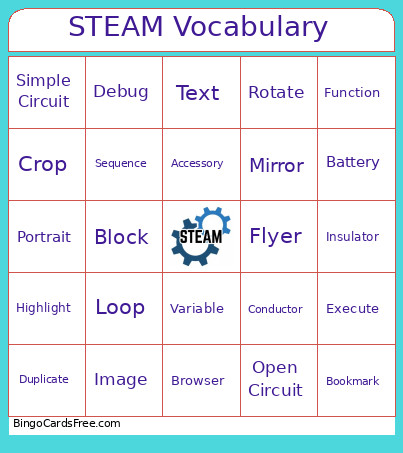
This STEAM Vocabulary Bingo Cards Game contains following Words or Phrases: Bookmark, Browser, Portrait, Landscape, Orientation, Upload, Align, Duplicate, Group, Mirror, Resize, Rotate, Battery, Conductor, Insulator, Open Circuit, Closed Circuit, LED, Parallel Circuit, Series Circuit, Simple Circuit, Positive, Negative, Algorithm, Block, Conditional, Animate, Debug, Function, Loop, Programmer, Execute, Sequence, Variable, Robot, Accessory, Crop, Flyer, Font, Image, Text, Screenshot, Highlight.

 This STEAM Vocabulary Bingo Cards Game contains following Words or Phrases: Bookmark, Browser, Portrait, Landscape, Orientation, Upload, Align, Duplicate, Group, Mirror, Resize, Rotate, Battery, Conductor, Insulator, Open Circuit, Closed Circuit, LED, Parallel Circuit, Series Circuit, Simple Circuit, Positive, Negative, Algorithm, Block, Conditional, Animate, Debug, Function, Loop, Programmer, Execute, Sequence, Variable, Robot, Accessory, Crop, Flyer, Font, Image, Text, Screenshot, Highlight.