Print free StevoV26 bingo cards or adjust them,
unlimited prints! Choose from 42,200+ templates or use the bingo card generator.
Add numbers, words, photos, or mix them all.
Play using printed PDF, digital bingo cards,
and the digital bingo caller, or combine all formats.
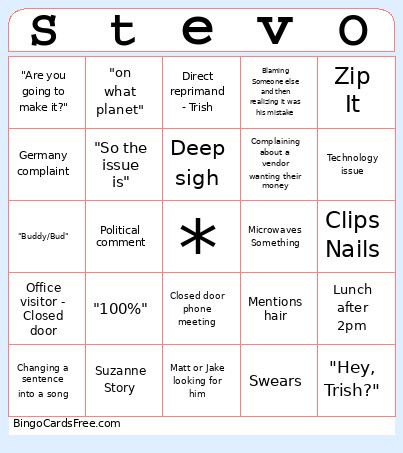
About: This bingo card perfectly captures the quirky charm and daily routines of office life with a coworker who’s always in the mix. Packed with memorable catchphrases, classic workplace scenarios, and inside jokes, it’s ideal for team meetings or office parties where everyone knows that one colleague who keeps things interesting. Get ready to laugh and commiserate as these moments inevitably pop up!
How To: To download a PDF to print, click the Print button.
You can change the card count and other
print preferences on the Print tab.
Grid items and free space text can be edited on the Basic tab.
Appearance can be highly personalized on the
corresponding tabs, or you can easily find any setting
on the 🔍 tab.
How to play StevoV26 Bingo Cards?
Paper Players: Print PDF bingo cards and physically cross off the cards.
Digital Caller: Click on the Play button above.
Digital Players: Click on the Play button above, and then click on the 🎫 button.
Paper Caller: Print PDF calling list & calling slips and physically pick the slips.
Mixed Play: Choose any combination above.
For example, caller can be either Printed or Digital.
And players can be Printed or Digital or a combination of both.
Step-By-Step:
Start by getting the StevoV26 PDF by clicking on the "Print" button above.
Open the PDF and print a hard copy.
For random calling, you can print another copy of the call list, cut, fold and then pick them randomly at play time.
Cut the bingo cards at the cut lines if there are more than 1 bingo cards per page.
Give one card to each player. For marking, you can use crayons. Crayons cost the least.
Choose one person to be the caller. If you are playing in a small group, the caller can as well play along with their own Bingo card.
The caller starts the game by randomly pulling an item from the call list and saying it to everyone.
The players check their cards to see if they have the called word. If they do, they cross off that word.
The first player to finish a horizontal, vertical, or a diagonal line of marked items shouts "Bingo!" and wins the play.
The caller validates that the items crossed off form a correct line according to the Bingo card and call list.
You can play for varied patterns or a full card blackout for a longer play.
This StevoV26 Bingo Cards Game contains following Words or Phrases: Changes the thermostat, "Help me Help you", "Steven, can I borrow you?", Exclamation with no follow up, "Hey, Trish?", Democrat complaint, "Where's the cash?", Singing Along with the radio, Office visitor - Closed door, Office visitor -Open door, Where did you go for lunch, Zip It, Direct reprimand -Betty, Direct reprimand - Trish, Random sports Discussion, Referencing Age, Mentions Trisha's Vacation Time, Can't find an email that he was copied on, Technology issue, Swears, "Buddy/Bud", Blaming Someone else and then realizing it was his mistake, Matt or Jake looking for him, Ask for silverware, Logan dis, Mentions hair, Doesn't know paylocity announcement, Political comment, Fills water Cup, Excel spreadsheet problem, References being in the Marines, Complaining about a vendor wanting their money, Changing a sentence into a song, Breaking news, Calls Steve into a meeting, Goes to the refrigerator, "Are you going to make it?", We all laugh and he doesn't know why, Clips Nails, "Hey, Steve / Steven?", Having Steven read an email before sending it, Suzanne Story, Germany complaint, "My stuff didn't Print", Deep sigh, Microwaves Something, Lunch after 2pm, "N-n-n-n-n-no", "I don't like your tone", "on what planet", "bro", "you know what I mean", "what do you want from me", Closed door phone meeting, "100%", "So the issue is".

 This StevoV26 Bingo Cards Game contains following Words or Phrases: Changes the thermostat, "Help me Help you", "Steven, can I borrow you?", Exclamation with no follow up, "Hey, Trish?", Democrat complaint, "Where's the cash?", Singing Along with the radio, Office visitor - Closed door, Office visitor -Open door, Where did you go for lunch, Zip It, Direct reprimand -Betty, Direct reprimand - Trish, Random sports Discussion, Referencing Age, Mentions Trisha's Vacation Time, Can't find an email that he was copied on, Technology issue, Swears, "Buddy/Bud", Blaming Someone else and then realizing it was his mistake, Matt or Jake looking for him, Ask for silverware, Logan dis, Mentions hair, Doesn't know paylocity announcement, Political comment, Fills water Cup, Excel spreadsheet problem, References being in the Marines, Complaining about a vendor wanting their money, Changing a sentence into a song, Breaking news, Calls Steve into a meeting, Goes to the refrigerator, "Are you going to make it?", We all laugh and he doesn't know why, Clips Nails, "Hey, Steve / Steven?", Having Steven read an email before sending it, Suzanne Story, Germany complaint, "My stuff didn't Print", Deep sigh, Microwaves Something, Lunch after 2pm, "N-n-n-n-n-no", "I don't like your tone", "on what planet", "bro", "you know what I mean", "what do you want from me", Closed door phone meeting, "100%", "So the issue is".