Stranger things last episode Bingo Cards - Print Free or Customize
Print free Stranger things last episode bingo cards or personalize,
limitless prints! Select from 41,500+ templates or use our bingo card generator.
Add numbers, words, pictures, or any combination.
Play using printed PDF, online bingo cards,
and our online bingo caller, or mix physical and digital.
About: This bingo card is perfect for a Stranger Things finale watch party or fan event. Packed with wild theories, nostalgic callbacks, and emotional predictions, it's designed for die-hard fans who love speculating and catching every quirky moment. Get ready for a mix of suspense, humor, and heartfelt nostalgia as you see which predictions come true!
How To: To save a printable PDF, click the Print button.
You can alter the number of cards and other
printing preferences on the Print tab.
Grid items and free space text can be edited on the Basic tab.
Appearance can be exactly customized on the
relevant tabs, or you can quickly search any preference
using the 🔍 tab.
How to play Stranger things last episode Bingo Cards?
Online Players: Click on the Play button above, and then click on the 🎫 button.
Printed Caller: Print PDF calling list & calling slips and physically select the slips.
Printed Players: Print PDF bingo cards and physically scratch the cards.
Online Caller: Click on the Play button above.
Mixed Mode: Choose any combination above.
For example, caller can be either Offline or Online.
And players can be Offline or Online or a combination of both.
Step-By-Step:
Start by saving the Stranger things last episode PDF by clicking on the "Print" button above.
Open the PDF and print a hard copy.
For random calling, you can print another copy of the call list, cut, fold and then draw them randomly at play time.
Cut the bingo cards at the cut lines if there are greater than 1 bingo cards per page.
Distribute one card per player. For marking, you can use crayons. Crayons cost the least.
Choose one person to be the caller. If you are playing in a small group, the caller can as well play along with their own Bingo card.
The caller initiates the game by randomly pulling an item from the call list and calling out it to all players.
The players scan their cards to see if they have the called word. If they do, they cross off that word.
The first player to complete a horizontal, vertical, or a diagonal line of marked items announces "Bingo!" and wins the play.
The caller checks that the items marked form a proper line according to the Bingo card and call list.
You can play for varied patterns or a full card blackout for a longer play.
This Stranger things last episode Bingo Cards Game contains following Words or Phrases: No one will die(main characters), Someone will die(excluding cali, main characters), Someone will almost die but get saved at the last sec, Vecna is actually a good guy and he's just been getting mind controlled the whole time, Products placement, 11 will "die" or at least people think she is, but not, 11+8+1=20 which kills mind flare, 11 gets referred as a "Jane Doe", Indiana Jones style ending where you see the government has a giant facility with all kind of unexplainable things that the hide from the public, The gang plays DnD one more time, Someone will say the words "Stranger things" in a sentence, The tri dragon is the final boss, The gang wins but the worlds still collide, Dr. K does literally nothing, Dustin lives with Steve in the epilogue, In the epilogue there is a long segment about how the main 4 aren't as close as they used to be, The president will make a statement about Hawkins, They will leave the door open for a spin off, The final scene will be a random group of kids playing MTG and some monster from Magic will be hinted at being real, Holly will do more than Mike, There will be a long pause during a scene so people can react, 11 year time skip, Vecna will let Will take over his body to help kill the mind flair, Someone will make a joke about the future like "there's no way ___ will ever happen." Something like that.

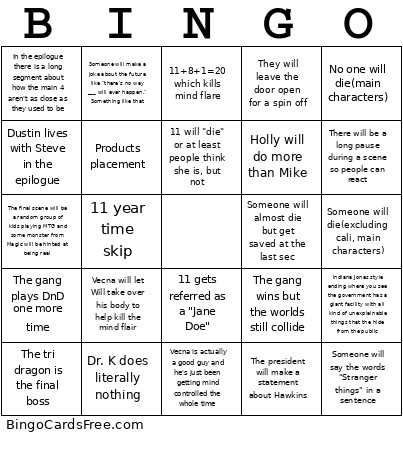 This Stranger things last episode Bingo Cards Game contains following Words or Phrases: No one will die(main characters), Someone will die(excluding cali, main characters), Someone will almost die but get saved at the last sec, Vecna is actually a good guy and he's just been getting mind controlled the whole time, Products placement, 11 will "die" or at least people think she is, but not, 11+8+1=20 which kills mind flare, 11 gets referred as a "Jane Doe", Indiana Jones style ending where you see the government has a giant facility with all kind of unexplainable things that the hide from the public, The gang plays DnD one more time, Someone will say the words "Stranger things" in a sentence, The tri dragon is the final boss, The gang wins but the worlds still collide, Dr. K does literally nothing, Dustin lives with Steve in the epilogue, In the epilogue there is a long segment about how the main 4 aren't as close as they used to be, The president will make a statement about Hawkins, They will leave the door open for a spin off, The final scene will be a random group of kids playing MTG and some monster from Magic will be hinted at being real, Holly will do more than Mike, There will be a long pause during a scene so people can react, 11 year time skip, Vecna will let Will take over his body to help kill the mind flair, Someone will make a joke about the future like "there's no way ___ will ever happen." Something like that.