Studio B Buildout Bingo Cards - Print Free or Customize
Print free Studio B Buildout bingo cards or personalize,
unlimited prints! Pick from 41,500+ designs or use the bingo card generator.
Add numbers, phrases, photos, or all of them.
Play using printed PDF, virtual bingo cards,
and the virtual bingo caller, or mix physical and digital.
About: This bingo card is perfect for anyone involved in construction, renovation, or buildout projects, especially those familiar with the quirks of a tight-knit team working under pressure. The tone is lighthearted and playful, poking fun at the everyday frustrations, funny mishaps, and familiar personalities that pop up during long days on-site. Great for team meetings, end-of-week gatherings, or simply bonding over shared headaches and inside jokes.
How To: To get a printable PDF, click the Print button.
You can alter the card count and other
printing settings on the Print tab.
Grid items and free space text can be edited on the Basic tab.
Appearance can be highly personalized on the
corresponding tabs, or you can easily search any option
using the 🔍 tab.
How to play Studio B Buildout Bingo Cards?
Printed Caller: Print PDF calling list & calling slips and manually select the slips.
Online Caller: Click on the Play button above.
Online Players: Click on the Play button above, and then click on the 🎫 button.
Printed Players: Print PDF bingo cards and manually cross off the cards.
Combo Mode: Select any combination above.
For example, caller can be either Printed or Online.
And players can be Printed or Online or a combo of both.
Step-By-Step:
Start by saving the Studio B Buildout PDF by clicking on the "Print" button above.
Open the PDF and print a hard copy.
For random drawing, you can print another copy of the call list, cut, fold and then draw them randomly at play time.
Cut the bingo cards at the cut lines if there are greater than 1 bingo cards per page.
Give one card to each player. For marking, you can use pencils. Crayons cost the least.
Select one person to be the caller. If you are playing in a small group, the caller can also play along with their own Bingo card.
The caller initiates the play by randomly picking an item from the call list and calling out it to everyone.
The players scan their cards to see if they have the announced word. If they do, they mark that word.
The first player to complete a horizontal, vertical, or a diagonal line of crossed items announces "Bingo!" and wins the game.
The caller checks that the items marked form a correct line according to the Bingo card and call list.
You can play for different patterns or a full card blackout for a longer game.
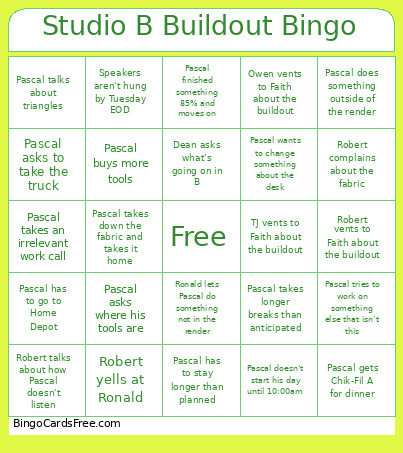
This Studio B Buildout Bingo Cards Game contains following Words or Phrases: Pascal does something outside of the render, Robert vents to Faith about the buildout, TJ vents to Faith about the buildout, Pascal has to stay longer than planned, Pascal buys more tools, Dean asks what's going on in B, Pascal finished something 85% and moves on, Ronald lets Pascal do something not in the render, Pascal tries to work on something else that isn't this, Pascal has to go to Home Depot, Pascal gets Chik-Fil A for dinner, Robert talks about how Pascal doesn't listen, Pascal takes longer breaks than anticipated, Robert yells at Ronald, Pascal asks to take the truck, Pascal talks about triangles, Pascal doesn't start his day until 10:00am, Owen vents to Faith about the buildout, Pascal takes an irrelevant work call, Pascal wants to change something about the desk, Robert complains about the fabric, Pascal takes down the fabric and takes it home, Pascal asks where his tools are, Speakers aren't hung by Tuesday EOD.

 This Studio B Buildout Bingo Cards Game contains following Words or Phrases: Pascal does something outside of the render, Robert vents to Faith about the buildout, TJ vents to Faith about the buildout, Pascal has to stay longer than planned, Pascal buys more tools, Dean asks what's going on in B, Pascal finished something 85% and moves on, Ronald lets Pascal do something not in the render, Pascal tries to work on something else that isn't this, Pascal has to go to Home Depot, Pascal gets Chik-Fil A for dinner, Robert talks about how Pascal doesn't listen, Pascal takes longer breaks than anticipated, Robert yells at Ronald, Pascal asks to take the truck, Pascal talks about triangles, Pascal doesn't start his day until 10:00am, Owen vents to Faith about the buildout, Pascal takes an irrelevant work call, Pascal wants to change something about the desk, Robert complains about the fabric, Pascal takes down the fabric and takes it home, Pascal asks where his tools are, Speakers aren't hung by Tuesday EOD.