Print free Summer Camp Ice Breaker bingo cards or modify,
limitless cards! Pick from 42,200+ templates or use our bingo card generator.
Add numbers, phrases, pictures, or mix them all.
Play using PDF prints, online bingo cards,
and our online bingo caller, or go hybrid.
About: This bingo card is perfect for icebreaker events or social mixers where getting to know one another is the goal. With a fun mix of travel experiences, quirky talents, and personal achievements, it sparks conversation and helps people discover unexpected connections in a group. Great for classrooms, team building, or any gathering of diverse personalities!
How To: To get a printable PDF, click the Print button.
You can change the card quantity and other
printing preferences on the Print tab.
Grid items and free space text can be added on the Basic tab.
Appearance can be fully customized on the
corresponding tabs, or you can easily locate any setting
on the 🔍 tab.
How to play Summer Camp Ice Breaker Bingo Cards?
Virtual Players: Click on the Play button above, and then click on the 🎫 button.
Paper Caller: Print PDF calling list & calling slips and manually draw the slips.
Virtual Caller: Click on the Play button above.
Paper Players: Print PDF bingo cards and manually scratch the cards.
Combo Play: Choose any combination above.
For instance, caller can be either Printed or Virtual.
And players can be Printed or Virtual or a mix of both.
Step-By-Step:
Start by saving the Summer Camp Ice Breaker PDF by clicking on the "Print" button above.
Open the PDF and print it.
For random calling, you can print another copy of the call list, cut, fold and then draw them randomly at play time.
Cut the bingo cards at the cut marks if there are more than 1 bingo cards per page.
Distribute one card per player. For marking, you can use crayons. Crayons cost the least.
Choose one person to be the caller. If you are playing in a small group, the caller can as well play along with their own Bingo card.
The caller starts the play by randomly pulling an item from the call list and calling out it to everyone.
The players check their cards to see if they have the announced word. If they do, they mark that word.
The first player to finish a horizontal, vertical, or a diagonal line of crossed items shouts "Bingo!" and wins the game.
The caller checks that the items marked form a correct line as per the Bingo card and call list.
You can play for varied patterns or a full card blackout for a longer game.
This Summer Camp Ice Breaker Bingo Cards Game contains following Words or Phrases: Knows more than one language, Been to Europe, Been to Asia, Been to South America, Been to Australia, Has a tattoo, Has multiple pets, Has a known phobia, Same sign as you, Digs your favorite band, Grew up in another state, Been to Burning Man, Owns a business, Enjoys doing math, Loves to draw, Been on TV, Met a celebrity, Collects something specific, Traveled more than 3 hours to get here, Knows how to knit, Oldest in their family, Youngest in their family, Middle child, Only child, Enjoys reading physical books, Never had a cavity, Won a competion, Likes your fave dessert, Left handed, Can play an instrument, Has a secret super-power, Doesn't have cable TV, Can't dance, Hasn't seen Titanic, Can juggle, Can solve a Rubik's Cube, Hand-writes letters, Loves to bake, Hasn't watched the World Cup, Dual citizenship, Written a short story, Writes poetry, Has done stand-up comedy, Doesn't drink coffee, Jumped out of a plane, Can do 30 push-ups, Has a special karaoke song, Can share a favorite quote, Owns a boat, Bikes to work, Never broken a bone, Broken 3+ bones, Works from home, Grows food in a garden, Can't keep plants alive, Can do a spot on impression of..., Has worked in a restaurant, Has an advanced degree, Doesn't use social media, Has read your fave book.

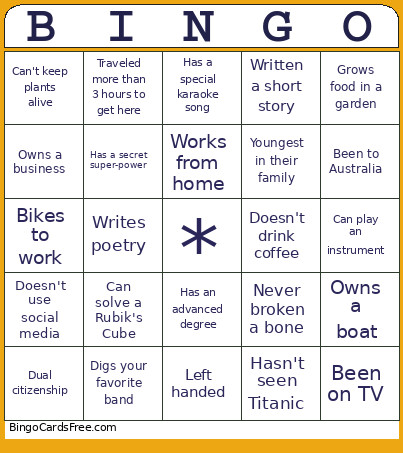 This Summer Camp Ice Breaker Bingo Cards Game contains following Words or Phrases: Knows more than one language, Been to Europe, Been to Asia, Been to South America, Been to Australia, Has a tattoo, Has multiple pets, Has a known phobia, Same sign as you, Digs your favorite band, Grew up in another state, Been to Burning Man, Owns a business, Enjoys doing math, Loves to draw, Been on TV, Met a celebrity, Collects something specific, Traveled more than 3 hours to get here, Knows how to knit, Oldest in their family, Youngest in their family, Middle child, Only child, Enjoys reading physical books, Never had a cavity, Won a competion, Likes your fave dessert, Left handed, Can play an instrument, Has a secret super-power, Doesn't have cable TV, Can't dance, Hasn't seen Titanic, Can juggle, Can solve a Rubik's Cube, Hand-writes letters, Loves to bake, Hasn't watched the World Cup, Dual citizenship, Written a short story, Writes poetry, Has done stand-up comedy, Doesn't drink coffee, Jumped out of a plane, Can do 30 push-ups, Has a special karaoke song, Can share a favorite quote, Owns a boat, Bikes to work, Never broken a bone, Broken 3+ bones, Works from home, Grows food in a garden, Can't keep plants alive, Can do a spot on impression of..., Has worked in a restaurant, Has an advanced degree, Doesn't use social media, Has read your fave book.