Summer Game Fest 2026 Bingo Cards - Print Free or Customize
Print free Summer Game Fest 2026 bingo cards or adjust them,
limitless cards! Select from 42,200+ templates or use the bingo card generator.
Add numbers, phrases, pictures, or all of them.
Play using PDF printouts, online bingo cards,
and the online bingo caller, or mix physical and digital.
About: This bingo card is perfect for gamers and fans watching a big gaming showcase, like E3 or Summer Game Fest. It mixes dream announcements, long-awaited sequels, wild surprises, and the kind of over-the-top industry trends everyone loves to joke about. Expect playful banter as friends race to mark off their wildest hopes and biggest pet peeves.
How To: To save a PDF to print, click the Print button.
You can modify the card quantity and other
printing settings on the Print tab.
Grid items and free space content can be edited on the Basic tab.
Appearance can be highly personalized on the
relevant tabs, or you can quickly find any setting
using the 🔍 tab.
How to play Summer Game Fest 2026 Bingo Cards?
Printed Caller: Print PDF calling list & calling slips and physically pick the slips.
Printed Players: Print PDF bingo cards and physically scratch the cards.
Virtual Players: Click on the Play button above, and then click on the 🎫 button.
Virtual Caller: Click on the Play button above.
Mixed Play: Pick any combination above.
For instance, caller can be either Printed or Virtual.
And players can be Printed or Virtual or a combo of both.
Step-By-Step:
Start by saving the Summer Game Fest 2026 Bingo PDF by clicking on the "Print" button above.
Open the PDF and print it.
For random calling, you can print another copy of the call list, cut, fold and then draw them randomly at play time.
Cut the bingo cards at the cut marks if there are more than 1 bingo cards per page.
Give one card to each player. For marking, you can use pens. Crayons are the cheapest.
Pick one person to be the caller. If you are playing in a small group, the caller may as well play along with their own Bingo card.
The caller starts the play by randomly drawing an item from the call list and announcing it to everyone.
The players scan their cards to see if they have the called word. If they do, they cross off that word.
The first player to complete a horizontal, vertical, or a diagonal line of marked items announces "Bingo!" and wins the play.
The caller verifies that the items crossed off form a proper line as per the Bingo card and call list.
You can play for different patterns or a full card blackout for a longer play.
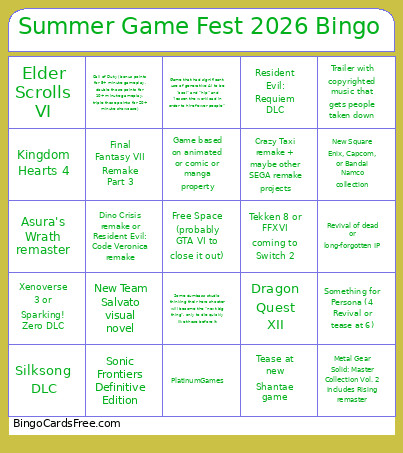
This Summer Game Fest 2026 Bingo Cards Game contains following Words or Phrases: New Team Salvato visual novel, Revival of dead or long-forgotten IP, Sonic Frontiers Definitive Edition, Ace Attorney 7, Half-Life 3, Some dumbass studio thinking their hero shooter will become the "next big thing", only to die quickly like those before it, Tease at new Shantae game, Silksong DLC, Game based on animated or comic or manga property, Xenoverse 3 or Sparking! Zero DLC, Final Fantasy VII Remake Part 3, Tekken 8 or FFXVI coming to Switch 2, Fatal Fury Kenshiro gameplay trailer, Chrono Trigger, Game that had significant use of generative AI to be "cool" and "hip" and "lessen the workload in order to hire fewer people", Something for Persona (4 Revival or tease at 6), Deltarune Chapter 5, Game that highlights EXTREMELY specific problem that almost no one has, Crazy Taxi remake + maybe other SEGA remake projects, New Square Enix, Capcom, or Bandai Namco collection, Some generic random mobile game teased as "the next step" or the like, Resident Evil: Requiem DLC, Call of Duty (bonus points for 5+ minute gameplay, double those points for 10+ minute gameplay, triple those points for 20+ minute showcase), Dino Crisis remake or Resident Evil: Code Veronica remake, Devil May Cry 6, Trailer with copyrighted music that gets people taken down, Elder Scrolls VI, Dragon Quest XII, Kingdom Hearts 4, Cozy game, PlatinumGames, Cancelled game gets revived, Metal Gear Solid: Master Collection Vol. 2 includes Rising remaster, Asura's Wrath remaster, Mega Man: Dual Override or Ōkami 2.

 This Summer Game Fest 2026 Bingo Cards Game contains following Words or Phrases: New Team Salvato visual novel, Revival of dead or long-forgotten IP, Sonic Frontiers Definitive Edition, Ace Attorney 7, Half-Life 3, Some dumbass studio thinking their hero shooter will become the "next big thing", only to die quickly like those before it, Tease at new Shantae game, Silksong DLC, Game based on animated or comic or manga property, Xenoverse 3 or Sparking! Zero DLC, Final Fantasy VII Remake Part 3, Tekken 8 or FFXVI coming to Switch 2, Fatal Fury Kenshiro gameplay trailer, Chrono Trigger, Game that had significant use of generative AI to be "cool" and "hip" and "lessen the workload in order to hire fewer people", Something for Persona (4 Revival or tease at 6), Deltarune Chapter 5, Game that highlights EXTREMELY specific problem that almost no one has, Crazy Taxi remake + maybe other SEGA remake projects, New Square Enix, Capcom, or Bandai Namco collection, Some generic random mobile game teased as "the next step" or the like, Resident Evil: Requiem DLC, Call of Duty (bonus points for 5+ minute gameplay, double those points for 10+ minute gameplay, triple those points for 20+ minute showcase), Dino Crisis remake or Resident Evil: Code Veronica remake, Devil May Cry 6, Trailer with copyrighted music that gets people taken down, Elder Scrolls VI, Dragon Quest XII, Kingdom Hearts 4, Cozy game, PlatinumGames, Cancelled game gets revived, Metal Gear Solid: Master Collection Vol. 2 includes Rising remaster, Asura's Wrath remaster, Mega Man: Dual Override or Ōkami 2.