Super Bowl LIX @ LV John Bingo Cards - Print Free or Customize
Print free Super Bowl LIX @ LV John bingo cards or modify,
limitless cards! Select from 42,200+ templates or use our bingo card generator.
Add numbers, phrases, pictures, or any combination.
Play using printable PDF, virtual bingo cards,
and our virtual bingo caller, or mix physical and digital.
About: This bingo card perfectly captures the unpredictable fun and inside jokes of a Super Bowl watch party with friends. Blending football moments, quirky personal traditions, and playful group dynamics, it's ideal for any gathering where sports fans and non-fans come together to enjoy the big game—and each other's company. Great for livening up your next game day event!
How To: To get a printable PDF, click the Print button.
You can modify the card quantity and other
print settings on the Print tab.
Grid items and free space text can be added on the Basic tab.
Appearance can be entirely personalized on the
corresponding tabs, or you can easily find any setting
on the 🔍 tab.
How to play Super Bowl LIX @ LV John Bingo Cards?
Virtual Players: Click on the Play button above, and then click on the 🎫 button.
Paper Caller: Print PDF calling list & calling slips and physically draw the slips.
Paper Players: Print PDF bingo cards and physically scratch the cards.
Virtual Caller: Click on the Play button above.
Hybrid Play: Choose any combination above.
For instance, caller can be either Paper or Virtual.
And players can be Paper or Virtual or a mix of both.
Step-By-Step:
Start by downloading the Super Bowl LIX @ LV John PDF by clicking on the "Print" button above.
Open the PDF and print it.
For random calling, you can print another copy of the call list, cut, fold and then draw them randomly at play time.
Cut the bingo cards at the cut lines if there are greater than 1 bingo cards per page.
Distribute one card per player. For marking, you can use markers. Crayons are the cheapest.
Choose one person to be the caller. If you are playing in a small group, the caller may as well play along with their own Bingo card.
The caller starts the play by randomly pulling an item from the call list and saying it to everyone.
The players scan their cards to see if they have the announced word. If they do, they dab that word.
The first player to finish a horizontal, vertical, or a diagonal line of marked items announces "Bingo!" and wins the game.
The caller checks that the items crossed off form a proper line according to the Bingo card and call list.
You can play for multiple patterns or a full card blackout for an extended game.
This Super Bowl LIX @ LV John Bingo Cards Game contains following Words or Phrases: Travis Kelce Touchdown, Saquon Barkley Touchdown, Saquon Barkley 70 Rushing Yards, Patrick Mahomes 150 Passing Yards, Jesus Commercial for HeGetsUs.Com, Jalen Hurts 150 Passing Yards, Eagles TD, Chiefs TD, Somebody asks Jacob how tall he is, Chiefs winning/tied at halftime, Gatorade bath is blue, Coin toss is heads, Interception, Fumble recovery, Field goal made longer than 40 yards, Missed FG, Someone spoils a play, Ethan stands and cries during national anthem or when they show Trump, Drew tells someone to stop asking questions, Quinn ignores someone while on Twitter, Sofia or Milo mention three year anniversary, Yonah explains his thesis, Aidan recruits someone for the short film, Elisha mansplains Kendrick and Drake beef at halftime, Jonathan takes a smoke break, Hailey compliments someone's beard, Mandy says something you wouldn't say out loud., Timmy shushes everyone during a commercial, Nina or Samantha (empaths) feel disheartened when a player messes up, Anna's marriage pact mentioned or her in-laws seen on TV, Sarah makes someone try her dessert, Stella talks about the Buffalo Bills or Fourth Wing, Isabella shows up to accompany her orphaned focaccia, Someone calls Tom Brady or Saquon Barkley hot, Our WiFi breaks, You stay after and help us clean ;), Charlie altruistically offers you the last piece of something you wanted, Zoe forgets a possession on the way out, Kai Kai sighs derisively, Someone confused by Kansas City being in Missouri, Man gets upset when they show Taylor Swift, Argument over seating, Greta and Amelia confused for one another, Potluck contribution obviously from pantry, Ask Natalie to see a picture of her cousin who looks "just like her".

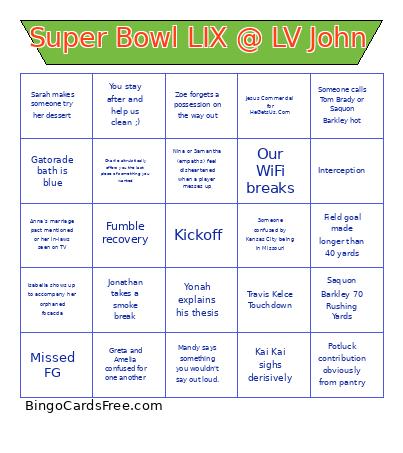 This Super Bowl LIX @ LV John Bingo Cards Game contains following Words or Phrases: Travis Kelce Touchdown, Saquon Barkley Touchdown, Saquon Barkley 70 Rushing Yards, Patrick Mahomes 150 Passing Yards, Jesus Commercial for HeGetsUs.Com, Jalen Hurts 150 Passing Yards, Eagles TD, Chiefs TD, Somebody asks Jacob how tall he is, Chiefs winning/tied at halftime, Gatorade bath is blue, Coin toss is heads, Interception, Fumble recovery, Field goal made longer than 40 yards, Missed FG, Someone spoils a play, Ethan stands and cries during national anthem or when they show Trump, Drew tells someone to stop asking questions, Quinn ignores someone while on Twitter, Sofia or Milo mention three year anniversary, Yonah explains his thesis, Aidan recruits someone for the short film, Elisha mansplains Kendrick and Drake beef at halftime, Jonathan takes a smoke break, Hailey compliments someone's beard, Mandy says something you wouldn't say out loud., Timmy shushes everyone during a commercial, Nina or Samantha (empaths) feel disheartened when a player messes up, Anna's marriage pact mentioned or her in-laws seen on TV, Sarah makes someone try her dessert, Stella talks about the Buffalo Bills or Fourth Wing, Isabella shows up to accompany her orphaned focaccia, Someone calls Tom Brady or Saquon Barkley hot, Our WiFi breaks, You stay after and help us clean ;), Charlie altruistically offers you the last piece of something you wanted, Zoe forgets a possession on the way out, Kai Kai sighs derisively, Someone confused by Kansas City being in Missouri, Man gets upset when they show Taylor Swift, Argument over seating, Greta and Amelia confused for one another, Potluck contribution obviously from pantry, Ask Natalie to see a picture of her cousin who looks "just like her".