Super Bowl LX Bingo Cards - Print Free or Customize
Print free Super Bowl LX bingo cards or alter them,
unlimited prints! Choose from 40,600+ designs or use our bingo card generator.
Add numbers, words, pictures, or all of them.
Play using PDF printouts, digital bingo cards,
and our digital bingo caller, or combine all formats.
About: This bingo card captures all the unpredictable excitement and classic moments of a Super Bowl party, from unexpected touchdowns to over-the-top commercials and celebrity sightings. It's ideal for livening up any football watch party with friends, offering plenty of laughs and friendly competition as everyone hunts for familiar game day antics and viral ad moments.
How To: To get a PDF to print, click the Print button.
You can modify the card count and other
print settings on the Print tab.
Grid items and free space content can be added on the Basic tab.
Appearance can be entirely customized on the
relevant tabs, or you can quickly find any option
on the 🔍 tab.
How to play Super Bowl LX Bingo Cards?
Paper Caller: Print PDF calling list & calling slips and manually select the slips.
Virtual Caller: Click on the Play button above.
Paper Players: Print PDF bingo cards and manually cross off the cards.
Virtual Players: Click on the Play button above, and then click on the 🎫 button.
Hybrid Mode: Select any combination above.
For instance, caller can be either Printed or Virtual.
And players can be Printed or Virtual or a combo of both.
Step-By-Step:
Start by downloading the Super Bowl LX PDF by clicking on the "Print" button above.
Open the PDF and print it.
For random calling, you can print another copy of the call list, cut, fold and then pick them randomly at play time.
Cut the bingo cards at the cut marks if there are more than 1 bingo cards per page.
Give one card to each player. For marking, you can use markers. Crayons cost the least.
Select one person to be the caller. If you are playing in a small group, the caller may as well play along with their own Bingo card.
The caller opens the game by randomly picking an item from the call list and saying it to everyone.
The players scan their cards to see if they have the called word. If they do, they dab that word.
The first player to finish a horizontal, vertical, or a diagonal line of marked items shouts "Bingo!" and wins the play.
The caller checks that the items marked form a proper line as per the Bingo card and call list.
You can play for varied patterns or a full card blackout for an extended play.
This Super Bowl LX Bingo Cards Game contains following Words or Phrases: celeb cameo in an advertisement, Pats score a field goal, Pats score a touchdown, Seahawks score a field goal, Seahawks score a touchdown, Bad bunny crushes the halftime show, Doritos ad, Budweiser ad, Super sad ad, Players get in a fight on field, Someone cries during the national anthem, Instacart ad, Bad bunny brings out a special guest, Interception, Shirtless fan with body paint, Anyone on the sideline gets hit (or falls), Shot of Golden Gate Bridge, Touchdown celebration, Quarterback sack, Fanduel ad, Cute animal in an ad, Super weird ad, Protest activity, Fan disrupts the game, Mentions of Taylor swift and/or Travis Kelce, Tom Brady, Player gets injured, Player drops the ball, One-handed catch, Commercial with a football player in it, Someone comes to the party after the halftime show, Someone at the party is wearing a football jersey, Someone at the party is wearing patriots colors, Someone at the party is wearing Seahawks colors, Flag thrown, Timeout called, Patriots coach squatting, Movie trailer, Praying player, Cheerleader close up, Kid fan on TV, Super drunk fan, Hail Mary, Someone at party does not understand rules of football, Depressed fan, Booing at ref, Coach yells at ref, Call under review, Ref falls over or gets hit by player, Athlete gets butt smacked, Commentator talks about weather, Celebrity sighting in crowd, Drone shot of SF, Ben Affleck and Matt Damon in Dunkin ad, Two minute warning, Any team scores 20+ points, Missed field goal, Random celebrity collab in an ad.

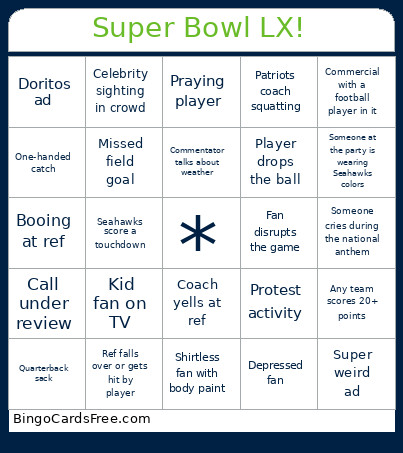 This Super Bowl LX Bingo Cards Game contains following Words or Phrases: celeb cameo in an advertisement, Pats score a field goal, Pats score a touchdown, Seahawks score a field goal, Seahawks score a touchdown, Bad bunny crushes the halftime show, Doritos ad, Budweiser ad, Super sad ad, Players get in a fight on field, Someone cries during the national anthem, Instacart ad, Bad bunny brings out a special guest, Interception, Shirtless fan with body paint, Anyone on the sideline gets hit (or falls), Shot of Golden Gate Bridge, Touchdown celebration, Quarterback sack, Fanduel ad, Cute animal in an ad, Super weird ad, Protest activity, Fan disrupts the game, Mentions of Taylor swift and/or Travis Kelce, Tom Brady, Player gets injured, Player drops the ball, One-handed catch, Commercial with a football player in it, Someone comes to the party after the halftime show, Someone at the party is wearing a football jersey, Someone at the party is wearing patriots colors, Someone at the party is wearing Seahawks colors, Flag thrown, Timeout called, Patriots coach squatting, Movie trailer, Praying player, Cheerleader close up, Kid fan on TV, Super drunk fan, Hail Mary, Someone at party does not understand rules of football, Depressed fan, Booing at ref, Coach yells at ref, Call under review, Ref falls over or gets hit by player, Athlete gets butt smacked, Commentator talks about weather, Celebrity sighting in crowd, Drone shot of SF, Ben Affleck and Matt Damon in Dunkin ad, Two minute warning, Any team scores 20+ points, Missed field goal, Random celebrity collab in an ad.