
Super Mario 64 DS Bingo Cards - Print Free or Customize
Print free Super Mario 64 DS bingo cards or adjust them, unlimited cards! Pick from 41,500+ designs or use the bingo card generator. Add numbers, words, pictures, or mix them all. Play using printed PDF, online bingo cards, and the online bingo caller, or mix physical and digital.
About: This bingo card is perfect for fans of Super Mario 64 DS who want to make their next playthrough more exciting. Packed with challenges from collecting stars in classic courses to defeating memorable bosses and completing mini-games, it's great for competitive gaming nights, speedrun races, or just leveling up the fun with friends at a Mario-themed party.
How To: To save a printable PDF, click the Print button. You can alter the card quantity and other printing settings on the Print tab. Grid items and free space content can be edited on the Basic tab. Appearance can be entirely customized on the corresponding tabs, or you can easily search any option on the 🔍 tab.
How to play Super Mario 64 DS Bingo Cards?
- Digital Caller: Click on the Play button above.
- Printed Players: Print PDF bingo cards and physically mark the cards.
- Printed Caller: Print PDF calling list & calling slips and physically draw the slips.
- Digital Players: Click on the Play button above, and then click on the 🎫 button.
- Mixed Play: Choose any combination above. For instance, caller can be either Offline or Digital. And players can be Offline or Digital or a combo of both.
Step-By-Step:
- Start by saving the Super Mario 64 DS Bingo PDF by clicking on the "Print" button above.
- Open the PDF and print it.
- For random drawing, you can print another copy of the call list, cut, fold and then pick them randomly at play time.
- Cut the bingo cards at the cut marks if there are more than 1 bingo cards per page.
- Give one card to each player. For marking, you can use crayons. Crayons cost the least.
- Choose one person to be the caller. If you are playing in a small group, the caller can also play along with their own Bingo card.
- The caller initiates the play by randomly picking an item from the call list and announcing it to everyone.
- The players check their cards to see if they have the called word. If they do, they dab that word.
- The first player to finish a horizontal, vertical, or a diagonal line of marked items announces "Bingo!" and wins the play.
- The caller confirms that the items crossed off form a correct line as per the Bingo card and call list.
- You can play for varied patterns or a full card blackout for a longer play.
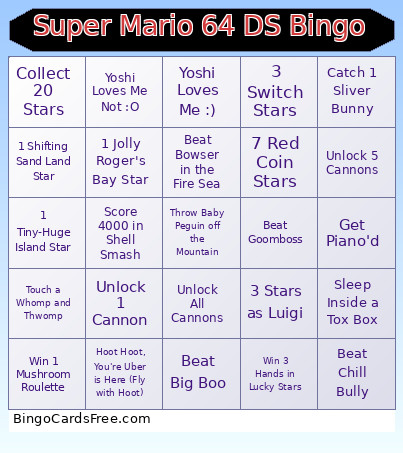 This Super Mario 64 DS Bingo Cards Game contains following Words or Phrases: 1 Secret Star (Castle), 3 Secret Stars (Castle), 5 Secret Stars (Castle), 7 Secret Stars (Castle), 10 Secret Stars (Castle), 15 Secret Stars (Castle), 1 Bob-omb Battlefield Star, 3 Bob-omb Battlefield Stars, 5 Bob-omb Battlefield Stars, 1 Whomps Fortress Star, 3 Whomps Fortress Stars, 5 Whomps Fortress Stars, 1 Jolly Roger's Bay Star, 3 Jolly Roger's Bay Stars, 5 Jolly Roger's Bay Stars, 1 Cool, Cool Mountain Star, 3 Cool, Cool Mountain Stars, 5 Cool, Cool Mountain Stars, 1 Big Boo Haunt Star, 3 Big Boo Haunt Stars, 5 Big Boo Haunt Stars, 1 Hazy Maze Cave Star, 3 Hazy Maze Cave Stars, 5 Hazy Maze Cave Stars, 1 Leathal Lava Land Star, 3 Leathal Lava Land Stars, 5 Leathal Lava Land Stars, 1 Shifting Sand Land Star, 3 Shifting Sand Land Stars, 5 Shifting Sand Land Stars, 1 Dire Dire Docks Star, 3 Dire Dire Docks Stars, 5 Dire Dire Docks Stars, 1 Snowman's Land Star, 3 Snowman's Land Stars, 5 Snowman's Land Stars, 1 Wet-Dry World Star, 3 Wet-Dry World Stars, 5 Wet-Dry World Stars, 1 Tall, Tall Mountain Star, 3 Tall, Tall Mountain Stars, 5 Tall, Tall Mountain Stars, 1 Tiny-Huge Island Star, 3 Tiny-Huge Island Stars, 5 Tiny-Huge Island Stars, 1 Tick Tock Clock Star, 3 Tick Tock Clock Stars, 1 Rainbow Ride Star, 3 Rainbow Ride Stars, Race Koopa the Quick Twice, Beat Every Boss Once, Beat a Level Damageless, 3 Stars as Yoshi, 3 Stars as Mario, 3 Stars as Luigi, 3 Stars as Wario, Get 3 Slide Stars, Get 5 Slide Stars, Fully Clear a Level, Fully Clear 2 Levels, Fully Clear 3 Levels, Collect 10 Stars, Collect 20 Stars, Collect 30 Stars, Collect 40 Stars, Collect 50 Stars, 3 Red Coin Stars, 5 Red Coin Stars, 7 Red Coin Stars, 10 Red Coin Stars, 15 Red Coin Stars, 1 Silver Star Star, 3 Silver Star Stars, 5 Silver Star Stars, 3 Switch Stars, 5 Switch Stars, 7 Switch Stars, 10 Switch Stars, Catch 3 Unique Bunnies, Catch 6 Unique Bunnies, Catch 1 Sliver Bunny, Catch 3 Yellow Bunnies, Catch 3 Red Bunnies, Catch 3 Green Bunnies, Catch 3 Orange Bunnies, Use a Super Mushroom, Use a 1 Up Mushroom, Use a Metal Power Flower, Use a Invisible Power Flower, Use a Fire Power Flower, Use a Balloon Power Flower, Use a Wing Feather, Unlock 1 Cannon, Unlock 3 Cannons, Unlock 5 Cannons, Unlock All Cannons, Unlock Mario, Unlock Luigi, Unlock Wario, Death by Fall Damage, Death by Fire, Death by Electricution, Death by Smush, Death by Toxic Air, Drown, Death by Pit, Death by Bubba, Death by Freezing, Beat King Bob-omb, Beat King Whomp, Beat Goomboss, Beat Big Mr. I, Beat Big Boo, Beat Big Boo Twice, Beat Big Boo Thrice, Beat King Boo, Beat Big Bully, Beat Eyerok, Beat Wiggler, Beat Chill Bully, Beat Cheif Chilly, Beat Bowser in the Dark World, Beat Bowser in the Fire Sea, Beat Bowser in the Sky, Lose Your Hat, 5 Unique 1 Ups, Ground Pound a Post, Get Launched by a Heave-Ho, Get Thrown by a Chuckya, Touch a Whomp and Thwomp, Get Piano'd, Sleep Inside a Tox Box, Throw Baby Peguin off the Mountain, Drop an Ukiki into the Void, Hoot Hoot, You're Uber is Here (Fly with Hoot), Make a Square Egg, Eat a Star as Yoshi, 25 Stars in Wanted, Yoshi Loves Me :), Yoshi Loves Me Not :O, 5 Stars in Hide and Boo Seek, 10 Stars in Puzzle Panel, 5 Stars in Boom Box, 5 Stars in Tox Box Shuffle, 5 Stars in Which Wiggler, 15 Stars in Mario's Slides, 5 Stars in Bounce and Pounce, Score 100 in Sort or 'Splode, Score 15 in Trampoline Time, Score 1000 in Shuffle Shell, Score 50 in Bounce and Trounce, 5 Stars in Connect the Characters, Score 4000 in Shell Smash, Score 3000 in Trampoline Terror, Win 5 Hands in Memory Match, Win 5 Hands in Pair-a-Gone, Win 3 Hands in Picture Poker, Win 1 Mushroom Roulette, Win 3 Hands in Lucky Stars, Win 3 Hands in Memory Master, Score 20,000 in Bom-omb Squad, Complete Snowball Slalom, Score 2000 in Bingo Ball, Score 20 in Coincentration, 15 Stars in Psyche Out!, Score 20000 in Slots Shot, Score 10 in Lakitu Launch, Score 10 in Intense Coincentration, Complete Giant Snowball Slalom.