
Super Mario Galaxy 2 Bingo Cards - Print Free or Customize
Print free Super Mario Galaxy 2 bingo cards or customize, limitless prints! Pick from 41,500+ templates or use the bingo card generator. Add numbers, phrases, images, or all of them. Play using PDF printouts, digital bingo cards, and the digital bingo caller, or combine all formats.
About: This bingo card is perfect for fans of Super Mario Galaxy 2 who want to add extra challenge and fun to their playthroughs. With a mix of collecting stars, completing tricky objectives, and seeking out secrets, it’s ideal for game nights, speedrunning events, or online races among Mario enthusiasts of all ages.
How To: To get a PDF to print, click the Print button. You can change the card count and other print options on the Print tab. Grid items and free space text can be added on the Basic tab. Appearance can be fully customized on the relevant tabs, or you can quickly search any option using the 🔍 tab.
How to play Super Mario Galaxy 2 Bingo Cards?
- Virtual Players: Click on the Play button above, and then click on the 🎫 button.
- Printed Caller: Print PDF calling list & calling slips and manually draw the slips.
- Printed Players: Print PDF bingo cards and manually write on the cards.
- Virtual Caller: Click on the Play button above.
- Hybrid Play: Select any combination above. For instance, caller can be either Offline or Virtual. And players can be Offline or Virtual or a mix of both.
Step-By-Step:
- Start by downloading the Super Mario Galaxy 2 Bingo PDF by clicking on the "Print" button above.
- Open the PDF and print a hard copy.
- For random drawing, you can print another copy of the call list, cut, fold and then pick them randomly at play time.
- Cut the bingo cards at the cut lines if there are more than 1 bingo cards per page.
- Distribute one card per player. For marking, you can use pencils. Crayons are the cheapest.
- Select one person to be the caller. If you are playing in a small group, the caller can also play along with their own Bingo card.
- The caller initiates the play by randomly picking an item from the call list and calling out it to all players.
- The players check their cards to see if they have the announced word. If they do, they dab that word.
- The first player to finish a horizontal, vertical, or a diagonal line of marked items announces "Bingo!" and wins the play.
- The caller confirms that the items marked form a proper line as per the Bingo card and call list.
- You can play for multiple patterns or a full card blackout for an extended play.
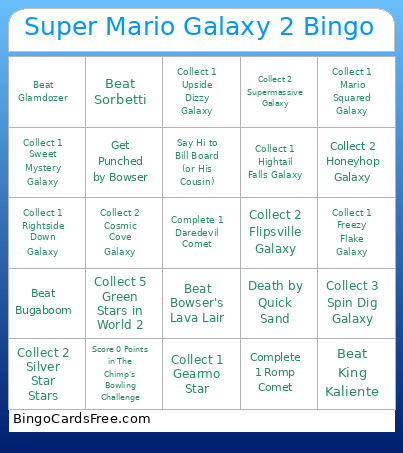 This Super Mario Galaxy 2 Bingo Cards Game contains following Words or Phrases: Collect 1 Sky Station Galaxy, Collect 2 Sky Station Galaxy, Collect 3 Sky Station Galaxy, Collect 1 Yoshi Star Galaxy, Collect 2 Yoshi Star Galaxy, Collect 3 Yoshi Star Galaxy, Collect 1 Spin Dig Galaxy, Collect 2 Spin Dig Galaxy, Collect 3 Spin Dig Galaxy, Collect 1 Fluffy Bluff Galaxy, Collect 2 Fluffy Bluff Galaxy, Collect 3 Fluffy Bluff Galaxy, Collect 1 Flip-Swap Galaxy, Collect 2 Flip-Swap Galaxy, Red Only Flip-Swap Galaxy, Blue Only Flip-Swap Galaxy, Collect 1 Rightside Down Galaxy, Collect 2 Rightside Down Galaxy, Collect 1 Bowser Jr.'s Fiery Flotilla Galaxy, Collect 2 Bowser Jr.'s Fiery Flotilla Galaxy, Collect 1 Puzzle Plank Galaxy, Collect 2 Puzzle Plank Galaxy, Collect 3 Puzzle Plank Galaxy, Collect 1 Hightail Falls Galaxy, Collect 2 Hightail Falls Galaxy, Collect 3 Hightail Falls Galaxy, Collect 1 Boulder Bowl Galaxy, Collect 2 Boulder Bowl Galaxy, Collect 3 Boulder Bowl Galaxy, Collect 1 Cosmic Cove Galaxy, Collect 2 Cosmic Cove Galaxy, Collect 3 Cosmic Cove Galaxy, Collect 1 Wild Glide Galaxy, Collect 2 Wild Glide Galaxy, Collect 1 Honeybloom Galaxy, Collect 2 Honeybloom Galaxy, Collect 1 Bowser's Lava Lair Galaxy, Collect 2 Bowser's Lava Lair Galaxy, Collect 1 Tall Trunk Galaxy, Collect 2 Tall Trunk Galaxy, Collect 3 Tall Trunk Galaxy, Collect 0 Coins in Tall Trunk Galaxy, Collect 1 Cloudy Court Galaxy, Collect 2 Cloudy Court Galaxy, Collect 3 Cloudy Court Galaxy, Collect 1 Haunty Halls Galaxy, Collect 2 Haunty Halls Galaxy, Collect 3 Haunty Halls Galaxy, Collect 1 Freezy Flake Galaxy, Collect 2 Freezy Flake Galaxy, Collect 3 Freezy Flake Galaxy, Destroy all Snow Sculptures in Freezy Flake Galaxy, Collect 1 Rolling Masterpiece Galaxy, Collect 2 Rolling Masterpiece Galaxy, Collect 1 Beat Block Galaxy, Collect 2 Beat Block Galaxy, No Spinning in Beat Block Galaxy, Collect 1 Bowser Jr.'s Fearsome Fleat Galaxy, Collect 2 Bowser Jr.'s Fearsome Fleat Galaxy, Collect 1 Supermassive Galaxy, Collect 2 Supermassive Galaxy, Collect 3 Supermassive Galaxy, 99 Lives in Supermassive Galaxy, Collect 1 Flipsville Galaxy, Collect 2 Flipsville Galaxy, Collect 3 Flipsville Galaxy, Collect 1 Starshine Beach Galaxy, Collect 2 Starshine Beach Galaxy, Collect 3 Starshine Beach Galaxy, Collect 1 Chompworks Galaxy, Collect 2 Chompworks Galaxy, Collect 3 Chompworks Galaxy, Collect 1 Sweet Mystery Galaxy, Collect 2 Sweet Mystery Galaxy, Collect 1 Honeyhop Galaxy, Collect 2 Honeyhop Galaxy, Collect 1 Bowser's Gravity Gauntlet Galaxy, Collect 2 Bowser's Gravity Gauntlet Galaxy, Collect 1 Space Storm Galaxy, Collect 2 Space Storm Galaxy, Collect 3 Space Storm Galaxy, No Time Switches in Space Storm Galaxy 2, Collect 1 Slipsand Galaxy, Collect 2 Slipsand Galaxy, Collect 3 Slipsand Galaxy, Collect 1 Shiverburn Galaxy, Collect 2 Shiverburn Galaxy, Collect 3 Shiverburn Galaxy, Collect 1 Boo Moon Galaxy, Collect 2 Boo Moon Galaxy, Collect 3 Boo Moon Galaxy, Collect 1 Upside Dizzy Galaxy, Collect 2 Upside Dizzy Galaxy, Collect 1 Fleet Glide Galaxy, Collect 2 Fleet Glide Galaxy, Collect 1 Bowser Jr.'s Boom Bunker Galaxy, Collect 2 Bowser Jr.'s Boom Bunker Galaxy, Collect 1 Melty Monster Galaxy, Collect 2 Melty Monster Galaxy, Collect 3 Melty Monster Galaxy, Collect 1 Clockwork Ruins Galaxy, Collect 2 Clockwork Ruins Galaxy, Collect 3 Clockwork Ruins Galaxy, Collect 1 Throwback Galaxy, Collect 2 Throwback Galaxy, Collect 3 Throwback Galaxy, Collect 1 Battle Belt Galaxy, Collect 2 Battle Belt Galaxy, Collect 3 Battle Belt Galaxy, Collect 1 Flash Back Galaxy, Collect 2 Flash Back Galaxy, Collect 1 Slimy Spring Galaxy, Collect 2 Slimy Spring Galaxy, Complete Slimy Spring Galaxy 1 With No Shell, Collect 1 Bowser's Galaxy Generator Galaxy, Collect 2 Bowser's Galaxy Generator Galaxy, Collect 1 Mario Squared Galaxy, Collect 2 Mario Squared Galaxy, Collect 1 Rolling Coaster Galaxy, Collect 2 Rolling Coaster Galaxy, Collect 1 Twisty Trials Galaxy, Collect 2 Twisty Trials Galaxy, Collect 1 Stone Cyclone Galaxy, Collect 2 Stone Cyclone Galaxy, Collect 1 Boss Blitz Galaxy, Collect 2 Boss Blitz Galaxy, Collect 1 Flip-Out Galaxy, Collect 2 Flip-Out Galaxy, Complete The Ultimate Test, Complete The Perfect Run, Collect Two Rolling Ball Stars, Complete Two Fluzzard Races, Complete a Race, Complete 2 Races, Collect a Bronze Star, Collect 5 Green Stars, Collect 10 Green Stars, Collect 15 Green Stars, Collect 3 Green Stars in World 1, Collect 5 Green Stars in World 1, Collect 7 Green Stars in World 1, Collect 3 Green Stars in World 2, Collect 5 Green Stars in World 2, Collect 7 Green Stars in World 2, Collect 3 Green Stars in World 3, Collect 5 Green Stars in World 3, Collect 7 Green Stars in World 3, Collect 3 Green Stars in World 4, Collect 5 Green Stars in World 4, Collect 7 Green Stars in World 4, Collect 3 Green Stars in World 5, Collect 5 Green Stars in World 5, Collect 7 Green Stars in World 5, Collect 3 Green Stars in World 6, Collect 5 Green Stars in World 6, Collect 7 Green Stars in World 6, Collect 3 Green Stars in World S, Collect 5 Green Stars in World S, Collect 7 Green Stars in World S, Collect 1 "Trash" Star, Collect 2 "Trash" Stars, Collect 1 Silver Star Star, Collect 2 Silver Star Stars, Collect 3 Silver Star Stars, Collect 3 Grand Stars, Collect 1 Chimp Challenge Star, Collect 2 Chimp Challenge Stars, Collect 3 Chimp Challenge Stars, Score 0 Points in The Chimp's Bowling Challenge, Collect 1 Gearmo Star, Collect 2 Gearmo Stars, Complete 3 Prankster Comet Stars, Complete 5 Prankster Comet Stars, Complete 7 Prankster Comet Stars, Complete 1 Cosmic Clones Comet, Complete 2 Cosmic Clones Comets, Complete 3 Cosmic Clones Comets, Complete 1 Daredevil Comet, Complete 2 Daredevil Comets, Complete 3 Daredevil Comets, Complete 1 Speedrun Comet, Complete 2 Speedrun Comets, Complete 3 Speedrun Comets, Complete 1 Romp Comet, Complete 2 Romp Comets, Complete 1 Double Time Comet, Complete 2 Double Time Comets, 3 Purple Coin Stars, 5 Purple Coin Stars, 7 Purple Coin Stars, Use a Bee Mushroom, Use a Boo Mushroom, Use a Spring Mushroom, Use a Fire Flower, Use a Rainbow Star, Use a Cloud Flower, Use a Rock Mushroom, Use a Spin Drill, Use a Life Mushroom, Use a 1-Up Mushroom, Use all Power Ups, Death by Fire/Lava, Death by Electricution, Drown, Drown with Fluzzard, Death by Plant, Death by Pit, Death by Black Hole, Death by Explosives, Death by Freezing, Death by Smush, Death by Goop, Death by Quick Sand, Death by Slurple, Beat Peewee Piranha, Beat King Lakitu, Beat Digga-Leg, Beat Gobblegut, Beat Mandibug Stack, Beat Rollidillo, Beat Sorbetti, Beat Megahammer, Beat Glamdozer, Beat Squizzard, Beat Prince Pikante, Beat Bowser Jr (Boomsday Machine), Beat King Whomp, Beat Bugaboom, Beat Bugaboom without Power Ups, Beat Firery Gobblegut, Beat Dino Piranha, Beat King Kaliente, Beat Major Burrows, Beat Bouldegeist, Beat Firery Dino Piranha, Beat Bowser's Lava Lair, Beat Bowser's Gravity Gauntlet, Beat Bowser's Galaxy Generator, Launch Out of a Cannon, "You've Got Mail", Find Captain Toad in a Stage, Talk to Each Member of the Toad Brigade, Collect 10 Unique 1 Ups, Complete 3 Music Note Challenges, Climb on Queen Bee, Bedtime Story with Lubba (Whole Book), Say Hi to Bill Board (or His Cousin), Get a Tip From Tip TV, Get Punched by Bowser, Dog Paddle With Yoshi, Spot the Shiverburn Galaxy Aliens, Glimpse the Black Orb of Doom in Melty Monster Galaxy, Perform the Yoshi Flutter Glitch, Have a Conversation With All Starship Crew Members, Gamble for 1 Ups With Lumalee.