
Super Secreto Bingo Cards - Print Free or Customize
Print free Super Secreto bingo cards or adjust them, unlimited prints! Choose from 42,200+ templates or use the bingo card generator. Add numbers, words, pictures, or mix them all. Play using printable PDF, digital bingo cards, and the digital bingo caller, or mix physical and digital.
About: This bingo card is a playful celebration of inside jokes, quirky habits, and running gags among a tight-knit group of friends. Ideal for parties or casual hangouts with people who share these experiences, it captures the spirit of lively conversations, pop culture references, and shared memories. Expect laughs, nostalgia, and lots of friendly competition as everyone races to spot familiar moments throughout the event.
How To: To download a printable PDF, click the Print button. You can adjust the card quantity and other printing options on the Print tab. Grid items and free space text can be changed on the Basic tab. Appearance can be entirely personalized on the relevant tabs, or you can quickly search any preference on the 🔍 tab.
How to play Super Secreto Bingo Cards?
- Paper Caller: Print PDF calling list & calling slips and manually pick the slips.
- Paper Players: Print PDF bingo cards and manually write on the cards.
- Digital Caller: Click on the Play button above.
- Digital Players: Click on the Play button above, and then click on the 🎫 button.
- Hybrid Play: Select any combination above. For example, caller can be either Printed or Digital. And players can be Printed or Digital or a combo of both.
Step-By-Step:
- Start by downloading the Super Secreto PDF by clicking on the "Print" button above.
- Open the PDF and print a hard copy.
- For random drawing, you can print another copy of the call list, cut, fold and then pick them randomly at play time.
- Cut the bingo cards at the cut marks if there are more than 1 bingo cards per page.
- Give one card to each player. For marking, you can use markers. Crayons cost the least.
- Select one person to be the caller. If you are playing in a small group, the caller can also play along with their own Bingo card.
- The caller initiates the game by randomly drawing an item from the call list and announcing it to all players.
- The players look at their cards to see if they have the called word. If they do, they mark that word.
- The first player to finish a horizontal, vertical, or a diagonal line of marked items shouts "Bingo!" and wins the game.
- The caller confirms that the items marked form a proper line according to the Bingo card and call list.
- You can play for different patterns or a full card blackout for an extended game.
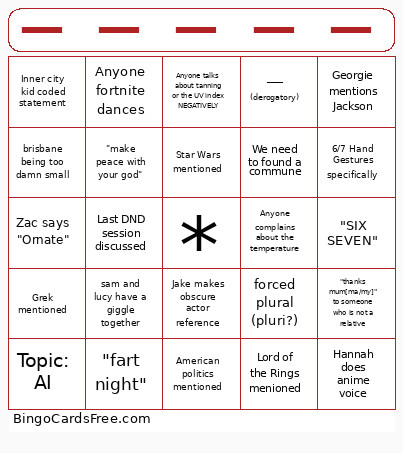 This Super Secreto Bingo Cards Game contains following Words or Phrases: Max wears Umbro jumper or vans, Jake makes obscure actor reference, Zane pulls up flight tracker, We need to found a commune, Holly says "oh Madonne" (I can't stop ;0), Coke Zero/Fridge Cigarette, Shan Crossword, Zac says "Ornate", Anyone says "Ravishing", Jake and Grace leave early, Topic: Housing crisis, Topic: AI, Topic: Derailing a train, Someone hits a griddy, Anti-capitalist message, Anyone fortnite dances, Zombie apocolypse/Prepping, Anyone says "So true king", Anyone tries to convince Zac and Max to play fortnite, Zac makes a surprise speech, Shan gets teary about a hypothetical, Hannah does anime voice, Georgie mentions Jackson, Jake slaps knee and says "weellllll", Spongebob and Patrick moment, Someone breaks a glass, Intentionally annoying buzzer, Someone spills a drink, American politics mentioned, Demacles mentioned, Grek mentioned, Last DND session discussed, "Taxi!", Lord of the Rings menioned, Someone does a (bad) impression, "(I'm) romanticising", "Go piss girl!", "fart night", Minecraft, "Slay", Floor time occurs, Star Wars mentioned, Holly yells about gambling, Milton State School mention, Inner city kid coded statement, "FTSAG", "make peace with your god", "gods be good", Prequel meme, Anyone says diva, "WHY would a man be there!", faded than a hoe, brisbane being too damn small, ____ (derogatory), someone thinks something is gluten free that clearly is not, someone spills a drink for a second time, sam and lucy have a giggle together, anyone calls something their special interest, "thanks mum[ma/my]" to someone who is not a relative, "SIX SEVEN", 6/7 Hand Gestures specifically, Anyone complains about the temperature, Anyone suggests a swim, Snowball or Peanut mention, Chick or Gracie mention, Jethrow or Elaine mention, Tia or Pippa mention, Act of kindness witnessed <3, "Soooo selfless", An actually selfless act, "fork knife", Anyone talks about tanning or the UV index POSITIVELY, Anyone talks about tanning or the UV index NEGATIVELY, Anyone mentions cricket, forced plural (pluri?), Freeeee biiiirdd.