Survivor 50 Bingo UPDATED Cards - Print Free or Customize
Print free Survivor 50 bingo UPDATED cards or adjust them,
unlimited prints! Pick from 41,500+ designs or use our bingo card generator.
Add numbers, phrases, photos, or any combination.
Play using PDF prints, virtual bingo cards,
and our virtual bingo caller, or go hybrid.
About: This bingo card is perfect for die-hard Survivor fans who love the show’s unpredictable moments, memorable characters, and iconic host Jeff Probst. From wild strategy blunders to classic contestant quirks, it captures the humor and drama that keep Survivor legendary. Great for watch parties or rewatch marathons with friends who know the legends by name!
How To: To download a PDF to print, click the Print button.
You can modify the card quantity and other
printing options on the Print tab.
Grid items and free space text can be added on the Basic tab.
Appearance can be entirely customized on the
corresponding tabs, or you can easily locate any option
on the 🔍 tab.
How to play Survivor 50 Bingo UPDATED Cards?
Online Players: Click on the Play button above, and then click on the 🎫 button.
Printed Caller: Print PDF calling list & calling slips and physically choose the slips.
Printed Players: Print PDF bingo cards and physically cross off the cards.
Online Caller: Click on the Play button above.
Mixed Mode: Pick any combination above.
For example, caller can be either Paper or Online.
And players can be Paper or Online or a combination of both.
Step-By-Step:
Start by saving the Survivor 50 Bingo UPDATED PDF by clicking on the "Print" button above.
Open the PDF and print it.
For random calling, you can print another copy of the call list, cut, fold and then pick them randomly at play time.
Cut the bingo cards at the cut lines if there are more than 1 bingo cards per page.
Distribute one card per player. For marking, you can use crayons. Crayons are the cheapest.
Pick one person to be the caller. If you are playing in a small group, the caller can also play along with their own Bingo card.
The caller opens the game by randomly pulling an item from the call list and calling out it to everyone.
The players look at their cards to see if they have the announced word. If they do, they dab that word.
The first player to complete a horizontal, vertical, or a diagonal line of marked items announces "Bingo!" and wins the game.
The caller verifies that the items crossed off form a correct line according to the Bingo card and call list.
You can play for different patterns or a full card blackout for a longer game.
This Survivor 50 Bingo UPDATED Cards Game contains following Words or Phrases: "That's how you do it on survivor", Someone gets pissy with Jeff, Jeff openly makes fun of Coach during a challenge, Coach blatantly lying about something ridiculous, Jonathan is sexist, Angelina mentions Ivy League, Angelina mentions her husband is in the military, Someone makes a fake idol, Someone goes home with an idol in their pocket, Coach does his fake tai chi, Med evac, Wildlife run in, Survivor romance, Iconic sponsorship (Applebees dinner, etc), Christian wins a physical challenge no one expects, Coach claims to have done something no one has done before, Someone eats a bug, Have/kill pet chicken, Jeff makes a sassy comment about how horrible someone is performing in challenge, Someone quits, Coach and Ozzy alliance, Jonathan and Kamilla alliance, Someone has a queer awakening, Someone says something racist during tribal council, Someone prompts negotiations with Jeff, Angelina brings up borrowing someone's jacket, Someone spells someone's name wrong at tribal council, Someone goes home with two idols or advantages, Someone gets really drunk on reward trip, Jeff in a cowboy hat, Call a challenge wrong or so close they have to consult tapes.

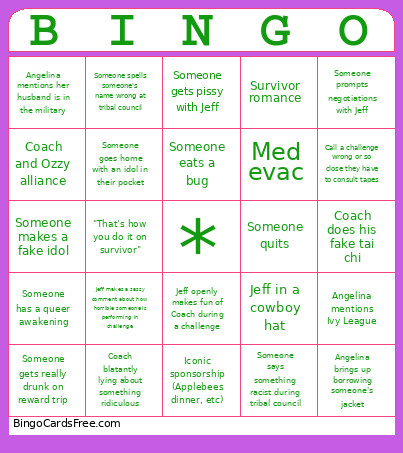 This Survivor 50 Bingo UPDATED Cards Game contains following Words or Phrases: "That's how you do it on survivor", Someone gets pissy with Jeff, Jeff openly makes fun of Coach during a challenge, Coach blatantly lying about something ridiculous, Jonathan is sexist, Angelina mentions Ivy League, Angelina mentions her husband is in the military, Someone makes a fake idol, Someone goes home with an idol in their pocket, Coach does his fake tai chi, Med evac, Wildlife run in, Survivor romance, Iconic sponsorship (Applebees dinner, etc), Christian wins a physical challenge no one expects, Coach claims to have done something no one has done before, Someone eats a bug, Have/kill pet chicken, Jeff makes a sassy comment about how horrible someone is performing in challenge, Someone quits, Coach and Ozzy alliance, Jonathan and Kamilla alliance, Someone has a queer awakening, Someone says something racist during tribal council, Someone prompts negotiations with Jeff, Angelina brings up borrowing someone's jacket, Someone spells someone's name wrong at tribal council, Someone goes home with two idols or advantages, Someone gets really drunk on reward trip, Jeff in a cowboy hat, Call a challenge wrong or so close they have to consult tapes.