Print free Season 50 bingo cards or adjust them,
unlimited cards! Choose from 42,200+ templates or use our bingo card generator.
Add numbers, phrases, pictures, or any combination.
Play using PDF prints, online bingo cards,
and our online bingo caller, or mix physical and digital.
About: This bingo card is perfect for a Survivor superfan watch party or an online fan forum. It captures all the inside jokes, famous moments, and quirky habits that make Survivor so entertaining. Whether it’s memorable contestant antics, iconic quotes, or legendary characters being mentioned, this card promises lots of laughs and knowing nods from true fans as they follow along each episode.
How To: To save a PDF to print, click the Print button.
You can change the card count and other
printing options on the Print tab.
Grid items and free space content can be added on the Basic tab.
Appearance can be exactly personalized on the
corresponding tabs, or you can easily search any preference
on the 🔍 tab.
How to play Season 50 Bingo Cards?
Online Caller: Click on the Play button above.
Online Players: Click on the Play button above, and then click on the 🎫 button.
Printed Players: Print PDF bingo cards and physically scratch the cards.
Printed Caller: Print PDF calling list & calling slips and physically select the slips.
Combo Play: Choose any combination above.
For instance, caller can be either Paper or Online.
And players can be Paper or Online or a combination of both.
Step-By-Step:
Start by saving the Season 50 PDF by clicking on the "Print" button above.
Open the PDF and print it.
For random calling, you can print another copy of the call list, cut, fold and then draw them randomly at play time.
Cut the bingo cards at the cut lines if there are greater than 1 bingo cards per page.
Give one card to each player. For marking, you can use pencils. Crayons are the cheapest.
Choose one person to be the caller. If you are playing in a small group, the caller can as well play along with their own Bingo card.
The caller starts the game by randomly drawing an item from the call list and saying it to everyone.
The players scan their cards to see if they have the announced word. If they do, they cross off that word.
The first player to finish a horizontal, vertical, or a diagonal line of marked items yells "Bingo!" and wins the game.
The caller validates that the items marked form a correct line as per the Bingo card and call list.
You can play for different patterns or a full card blackout for an extended game.
This Season 50 Bingo Cards Game contains following Words or Phrases: "Operation Bad Blood" is Brought Up, "Rizgod" is Said, A Contestant Hugs Jeff, An Advantage/ Idol is Played, Aubry Brings Up her Kid, Boston Rob Mentioned, Christian Pushes Joe in the Hammock, Cire Wins the Fan Vote, Cirie's Rizard of Oz mentioned, Contestants Shown with Coconuts, Contestants Sit in the Ocean, Contestants Strategize at the Hammock, Cursing, Devens Laughs Manically, Devens Wins the Fan Vote, Drone of Shot of Fishing, Immunity or Advantage is Played, Jeff Says "Worth Playing For", Joe Misspells Something, Jonathan Says "Mr. Jeff", Mike White's Abs Shown, Saying "100%" is used, Someone (Coach) Sings, Someone Brings up Playing with "Honor & Integrity", Someone Gets Blindsided, Someone Practices Making Fire, Someone Says They Love Cire, Tiffany Wins an Immunity Challenge, Rizzo Fans-Out, Christian Asks a Confusing Question, Coach Says Something Mildly Problematic, Ozzie Mentions Being Betrayed, Mr. Beast Mentioned.

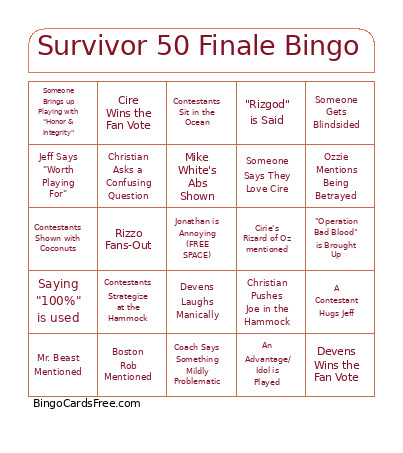 This Season 50 Bingo Cards Game contains following Words or Phrases: "Operation Bad Blood" is Brought Up, "Rizgod" is Said, A Contestant Hugs Jeff, An Advantage/ Idol is Played, Aubry Brings Up her Kid, Boston Rob Mentioned, Christian Pushes Joe in the Hammock, Cire Wins the Fan Vote, Cirie's Rizard of Oz mentioned, Contestants Shown with Coconuts, Contestants Sit in the Ocean, Contestants Strategize at the Hammock, Cursing, Devens Laughs Manically, Devens Wins the Fan Vote, Drone of Shot of Fishing, Immunity or Advantage is Played, Jeff Says "Worth Playing For", Joe Misspells Something, Jonathan Says "Mr. Jeff", Mike White's Abs Shown, Saying "100%" is used, Someone (Coach) Sings, Someone Brings up Playing with "Honor & Integrity", Someone Gets Blindsided, Someone Practices Making Fire, Someone Says They Love Cire, Tiffany Wins an Immunity Challenge, Rizzo Fans-Out, Christian Asks a Confusing Question, Coach Says Something Mildly Problematic, Ozzie Mentions Being Betrayed, Mr. Beast Mentioned.