
Survivor 50 watch party Bingo Cards - Print Free or Customize
Print free Survivor 50 watch party bingo cards or customize, limitless cards! Choose from 41,500+ templates or use the bingo card generator. Add numbers, words, photos, or any combination. Play using PDF printouts, virtual bingo cards, and the virtual bingo caller, or mix physical and digital.
About: This bingo card is tailor-made for the ultimate Survivor superfans, capturing all the wild twists, iconic player quirks, and classic Jeff Probst moments that make the show unforgettable. Perfect for viewing parties or online watch-alongs, it brings excitement and laughs as fans hunt for both new-era surprises and references to Survivor legends throughout each episode.
How To: To download a printable PDF, click the Print button. You can modify the card quantity and other print settings on the Print tab. Grid items and free space content can be added on the Basic tab. Appearance can be fully customized on the corresponding tabs, or you can easily find any preference using the 🔍 tab.
How to play Survivor 50 watch party Bingo Cards?
- Virtual Caller: Click on the Play button above.
- Paper Players: Print PDF bingo cards and physically scratch the cards.
- Virtual Players: Click on the Play button above, and then click on the 🎫 button.
- Paper Caller: Print PDF calling list & calling slips and physically draw the slips.
- Hybrid Mode: Pick any combination above. For example, caller can be either Paper or Virtual. And players can be Paper or Virtual or a combination of both.
Step-By-Step:
- Start by downloading the Survivor 50 watch party PDF by clicking on the "Print" button above.
- Open the PDF and print it.
- For random calling, you can print another copy of the call list, cut, fold and then draw them randomly at play time.
- Cut the bingo cards at the cut marks if there are more than 1 bingo cards per page.
- Distribute one card per player. For marking, you can use crayons. Crayons are the cheapest.
- Pick one person to be the caller. If you are playing in a small group, the caller can also play along with their own Bingo card.
- The caller begins the play by randomly pulling an item from the call list and announcing it to everyone.
- The players scan their cards to see if they have the announced word. If they do, they mark that word.
- The first player to finish a horizontal, vertical, or a diagonal line of marked items announces "Bingo!" and wins the play.
- The caller checks that the items crossed off form a correct line according to the Bingo card and call list.
- You can play for varied patterns or a full card blackout for a longer play.
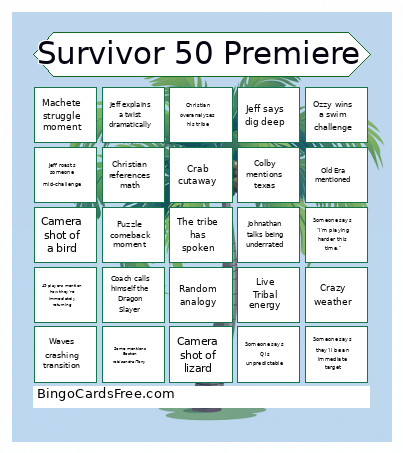 This Survivor 50 watch party Bingo Cards Game contains following Words or Phrases: "In the hands of the fans", New Era mentioned, Old Era mentioned, Someone finds an advantage or idol, Talk of previous alliance or pregaming, Player hides something in their pants, Jeff uses a cringy metaphor, RIZ GOD baby, Someone is starstruck by Cirie, White Lotus mentioned, Christian overanalyzes his tribe, Ozzy wins a swim challenge, Someone cries, Tribe makes fire without flint, Unanimous first vote, Joe talks about Eva, Montage of previous seasons, new era vs different game, Someone says they'll be an immediate target, Random analogy, Devens confessional as a news anchor, Jenna mentions how she played season 1, Ozzy/circe mention how they're playing a 5th time, Coach calls himself the Dragon Slayer, Contestant mentions how now they're parents, 49 players mention how they're immediately returning, "I thought my survivor journey was over", See/Kyle mention how they are winners, Someone mentions white lotus, Someone gets an advantage, Camera shot of a bird, Charlie mentions Taylor swift, Someone comments on rizzo's age or nickname, Angela mentions a "jacket", Camera shot of lizard, Jeff says dig deep, Puzzle comeback moment, Three-way handshake alliance formed, Someone says "I'm playing harder this time.", Challenge in the mud, Whispering at Tribal, Someone says "Trust no one.", Jeff wears a black shirt, Someone called bossy on Day 1, Someone searches for idol immediately, Machete struggle moment, Jeff roasts someone mid-challenge, Cirie says "I'm not the couch anymore.", Coach gives warrior speech, Christian references math, Someone says Q is unpredictable, Some mentions Boston rob/sandra/Tony, Colby mentions texas, Johnathan talks being underrated, Emily references her evolution, Someone says Dee is scary good, Alliance of five formed on day one, "I didn't come here to make friends", Immunity challenge involves untying knots, One person does nothing in challenge, Crazy weather, Jeff explains a twist dramatically, Day 1 alliance immediately exposed, Shelter debate argument, Live Tribal energy, Waves crashing transition, Crab cutaway, Someone cries Day 1.