Sweet As Mooncakes Bingo Cards - Print Free or Customize
Print free Sweet As Mooncakes bingo cards or personalize,
unlimited cards! Choose from 42,200+ templates or use the bingo card generator.
Add numbers, words, pictures, or all of them.
Play using printable PDF, digital bingo cards,
and the digital bingo caller, or combine all formats.
About: This bingo card is perfect for a campus social or student club event, bringing together NC State students with all sorts of interests and backgrounds. It's got a friendly, welcoming vibe, sparking conversation about campus life, favorite spots, hobbies, and fun personal facts. Use it to break the ice and help new friends discover what they have in common.
How To: To save a printable PDF, click the Print button.
You can alter the card count and other
printing options on the Print tab.
Grid items and free space text can be edited on the Basic tab.
Appearance can be totally personalized on the
corresponding tabs, or you can quickly locate any setting
using the 🔍 tab.
How to play Sweet As Mooncakes Bingo Cards?
Printed Caller: Print PDF calling list & calling slips and manually choose the slips.
Printed Players: Print PDF bingo cards and manually cross off the cards.
Online Caller: Click on the Play button above.
Online Players: Click on the Play button above, and then click on the 🎫 button.
Hybrid Mode: Pick any combination above.
For example, caller can be either Printed or Online.
And players can be Printed or Online or a combination of both.
Step-By-Step:
Start by downloading the Sweet As Mooncakes PDF by clicking on the "Print" button above.
Open the PDF and print it.
For random calling, you can print another copy of the call list, cut, fold and then pull them randomly at play time.
Cut the bingo cards at the cut lines if there are more than 1 bingo cards per page.
Give one card to each player. For marking, you can use pens. Crayons are the cheapest.
Pick one person to be the caller. If you are playing in a small group, the caller may also play along with their own Bingo card.
The caller starts the game by randomly drawing an item from the call list and saying it to everyone.
The players look at their cards to see if they have the called word. If they do, they cross off that word.
The first player to finish a horizontal, vertical, or a diagonal line of crossed items shouts "Bingo!" and wins the game.
The caller validates that the items marked form a proper line according to the Bingo card and call list.
You can play for different patterns or a full card blackout for an extended game.
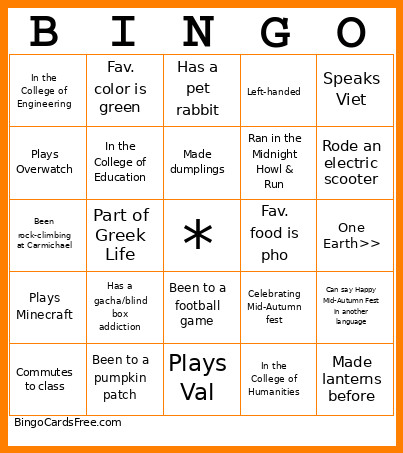
This Sweet As Mooncakes Bingo Cards Game contains following Words or Phrases: Commutes to class, Has a little brother, Plays Overwatch, Stepped on Talley Seal..., Knows how to crochet, Is a Junior, Lives on campus, Has a car on campus, Been rock-climbing at Carmichael, Is a Senior, In the College of Design, Has a class in Nelson, In the College of Engineering, Plays Minecraft, I pick Clark (dining hall), -c-, Plays an instrument, Can whistle, Has a class in Lampe, In the College of Agri. & Life Sciences, Fav. color is green, Has two siblings, Has a gacha/blind box addiction, Part of Greek Life, This is your 1st GBM, Performed for a cultural event, Born in September, Watched the World Cup, In the College of Education, Plays Roblox, Been to a pumpkin patch, -c-, In the Poole College of Management, Fav. season is Fall, Has family outside the country, Plays Val, Been to a concert this year, Is a Freshman, Has a pet rabbit, Broken a bone, Went to Packapalooza, Been to Hillsborough St., Made dumplings, Been to a football game, Fav. dining hall is Fountain, Lives off campus, Fav. color is blue, -c-, Been to a basketball game, Fav. food is pho, Left-handed, Met Mr. Wuf, Went to the beach, Is a Sophomore, In the College of Sciences, In the College of Humanities, Went to another state this summer, Visited 3 or more countries, Ran in the Midnight Howl & Run, Plays soccer, Case is the superior dining hall, Plays football, Celebrating Mid-Autumn fest, -c-, In the Wilson College, In the College of Nat. Resources, Can whistle, Fav. color is Red, Can say Happy Mid-Autumn Fest in another language, Fav. moon cake flavor is red bean, Plays volleyball, One Earth>>, Thinks UT is the best dining hall, Worked this summer, Made lanterns before, Rode an electric scooter, Has a class on Centennial, Speaks Viet, Went to the mountains this summer.

 This Sweet As Mooncakes Bingo Cards Game contains following Words or Phrases: Commutes to class, Has a little brother, Plays Overwatch, Stepped on Talley Seal..., Knows how to crochet, Is a Junior, Lives on campus, Has a car on campus, Been rock-climbing at Carmichael, Is a Senior, In the College of Design, Has a class in Nelson, In the College of Engineering, Plays Minecraft, I pick Clark (dining hall), -c-, Plays an instrument, Can whistle, Has a class in Lampe, In the College of Agri. & Life Sciences, Fav. color is green, Has two siblings, Has a gacha/blind box addiction, Part of Greek Life, This is your 1st GBM, Performed for a cultural event, Born in September, Watched the World Cup, In the College of Education, Plays Roblox, Been to a pumpkin patch, -c-, In the Poole College of Management, Fav. season is Fall, Has family outside the country, Plays Val, Been to a concert this year, Is a Freshman, Has a pet rabbit, Broken a bone, Went to Packapalooza, Been to Hillsborough St., Made dumplings, Been to a football game, Fav. dining hall is Fountain, Lives off campus, Fav. color is blue, -c-, Been to a basketball game, Fav. food is pho, Left-handed, Met Mr. Wuf, Went to the beach, Is a Sophomore, In the College of Sciences, In the College of Humanities, Went to another state this summer, Visited 3 or more countries, Ran in the Midnight Howl & Run, Plays soccer, Case is the superior dining hall, Plays football, Celebrating Mid-Autumn fest, -c-, In the Wilson College, In the College of Nat. Resources, Can whistle, Fav. color is Red, Can say Happy Mid-Autumn Fest in another language, Fav. moon cake flavor is red bean, Plays volleyball, One Earth>>, Thinks UT is the best dining hall, Worked this summer, Made lanterns before, Rode an electric scooter, Has a class on Centennial, Speaks Viet, Went to the mountains this summer.