Tacky wedding Bingo Cards - Print Free or Customize
Print free Tacky wedding bingo cards or alter them,
unlimited cards! Choose from 42,600+ designs or use our bingo card generator.
Add numbers, words, photos, or all of them.
Play using printed PDF, online bingo cards,
and our online bingo caller, or go hybrid.
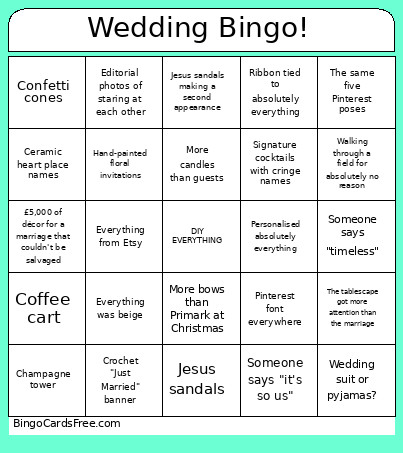
About: This bingo card pokes fun at the latest wedding trends, especially those Pinterest-perfect ceremonies overflowing with personalized touches and “intentional” details. It is perfect for a bridal shower or bachelorette where guests will recognize these all-too-familiar quirks. Expect lots of laughter from anyone who’s planned, attended, or survived a modern wedding!
How To: To get a PDF to print, click the Print button.
You can change the card count and other
print options on the Print tab.
Grid items and free space content can be changed on the Basic tab.
Appearance can be totally personalized on the
relevant tabs, or you can quickly find any option
on the 🔍 tab.
How to play Tacky wedding Bingo Cards?
Printed Players: Print PDF bingo cards and physically cross off the cards.
Printed Caller: Print PDF calling list & calling slips and physically draw the slips.
Digital Players: Click on the Play button above, and then click on the 🎫 button.
Digital Caller: Click on the Play button above.
Mixed Play: Select any combination above.
For example, caller can be either Printed or Digital.
And players can be Printed or Digital or a combination of both.
Step-By-Step:
Start by saving the Tacky wedding PDF by clicking on the "Print" button above.
Open the PDF and print it.
For random drawing, you can print another copy of the call list, cut, fold and then pick them randomly at play time.
Cut the bingo cards at the cut marks if there are greater than 1 bingo cards per page.
Give one card to each player. For marking, you can use pencils. Crayons cost the least.
Select one person to be the caller. If you are playing in a small group, the caller may also play along with their own Bingo card.
The caller opens the game by randomly pulling an item from the call list and announcing it to everyone.
The players scan their cards to see if they have the called word. If they do, they cross off that word.
The first player to finish a horizontal, vertical, or a diagonal line of marked items announces "Bingo!" and wins the play.
The caller confirms that the items marked form a proper line as per the Bingo card and call list.
You can play for multiple patterns or a full card blackout for a longer play.
This Tacky wedding Bingo Cards Game contains following Words or Phrases: £5,000 of décor for a marriage that couldn't be salvaged, An outfit that never beat the pyjama allegations, Barefoot in a muddy field, Bridesmaid proposal boxes, Bud vases every 10cm, Cake flowers that looked better than the cake, Ceramic heart place names, Champagne tower, Coffee cart, Confetti cones, -c-, Crochet "Just Married" banner, Disposable cameras, Editorial photos of staring at each other, Everything from Etsy, Everything had a bow, Everything looked expensive but homemade, Everything was beige, Flower girl proposal box, Fruit pretending to be décor, Hand-painted floral invitations, -c-, Handwritten font on every surface, Jesus sandals, Jesus sandals making a second appearance, Looking anywhere but the camera, Mismatched glasses because "character", More bows than Primark at Christmas, More candles than guests, More ribbons than flowers, More signs than furniture, Newspaper bouquet wrap, -c-, Order of the day sign, Personalised absolutely everything, Pinterest font everywhere, Polaroid cake topper, QR code RSVP, Ribbon tied to absolutely everything, Ribbon wands, Signature cocktails with cringe names, Someone says "intentional", Someone says "it's so us", -c-, Someone says "timeless", Someone says "whimsical", The décor had more personality than the vows, The same five Pinterest poses, The tablescape got more attention than the marriage, Vintage cake with cherries, Walking through a field for absolutely no reason, Wedding suit or pyjamas?, Welcome sign nobody read.

 This Tacky wedding Bingo Cards Game contains following Words or Phrases: £5,000 of décor for a marriage that couldn't be salvaged, An outfit that never beat the pyjama allegations, Barefoot in a muddy field, Bridesmaid proposal boxes, Bud vases every 10cm, Cake flowers that looked better than the cake, Ceramic heart place names, Champagne tower, Coffee cart, Confetti cones, -c-, Crochet "Just Married" banner, Disposable cameras, Editorial photos of staring at each other, Everything from Etsy, Everything had a bow, Everything looked expensive but homemade, Everything was beige, Flower girl proposal box, Fruit pretending to be décor, Hand-painted floral invitations, -c-, Handwritten font on every surface, Jesus sandals, Jesus sandals making a second appearance, Looking anywhere but the camera, Mismatched glasses because "character", More bows than Primark at Christmas, More candles than guests, More ribbons than flowers, More signs than furniture, Newspaper bouquet wrap, -c-, Order of the day sign, Personalised absolutely everything, Pinterest font everywhere, Polaroid cake topper, QR code RSVP, Ribbon tied to absolutely everything, Ribbon wands, Signature cocktails with cringe names, Someone says "intentional", Someone says "it's so us", -c-, Someone says "timeless", Someone says "whimsical", The décor had more personality than the vows, The same five Pinterest poses, The tablescape got more attention than the marriage, Vintage cake with cherries, Walking through a field for absolutely no reason, Wedding suit or pyjamas?, Welcome sign nobody read.