
TAG SALE BINGO Cards - Print Free or Customize
Print free TAG SALE BINGO cards or personalize, limitless prints! Pick from 42,200+ designs or use our bingo card generator. Add numbers, words, pictures, or any combination. Play using PDF prints, virtual bingo cards, and our virtual bingo caller, or combine all formats.
About: This bingo card pokes fun at the quirky, nostalgic, and sometimes baffling treasures you’ll find at neighborhood garage sales. Perfect for community events, family outings, or friends on a thrifting adventure, it captures the lighthearted spirit and oddball finds typical of weekend treasure hunts. Expect laughs, surprises, and maybe a little friendly competition.
How To: To get a printable PDF, click the Print button. You can modify the card count and other printing settings on the Print tab. Grid items and free space content can be edited on the Basic tab. Appearance can be fully personalized on the relevant tabs, or you can quickly locate any preference on the 🔍 tab.
How to play TAG SALE BINGO Cards?
- Digital Players: Click on the Play button above, and then click on the 🎫 button.
- Digital Caller: Click on the Play button above.
- Paper Players: Print PDF bingo cards and manually scratch the cards.
- Paper Caller: Print PDF calling list & calling slips and manually choose the slips.
- Hybrid Play: Pick any combination above. For instance, caller can be either Paper or Digital. And players can be Paper or Digital or a combination of both.
Step-By-Step:
- Start by saving the TAG SALE BINGO PDF by clicking on the "Print" button above.
- Open the PDF and print it.
- For random calling, you can print another copy of the call list, cut, fold and then draw them randomly at play time.
- Cut the bingo cards at the cut marks if there are greater than 1 bingo cards per page.
- Give one card to each player. For marking, you can use pencils. Crayons are the cheapest.
- Pick one person to be the caller. If you are playing in a small group, the caller can also play along with their own Bingo card.
- The caller begins the play by randomly picking an item from the call list and announcing it to everyone.
- The players look at their cards to see if they have the called word. If they do, they mark that word.
- The first player to complete a horizontal, vertical, or a diagonal line of crossed items shouts "Bingo!" and wins the game.
- The caller validates that the items crossed off form a correct line according to the Bingo card and call list.
- You can play for multiple patterns or a full card blackout for an extended game.
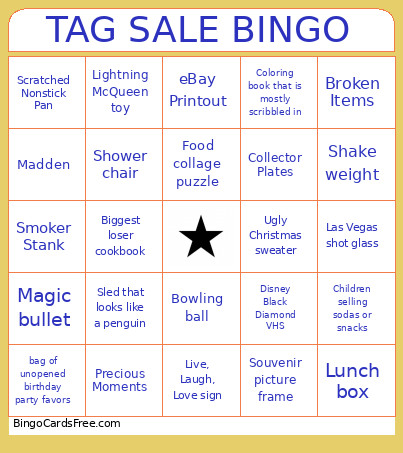 This TAG SALE BINGO Cards Game contains following Words or Phrases: "Not For Sale", A flat basketball, A saw, Abe Lincoln anything, Alarm clock, An item no one can identify, Any of the 50 Shades of Grey books, Any version of Scene It, Avon perfume bottles, Baby Clothes, Bag of Barbie dolls, bag of unopened birthday party favors, Barbie head makeover toy, Beanie Babies, Biggest loser cookbook, Billy the big mouth bass, Bismarck Larks baseball hat, Blender bottles, Bowling ball, Broken Items, Ceramic chicken container of some sort, charcoal grill, Children selling sodas or snacks, Chip and Dip, Collector Plates, Coloring book that is mostly scribbled in, Computer bag with company logo, Computer speakers, Container of random screws, bolts, nails, etc., Cookbooks, Cow knick knack, Crappy Crafts, Creepy dolls, Daytona Beach mug/shotglass, Dead old lady clothes, Dirty Plastic Ware, Disappointing garage sale with only like 5 items, Disney Black Diamond VHS, Dog collar, Drawstring promotional bag, Dumbbells, eBay Printout, Exercise bike, Food collage puzzle, Full box of promo koozies, Funko POP!, Garage with a Trump flag hanging up, Greasy Dirty CI, Halloween costume shoved into the original bag, Herb Alpert, Higher Than Retail Prices, Homemade art piece, Homemade baked goods near the checkout table, Iphone 4 case, Item with a specific name on it that no one will buy, Kids toy that is shaped like a barn, Las Vegas shot glass, Lightning McQueen toy, Live Laugh Love Orphans, Live, Laugh, Love sign, Lunch box, Madden, Magic bullet, Meat Grinder, Michael Kors purse, Midcentury furniture, Missing Parts, Novelty salt and pepper shakers, Old Calendar, Old Weed, Pink suitcase, Plants, Pool ladder, Potty training toilet, Precious Moments, Prescription glasses, Pressure Cooker, Racist vintage tchotchke, Rack of boutique clothes, Restaurant souvenir cup, Rubbermaid tote full of stuffies, Scrapbooking materials, Scratched Nonstick Pan, Seashell art monstrosity, Seashells, Shake weight, Shoes that belong in the trash, Shower chair, Skis or snowboard, Sled that looks like a penguin, Smoker Stank, Snowman cookie jar, Souvenir picture frame, Stained tshirt, Starbucks tumbler cup, Taxidermy, Thumb Slicer, Titanic VHS, Toaster from 1986, Trivial Pursuit, Trophy, Ugly Christmas sweater, Used candle, Used lotion/bodywash, Used Underwear/Bra, Vases, Water bottles, Water skis, Weather Damaged Sun Bleached, Wine glasses/tumblers, Word décor with the stereotypical calligraphy font, Ziplock bag full of McDonald's toys.