KPYA Spring Gala 2025 Bingo Cards - Print Free or Customize
Print free KPYA Spring Gala 2025 bingo cards or alter them,
limitless cards! Select from 41,500+ designs or use our bingo card generator.
Add numbers, phrases, pictures, or all of them.
Play using PDF prints, virtual bingo cards,
and our virtual bingo caller, or go hybrid.
About: This bingo card is perfect for breaking the ice and sparking conversations in a lively, social setting. It celebrates unique hobbies, bold adventures, and personal style, making it ideal for parties, networking events, or team gatherings. The prompts encourage guests to share interesting facts about themselves and discover surprising similarities with others.
How To: To get a printable PDF, click the Print button.
You can modify the card quantity and other
print settings on the Print tab.
Grid items and free space text can be changed on the Basic tab.
Appearance can be completely customized on the
relevant tabs, or you can quickly find any preference
using the 🔍 tab.
How to play KPYA Spring Gala 2025 Bingo Cards?
Printed Caller: Print PDF calling list & calling slips and manually pick the slips.
Online Players: Click on the Play button above, and then click on the 🎫 button.
Printed Players: Print PDF bingo cards and manually cross off the cards.
Online Caller: Click on the Play button above.
Mixed Play: Pick any combination above.
For instance, caller can be either Paper or Online.
And players can be Paper or Online or a mix of both.
Step-By-Step:
Start by getting the KPYA Spring Gala 2025 PDF by clicking on the "Print" button above.
Open the PDF and print a hard copy.
For random drawing, you can print another copy of the call list, cut, fold and then pull them randomly at play time.
Cut the bingo cards at the cut marks if there are greater than 1 bingo cards per page.
Distribute one card per player. For marking, you can use pencils. Crayons are the cheapest.
Pick one person to be the caller. If you are playing in a small group, the caller can as well play along with their own Bingo card.
The caller opens the game by randomly pulling an item from the call list and saying it to all players.
The players scan their cards to see if they have the announced word. If they do, they cross off that word.
The first player to complete a horizontal, vertical, or a diagonal line of crossed items shouts "Bingo!" and wins the game.
The caller validates that the items crossed off form a proper line according to the Bingo card and call list.
You can play for multiple patterns or a full card blackout for a longer game.
This KPYA Spring Gala 2025 Bingo Cards Game contains following Words or Phrases: can juggle or perform a magic trick, can play an instrument, can recite a poem or sing a song from memory, enjoys stargazing and knows constellations, has an unusual collection (rare stamps, vintage toys), has a sweet tooth, has done bungee jumping or skydiving, has met a celebrity in person, has participated in a flashmob / public performance, has read more than five books this year, has run a marathon or other endurance event, has the same pet (breed), has visited 5 or more countries, is eating your favorite appetizer or drink, is in a branch of the military, is sitting next to a pretty decor piece, is the oldest sibling, is the youngest sibling, is wearing a fiiiire fit, is wearing the color gold, is wearing the color pink, is wearing the color purple, is wearing the color silver, is wearing the same color tie or dress, knows how to crochet, knit or some other craft, likes board or card games, loves to cook and can make a dish from another culture, owns a business or has a side hustle, plays a musical instrument, speaks two or more languages, that does not drink coffee, with a name in common, with the same fav superhero, with the same taste in music.

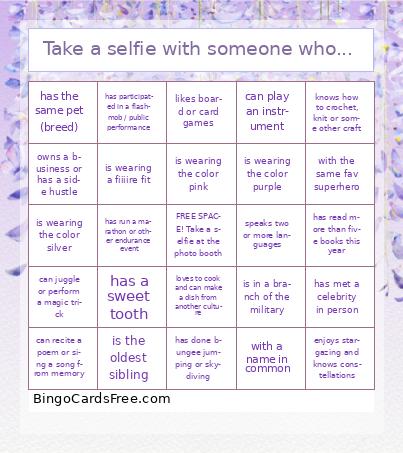 This KPYA Spring Gala 2025 Bingo Cards Game contains following Words or Phrases: can juggle or perform a magic trick, can play an instrument, can recite a poem or sing a song from memory, enjoys stargazing and knows constellations, has an unusual collection (rare stamps, vintage toys), has a sweet tooth, has done bungee jumping or skydiving, has met a celebrity in person, has participated in a flashmob / public performance, has read more than five books this year, has run a marathon or other endurance event, has the same pet (breed), has visited 5 or more countries, is eating your favorite appetizer or drink, is in a branch of the military, is sitting next to a pretty decor piece, is the oldest sibling, is the youngest sibling, is wearing a fiiiire fit, is wearing the color gold, is wearing the color pink, is wearing the color purple, is wearing the color silver, is wearing the same color tie or dress, knows how to crochet, knit or some other craft, likes board or card games, loves to cook and can make a dish from another culture, owns a business or has a side hustle, plays a musical instrument, speaks two or more languages, that does not drink coffee, with a name in common, with the same fav superhero, with the same taste in music.