
Taylor Swift Bingo Cards - Print Free or Customize
Print free Taylor Swift bingo cards or alter them, unlimited prints! Select from 42,200+ designs or use the bingo card generator. Add numbers, words, pictures, or any combination. Play using printed PDF, online bingo cards, and the online bingo caller, or mix physical and digital.
About: This bingo card is a celebration of Taylor Swift’s music through every era, perfect for superfans at a listening party or themed get-together. It showcases hits and deep cuts from her entire discography, making it a fun and interactive way to test your knowledge and spark conversations with fellow Swifties.
How To: To get a PDF to print, click the Print button. You can adjust the card count and other printing options on the Print tab. Grid items and free space text can be added on the Basic tab. Appearance can be exactly customized on the relevant tabs, or you can quickly find any preference on the 🔍 tab.
How to play Taylor Swift Bingo Cards?
- Virtual Caller: Click on the Play button above.
- Printed Players: Print PDF bingo cards and manually write on the cards.
- Virtual Players: Click on the Play button above, and then click on the 🎫 button.
- Printed Caller: Print PDF calling list & calling slips and manually draw the slips.
- Hybrid Play: Choose any combination above. For example, caller can be either Offline or Virtual. And players can be Offline or Virtual or a mix of both.
Step-By-Step:
- Start by downloading the Taylor Swift PDF by clicking on the "Print" button above.
- Open the PDF and print a hard copy.
- For random calling, you can print another copy of the call list, cut, fold and then pick them randomly at play time.
- Cut the bingo cards at the cut lines if there are more than 1 bingo cards per page.
- Distribute one card per player. For marking, you can use pens. Crayons cost the least.
- Choose one person to be the caller. If you are playing in a small group, the caller may also play along with their own Bingo card.
- The caller initiates the play by randomly drawing an item from the call list and announcing it to everyone.
- The players check their cards to see if they have the announced word. If they do, they mark that word.
- The first player to complete a horizontal, vertical, or a diagonal line of marked items announces "Bingo!" and wins the play.
- The caller confirms that the items crossed off form a proper line as per the Bingo card and call list.
- You can play for multiple patterns or a full card blackout for a longer play.
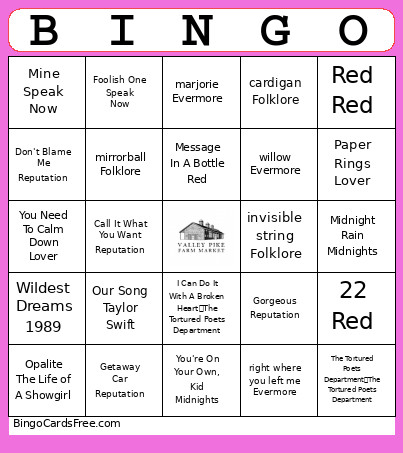 This Taylor Swift Bingo Cards Game contains following Words or Phrases: Tim McGraw Taylor Swift, Picture To Burn Taylor Swift, Teardrops On My Guitar Taylor Swift, Our Song Taylor Swift, Should've Said No Taylor Swift, Fearless Fearless, Fifteen Fearless, Love Story Fearless, White Horse Fearless, You Belong With Me Fearless, Mine Speak Now, Sparks Fly Speak Now, Back To December Speak Now, Speak Now Speak Now, Dear John Speak Now, Mean Speak Now, The Story Of Us Speak Now, Enchanted Speak Now, I Knew It, I Knew You Toy Story 5, Red Red, Stay Stay Stay Red, I Knew You Were Trouble Red, All Too Well Red, 22 Red, We Are Never Ever Getting Back Together Red, So High School The Tortured Poets Department, Welcome To New York 1989, Blank Space 1989, Style 1989, Out Of The Woods 1989, Foolish One Speak Now, Shake It Off 1989, Bad Blood 1989, Wildest Dreams 1989, Mr. Perfectly Fine Fearless, Message In A Bottle Red, ...Ready For It? Reputation, End Game Reputation, I Did Something Bad Reputation, Don't Blame Me Reputation, Delicate Reputation, Look What You Made Me Do Reputation, Gorgeous Reputation, Getaway Car Reputation, Call It What You Want Reputation, I Forgot That You Existed Lover, Cruel Summer Lover, Lover Lover, The Fate of Ophelia The Life of A Showgirl, I Think He Knows Lover, Miss Americana & The Heartbreak Prince Lover, Paper Rings Lover, Cornelia Street Lover, Death By A Thousand Cuts Lover, You Need To Calm Down Lover, the 1 Folklore, cardigan Folklore, the last great american dynasty Folklore, Elizabeth Taylor The Life of A Showgirl, my tears ricochet Folklore, mirrorball Folklore, seven Folklore, august Folklore, invisible string Folklore, betty Folklore, willow Evermore, champagne problems Evermore, gold rush Evermore, tis the damn season Evermore, tolerate it Evermore, no body no crime Evermore, marjorie Evermore, right where you left me Evermore, Lavender Haze Midnights, Maroon Midnights, Anti-Hero Midnights, Snow On The Beach Midnights, You're On Your Own, Kid Midnights, Midnight Rain Midnights, Bejeweled Midnights, Karma Midnights, Mastermind Midnights, Fortnight The Tortured Poets Department, The Tortured Poets Department The Tortured Poets Department, I Can Do It With A Broken Heart The Tortured Poets Department, Opalite The Life of A Showgirl, The Life of A Showgirl The Life of A Showgirl.