
TESOL Day 1 Bingo Cards - Print Free or Customize
Print free TESOL Day 1 bingo cards or customize, unlimited prints! Select from 42,200+ designs or use the bingo card generator. Add numbers, words, photos, or mix them all. Play using printed PDF, digital bingo cards, and the digital bingo caller, or mix physical and digital.
About: This bingo card is tailor-made for anyone attending a linguistics workshop, training session, or professional development seminar—especially educators and language lovers. It blends classic, sometimes awkward, conference moments with a rich selection of linguistic concepts. Use it to add humor and engagement to your next educational gathering or teacher training event!
How To: To get a printable PDF, click the Print button. You can change the card quantity and other printing options on the Print tab. Grid items and free space content can be edited on the Basic tab. Appearance can be completely customized on the relevant tabs, or you can easily search any setting on the 🔍 tab.
How to play TESOL Day 1 Bingo Cards?
- Printed Caller: Print PDF calling list & calling slips and physically pick the slips.
- Digital Caller: Click on the Play button above.
- Digital Players: Click on the Play button above, and then click on the 🎫 button.
- Printed Players: Print PDF bingo cards and physically cross off the cards.
- Combo Mode: Pick any combination above. For example, caller can be either Printed or Digital. And players can be Printed or Digital or a combo of both.
Step-By-Step:
- Start by getting the TESOL Day 1 PDF by clicking on the "Print" button above.
- Open the PDF and print it.
- For random calling, you can print another copy of the call list, cut, fold and then pick them randomly at play time.
- Cut the bingo cards at the cut marks if there are more than 1 bingo cards per page.
- Distribute one card per player. For marking, you can use pencils. Crayons are the cheapest.
- Pick one person to be the caller. If you are playing in a small group, the caller may also play along with their own Bingo card.
- The caller begins the game by randomly pulling an item from the call list and calling out it to everyone.
- The players check their cards to see if they have the called word. If they do, they dab that word.
- The first player to complete a horizontal, vertical, or a diagonal line of marked items yells "Bingo!" and wins the play.
- The caller checks that the items crossed off form a proper line according to the Bingo card and call list.
- You can play for varied patterns or a full card blackout for a longer play.
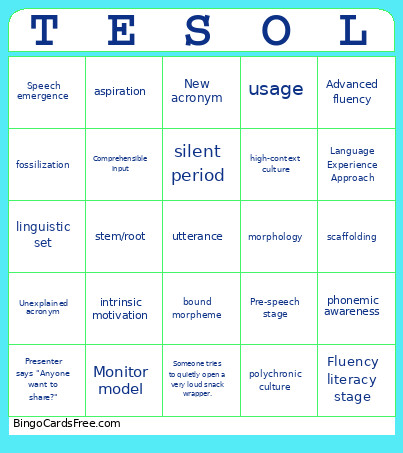 This TESOL Day 1 Bingo Cards Game contains following Words or Phrases: Unfunny joke, Funny joke, Someone arrives late, Presenter says "best practice", Presenter says "Let's put that question in the parking lot.", Presenter says "Does that make sense?", Someone is using multiple highlighters., Someone's phone rings., Unexplained acronym, A video plays with no sound., Presenter says "Let's circle back to that.", Presenter says "Let's put in pin in that.", The presenter uses a meme from 2010., The presenter points out a typo on their own slides., Someone tries to quietly open a very loud snack wrapper., Presenter acts like they are telling you a secret., Presenter gives an awkward high-five or fist bump., Presenter is visibly sweating., Cringey pun, Someone forgot to pick up the handouts and has to walk over and get them., Someone's checking sports scores, the stock market, or the news., Someone brings snacks to share., Presenter whispers for dramatic effect., Presenter raises their voice for dramatic effect., Presenter pauses for dramatic effect., Cutesy acronym, Excessive use of laser pointer, Presenter says "Anyone want to share?", Presenter says "Can somebody read this for me?, The slide clicker doesn't work, Awkward use of Gen Z slang, Energizer activity that everyone complains about, New acronym, Presenter uses a confusing metaphor, linguistics, phonetics, phoneme, transcription, International Phonetic Alphabet (IPA), voiced sounds, voiceless sounds, place of articulation, nasalization, aspiration, assimilation, diphthong, consonant clusters, epenthesis, voicing, elision, metathesis, intonation, stress, vowel reduction, morphology, word, morpheme, bound morpheme, free morpheme, stem/root, affix, derivational morpheme, inflectional morpheme, syntax, semantics, denotation, connotation, idioms, interference, language families, pragmatics, utterance, sociolinguistics, language policy, regional dialect, social dialect, pidgin, creole, World Englishes, communicative competence, register, discourse competence, strategic competence, BICS, CALP, culture, linguistic determinism, linguistic relativism, Sapir-Whorf hypothesis, cultural norms, individualism, collectivism, high-context culture, low-context culture, monochronic culture, polychronic culture, acculturation, honeymoon, hostility, humor, home, bias, cultural awareness, multicultural classroom, stereotype, cultural liaisons, proxemics, language learning, language acquisition, Cognitive theory, Sensorimotor stage, Preoperational stage, Concrete operational stage, Formal operational stage, Connectionism, Behaviorist theory, linguistic set, Monitor model, Acquisition-learning hypothesis, Input hypothesis, Comprehensible input, Monitor hypothesis, Natural order hypothesis, Affective-filter hypothesis, Universal Grammar, poverty of stimulus, Pre-speech stage, Babbling stage, One-word stage, underextension, overextension, Two-word stage, Early multiword stage, Later multiword stage, transfer, positive transfer, cognates, false cognates, negative transfer, code-switching, accents, silent period, interlanguage, fossilization, morpheme acquisition order, Pre-production, Early production, Speech emergence, Intermediate fluency, Advanced fluency, intrinsic motivation, extrinsic motivation, language modeling, target, comprehensible input, scaffolding, phonemic awareness, grapheme, grammar, usage, mechanics, genres, narrative writing, descriptive writing, expository writing, argumentative writing, procedural writing, rhetorical pattern, Whole Language approach, Phonics / skills-based approach, Language Experience Approach, Emergent literacy stage, Early literacy stage, Transitional literacy stage, Fluency literacy stage, phonological awareness.