
GS Bingo October Cards - Print Free or Customize
Print free GS bingo October cards or adjust them, limitless prints! Select from 42,200+ designs or use the bingo card generator. Add numbers, words, pictures, or all of them. Play using printed PDF, digital bingo cards, and the digital bingo caller, or mix physical and digital.
About: This bingo card is perfect for a lively workplace team-building event with a Halloween twist, designed to boost sales, recognize achievements, and spark creative interactions among staff. It blends fun social challenges, themed dress-up days, and friendly competition, making it ideal for retail or hospitality teams looking to build camaraderie while hitting their goals.
How To: To download a printable PDF, click the Print button. You can alter the card count and other printing settings on the Print tab. Grid items and free space text can be edited on the Basic tab. Appearance can be totally personalized on the corresponding tabs, or you can quickly search any setting using the 🔍 tab.
How to play GS Bingo October Cards?
- Printed Players: Print PDF bingo cards and manually cross off the cards.
- Virtual Players: Click on the Play button above, and then click on the 🎫 button.
- Printed Caller: Print PDF calling list & calling slips and manually choose the slips.
- Virtual Caller: Click on the Play button above.
- Combo Play: Select any combination above. For instance, caller can be either Printed or Virtual. And players can be Printed or Virtual or a combination of both.
Step-By-Step:
- Start by getting the GS Bingo October PDF by clicking on the "Print" button above.
- Open the PDF and print it.
- For random calling, you can print another copy of the call list, cut, fold and then pull them randomly at play time.
- Cut the bingo cards at the cut lines if there are more than 1 bingo cards per page.
- Give one card to each player. For marking, you can use markers. Crayons are the cheapest.
- Select one person to be the caller. If you are playing in a small group, the caller can as well play along with their own Bingo card.
- The caller opens the game by randomly drawing an item from the call list and saying it to all players.
- The players look at their cards to see if they have the called word. If they do, they cross off that word.
- The first player to finish a horizontal, vertical, or a diagonal line of crossed items yells "Bingo!" and wins the play.
- The caller confirms that the items crossed off form a proper line according to the Bingo card and call list.
- You can play for varied patterns or a full card blackout for an extended play.
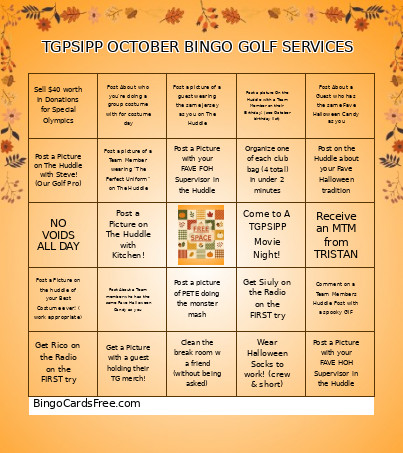 This GS Bingo October Cards Game contains following Words or Phrases: Get Rico on the Radio on the FIRST try, Get Siuly on the Radio on the FIRST try, Sell $40 worth in Donations for Special Olympics, Sell $20 worth in Donations for Special Olympics, Sell 5 Red Gloves in 1 shift!, Sell $150 worth of Retail in 1 sale, Get a Picture with a guest holding their TG merch!, Post a Picture with your FAVE manager in the Huddle, Post a Picture with your FAVE FOH Supervisor in the Huddle, Post a Picture with your FAVE HOH Supervisor in the Huddle, Receive an MTM from TRISTAN, Post a picture On the Huddle with a Team Member on their Birthday! (see October birthday list), Comment on a Team Members Huddle Post with a spooky GIF, Post on the Huddle about your Fave Halloween tradition, Wear a Flannel on the 23rd, Post a Group Photo on The Huddle of everyone wearing the same teams Jersey as you, Post a Picture on The Huddle with Steve! (Our Golf Pro), Post a Picture on The Huddle with Sales!, Post a Picture on The Huddle with Facilities!, Post a Picture on The Huddle with Kitchen!, Post a picture of a guest wearing a flannel, ON flannel Friday on The Huddle, Post a picture of a guest wearing the same jersey as you on The Huddle, Post a picture of a Team Member wearing "The Perfect Uniform" on The Huddle, Post a Video of a manager doing their version of the "Thriller" dance on The Huddle, Post About a Guest who has the same Fave Halloween Candy as you, Post About a Team member who has the same Fave Halloween Candy as you, Post About who you're doing a group costume with for costume day, Post a Picture of you and a team member wo have the same fave Halloween Movie, Post a Picture on the huddle of your Best Costume ever! ( work appropriate), Wear Halloween Socks to work! (crew & short), Clean the break room w a friend (without being asked), Post a picture of PETE doing the monster mash, Organize one of each club bag (4 total) in under 2 minutes, Get a customer to laugh at a Halloween themed joke (post it!), Get a guest to record you doing a spooky dance!, Take a Picture With Jenn in an Inflatable Suit on Sunday Funday!, Post a Picture with Bad Boney on the Huddle!, NO VOIDS ALL DAY, Come to A TGPSIPP Movie Night!.