Print free Volunteers bingo cards or personalize,
unlimited cards! Choose from 42,600+ templates or use the bingo card generator.
Add numbers, words, photos, or mix them all.
Play using printed PDF, digital bingo cards,
and the digital bingo caller, or combine all formats.
About: This bingo card is perfect for a volunteer appreciation event or community gathering centered around the dedicated people at the Creek. With an uplifting and inclusive tone, it encourages participants to connect, share stories, and celebrate each other's contributions—whether they’re long-time helpers, new faces, or those making a difference both in and out of their neighborhood.
How To: To download a printable PDF, click the Print button.
You can change the card count and other
print preferences on the Print tab.
Grid items and free space content can be changed on the Basic tab.
Appearance can be highly personalized on the
corresponding tabs, or you can quickly find any preference
using the 🔍 tab.
How to play Volunteers Bingo Cards?
Paper Caller: Print PDF calling list & calling slips and manually choose the slips.
Digital Players: Click on the Play button above, and then click on the 🎫 button.
Paper Players: Print PDF bingo cards and manually mark the cards.
Digital Caller: Click on the Play button above.
Combo Play: Pick any combination above.
For instance, caller can be either Offline or Digital.
And players can be Offline or Digital or a mix of both.
Step-By-Step:
Start by downloading the Volunteers PDF by clicking on the "Print" button above.
Open the PDF and print a hard copy.
For random calling, you can print another copy of the call list, cut, fold and then pick them randomly at play time.
Cut the bingo cards at the cut lines if there are greater than 1 bingo cards per page.
Distribute one card per player. For marking, you can use pencils. Crayons cost the least.
Pick one person to be the caller. If you are playing in a small group, the caller can also play along with their own Bingo card.
The caller starts the play by randomly pulling an item from the call list and calling out it to all players.
The players scan their cards to see if they have the called word. If they do, they mark that word.
The first player to finish a horizontal, vertical, or a diagonal line of crossed items announces "Bingo!" and wins the game.
The caller confirms that the items crossed off form a correct line as per the Bingo card and call list.
You can play for varied patterns or a full card blackout for a longer game.
This Volunteers Bingo Cards Game contains following Words or Phrases: Someone who has volunteered for 5 years or more, Someone who is new to volunteering at the Creek, Someone who is on the WCHA Executive, Someone who volunteers for more than one activity, Someone who volunteers outside of the Creek, Someone who has been recognized for their volunteer efforts, Someone who is an Activity Coordinator, Someone who is hosting today's event, Someone who volunteers with animals, Someone who volunteers for the Food Bank, Someone who volunteers with Children, Someone who volunteers with seniors, Someone who helps their neighbour, Some one who has volunteered to drive someone else, Someone who does friendly visits to shut-ins, Someone who volunteers their talents, Someone who has helped with Share the Wealth, Someone who helps with the Health Cupboard, Someone who helps plan Celebrations of Life, Someone who you were happy to see today, Someone who is a friend, Someone who you just met today, Someone who made an impression on you today, Someone who told you something you didn't already know.

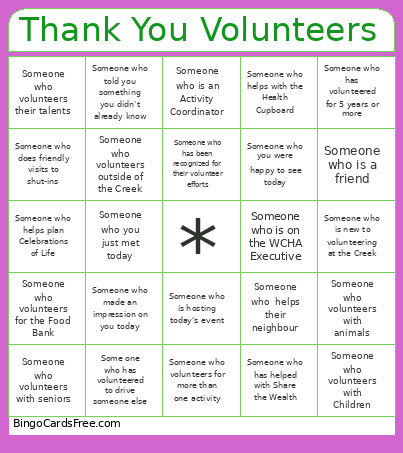 This Volunteers Bingo Cards Game contains following Words or Phrases: Someone who has volunteered for 5 years or more, Someone who is new to volunteering at the Creek, Someone who is on the WCHA Executive, Someone who volunteers for more than one activity, Someone who volunteers outside of the Creek, Someone who has been recognized for their volunteer efforts, Someone who is an Activity Coordinator, Someone who is hosting today's event, Someone who volunteers with animals, Someone who volunteers for the Food Bank, Someone who volunteers with Children, Someone who volunteers with seniors, Someone who helps their neighbour, Some one who has volunteered to drive someone else, Someone who does friendly visits to shut-ins, Someone who volunteers their talents, Someone who has helped with Share the Wealth, Someone who helps with the Health Cupboard, Someone who helps plan Celebrations of Life, Someone who you were happy to see today, Someone who is a friend, Someone who you just met today, Someone who made an impression on you today, Someone who told you something you didn't already know.