Thanksgiving Bingo Cards - Print Free or Customize
Print free Thanksgiving bingo cards or alter them,
limitless cards! Pick from 41,500+ templates or use the bingo card generator.
Add numbers, phrases, images, or mix them all.
Play using printable PDF, digital bingo cards,
and the digital bingo caller, or go hybrid.
About: Get ready for classic family gathering chaos with this bingo card, perfect for Thanksgiving or holiday meals. The card captures all the familiar moments and quirky habits that pop up when relatives come together—inside jokes, well-worn topics, and the little mishaps that always make these occasions memorable. Great for lightening the mood at big family events!
How To: To download a printable PDF, click the Print button.
You can modify the card quantity and other
printing options on the Print tab.
Grid items and free space text can be added on the Basic tab.
Appearance can be entirely customized on the
relevant tabs, or you can quickly search any setting
using the 🔍 tab.
How to play Thanksgiving Bingo Cards?
Printed Caller: Print PDF calling list & calling slips and physically choose the slips.
Digital Players: Click on the Play button above, and then click on the 🎫 button.
Digital Caller: Click on the Play button above.
Printed Players: Print PDF bingo cards and physically mark the cards.
Mixed Mode: Pick any combination above.
For instance, caller can be either Printed or Digital.
And players can be Printed or Digital or a combo of both.
Step-By-Step:
Start by getting the Thanksgiving PDF by clicking on the "Print" button above.
Open the PDF and print a hard copy.
For random calling, you can print another copy of the call list, cut, fold and then pull them randomly at play time.
Cut the bingo cards at the cut lines if there are more than 1 bingo cards per page.
Distribute one card per player. For marking, you can use pens. Crayons are the cheapest.
Pick one person to be the caller. If you are playing in a small group, the caller can also play along with their own Bingo card.
The caller starts the game by randomly drawing an item from the call list and calling out it to everyone.
The players scan their cards to see if they have the called word. If they do, they mark that word.
The first player to complete a horizontal, vertical, or a diagonal line of crossed items yells "Bingo!" and wins the play.
The caller confirms that the items marked form a proper line according to the Bingo card and call list.
You can play for different patterns or a full card blackout for a longer play.
This Thanksgiving Bingo Cards Game contains following Words or Phrases: Forced Group Picture, Mary hits her vape, Julie has her winter coat on inside, Mindy asks for seconds, Someone says "I'm stuffed", Someone brings up the wedding, Someone says they don't like dessert, Alexis forgets to put something out, Someone says "Looks good", Someone talks about Christmas, Stephen watches sports on his phone, Mindy tries to clean up someone's plate, Emma rolls her eyes, Someone brings up politics, Someone mentions how cold it is outside, Someone talks about how expensive things are, Someone says they don't like pie, Someone talks about work, Alexis asks to play a game, "...back in my day", Someone says they shouldn't have eaten that much, Mary has a phone call about Medicare, Emma talks about the dogs, Smoke break, Football is on TV, A Christmas movie is on TV, Someone says "Smells good", Mindy says it's her birthday / it's coming up, Mindy tries to tell a knock knock joke, Stephen mentions how bad his students are this year, Someone asks "Can you pass the salt?", Someone forgets where they put their drink, Someone is too hot and cracks a window, Someone starts a sentence with "I saw this thing online", Someone laughs at their own joke, Someone arrives much later than expected, Someone's phone alarm goes off, Someone says "I can't believe it's already Thanksgiving", Mindy calls Little Man "Mini Man", Someone says they haven't even started Christmas shopping yet, Someone says "I shouldn't have eaten that much".

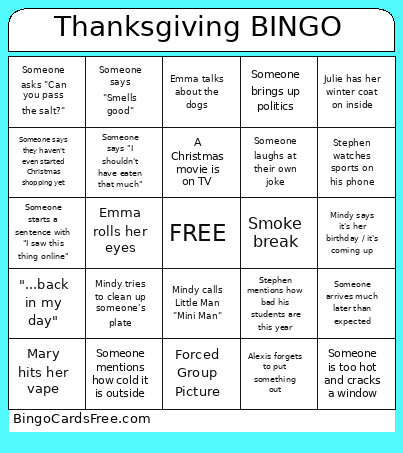 This Thanksgiving Bingo Cards Game contains following Words or Phrases: Forced Group Picture, Mary hits her vape, Julie has her winter coat on inside, Mindy asks for seconds, Someone says "I'm stuffed", Someone brings up the wedding, Someone says they don't like dessert, Alexis forgets to put something out, Someone says "Looks good", Someone talks about Christmas, Stephen watches sports on his phone, Mindy tries to clean up someone's plate, Emma rolls her eyes, Someone brings up politics, Someone mentions how cold it is outside, Someone talks about how expensive things are, Someone says they don't like pie, Someone talks about work, Alexis asks to play a game, "...back in my day", Someone says they shouldn't have eaten that much, Mary has a phone call about Medicare, Emma talks about the dogs, Smoke break, Football is on TV, A Christmas movie is on TV, Someone says "Smells good", Mindy says it's her birthday / it's coming up, Mindy tries to tell a knock knock joke, Stephen mentions how bad his students are this year, Someone asks "Can you pass the salt?", Someone forgets where they put their drink, Someone is too hot and cracks a window, Someone starts a sentence with "I saw this thing online", Someone laughs at their own joke, Someone arrives much later than expected, Someone's phone alarm goes off, Someone says "I can't believe it's already Thanksgiving", Mindy calls Little Man "Mini Man", Someone says they haven't even started Christmas shopping yet, Someone says "I shouldn't have eaten that much".