
🔍
Advertisement

The Fellowship of the Ring Bingo Cards - Print Free or Customize

Print free The Fellowship of the Ring bingo cards or alter them, unlimited cards! Choose from 43,200+ templates or use the bingo card generator. Add numbers, phrases, images, or any combination. Play using printable PDF, online bingo cards, and the online bingo caller, or combine all formats.

The Fellowship of the Ring Bingo
Someone says the name of the movieFrodo criesGandalf insults PippinEye of Sauron appearsDramatic eye contact
Legolas looks off into the distanceShrieking NazgulSting glows"You shall not pass!""One does not simply walk into Mordor."
"What about second breakfast?""Be at peace, Son of Gondor.""A wizard is never late, Frodo Baggins.""Nobody tosses a Dwarf!""Fly, you fools!"
"Keep it secret. Keep it safe."Someone calls the ring "precious"Aragorn gets called something other than his real nameClose up shot of the ringMerry and Pippin cause trouble
"Fool of a Took!"Gandalf bumps his headBoromir looks longingly at the ringPanoramic shot of New Zealand"Give them a moment for pity's sake!
This is shown at the top of the template and game pages.
Optional. If this template makes to the front page, you will be credited for creating it.
Shown at the top of each bingo card.

This can be text or an image. Images larger than 50 KB may be compressed and may lose transparency.
If words on a line are separated by this text, then:
  • Bingo card will only show the text on the right side of the separator.
  • The PDF call list will show the full text.
  • To disable this feature, clear this field.
Quiz Mode ON
Select which side of the quiz separator to show on the card preview on this page. When printing or playing, calling cards always show the right side only.
If words on a line are separated by this text, then:
  • The text on the right side of the separator will be spoken by the online game play.
  • Bingo card will only show the text on the left side of the separator.
  • The PDF call list will show the full text.
  • To disable this feature, clear this field.
Audio Mode ON
Use separate item lists for each column. This is useful for american traditional 75 ball number bingo or cards where each column should draw from a different set of items.
Enter numbers, words or phrases, each one on a new line. Up to 255 items are supported.

Items Per Column:
To specify items per column, eg for 75 ball bingo, turn ON the "Items Per Column" setting.
Sort   |   No Dups
Supports:
  1. Up to 99 images.
  2. Single or multiple image uploads.
  3. Up to 5 MB file size per image.
  4. You can use both Grid Items and Grid Images.
  5. Click an image or label to edit the label or delete the image.
  6. If an image background changes to white, remove transparency or reduce the image size to < 10KB.
    Choose whether image labels appear on bingo cards. Image labels are always shown on the calling card.
    Grid size in Columns x Rows format.
    Free space is usually the center square of the card. It is like a joker or a wild square, and counts towards the winning pattern.
    • Shows text or an image in the Free Space cell.
    • Make sure Free Space Cell is not set to "None".
    • To show text, enter text.
    • To show an image, click the button on the right and select an image.
    • If the image background changes to white, remove transparency or reduce the image size to < 10KB.
    Select Yes to generate unique random cards.

    If No is selected, all cards will have the same text in the same order, which might be useful in educational or quiz settings.
    Text is automatically resized to fit inside each cell. Shorter text may appear very large. Choose a smaller maximum font size to limit how large the text can get.
    Title text color.

    * Applicable when Card Title is text.
    Title background shape.

    * Requires Title Back Opacity to be > 0%.
    Title background opacity.

    * Requires Title Back Shape.
    Title background shape color.

    * Requires Title Back Shape.
    * Requires Title Back Opacity to be > 0%.
    Title background border color.

    * Requires Title Back Shape.
    * Requires Title Back Opacity to be > 0%.
    Grid Text color.
    Grid background color.
    Grid line color.
    • Background shape for cells.
    • Select a stock image or upload your own custom image.
    • You can use Cell Transparency setting to change how prominently the background shape shows.
    • If you select a shape other than Grid, you may have to increase Cell Padding if you want to fit the text inside the shape.
    • Don't see the selected image?
      Set Cell Transparency <50.
    Empty space inside each cell between border and text.
    Space between any 2 cells.
    0% makes grid background opaque. Higher setting makes grid background transparent allowing card background image or card background color to show.
    Outside border width.
    Card outside border color.

    * Requires Card Border Width > 0%
    Yes makes the card corners rounded.
    Empty space between card border and card contents.
    Card background color.
    • Background image for the whole card.
    • Select a stock image or upload your own custom image.
    • Use Card Transparency and Cell Transparency to control how much of the image shows through.
    Don't see the selected image?
    • Set Card Transparency >50.
    • Set Card Border Width >0 or Card Padding >0.
    • Set Cell Transparency >50.
    Select how the background image covers the whole card. You can also choose to repeat the image.
    Controls the transparency of the card background color. Higher values make the card background more transparent, allowing the card background image or outer background to show through.
    This mode uses rapid animations. It may cause dizziness, nausea, or trigger sensitive individuals. Please use responsibly.
    Warning! 
    Public: Anyone can see your card template, including search engines

    Private: Only you can see and edit the card template. You will need to be signed in.

    Click to Sign-Up « Free!!!

    Click to Sign-In
    Number of cards to generate and include in the Full PDF. The Preview button will always generate only 1 card.
    Choose whether to include a call list in the Full PDF. Grid prints the call list as a grid; List prints it as a text list.
    Printer paper size.
    Paper orientation for printing. Some card layouts may look better in portrait or landscape.
    Arrangement of cards on each page of paper.
    Horizontal margin on left and right sides of each card.
    Vertical margin on top and bottom sides of each card.
    Colors: Removes background to save ink for printing.

    B&W: Removes background & changes colors to black & white to save ink for printing.
    Select amount of empty space to keep in each cell for participants to write something.

    This feature is also called human bingo, people bingo, social bingo, get-to-know bingo or ice breaker bingo.
    Starting card number. Change if you need to reprint a set of cards starting with a specific card number.

    Note: If this is not 1, then call list (index card) will not be printed.
    Header height. Header is shown only when there is 1 or more characters.
    Instructions or any other message(s) at the top of each card.
    Footer height. Footer is shown only when there is 1 or more characters.
    Instructions or any other message(s) at the bottom of each card.
    All fonts support English.

    For non-English support in PDF, please try FreeSans, FreeSerif, DejaVuSans, DejaVuSerif or NotoSans
    ✉

    Suggestions | Feedback | Bug

    Similar Bingo Cards: , ,

    About: This bingo card is perfect for a Lord of the Rings movie marathon, packed with all the iconic quotes, memorable moments, and classic character antics fans love. With a fun and nostalgic vibe, it’s great for watch parties or fan gatherings where everyone can celebrate their favorite Middle-earth adventures together. Get ready for laughter, heartfelt scenes, and plenty of friendly competition!

    How To: To download a PDF to print, click the Print button. You can adjust the card count and other printing settings on the Print tab. Grid items and free space text can be changed on the Basic tab. Appearance can be totally personalized on the relevant tabs, or you can easily find any setting on the 🔍 tab.

    How to play The Fellowship of the Ring Bingo Cards?

    • Digital Players: Click on the Play button above, and then click on the 🎫 button.
    • Printed Players: Print PDF bingo cards and manually write on the cards.
    • Printed Caller: Print PDF calling list & calling slips and manually select the slips.
    • Digital Caller: Click on the Play button above.
    • Hybrid Play: Choose any combination above. For example, caller can be either Offline or Digital. And players can be Offline or Digital or a combo of both.

    Step-By-Step:

    1. Start by downloading the The Fellowship of the Ring Bingo PDF by clicking on the "Print" button above.
    2. Open the PDF and print it.
    3. For random calling, you can print another copy of the call list, cut, fold and then pull them randomly at play time.
    4. Cut the bingo cards at the cut lines if there are greater than 1 bingo cards per page.
    5. Distribute one card per player. For marking, you can use pencils. Crayons cost the least.
    6. Choose one person to be the caller. If you are playing in a small group, the caller can as well play along with their own Bingo card.
    7. The caller starts the game by randomly pulling an item from the call list and calling out it to all players.
    8. The players check their cards to see if they have the called word. If they do, they mark that word.
    9. The first player to finish a horizontal, vertical, or a diagonal line of marked items yells "Bingo!" and wins the play.
    10. The caller verifies that the items marked form a correct line according to the Bingo card and call list.
    11. You can play for varied patterns or a full card blackout for a longer play.
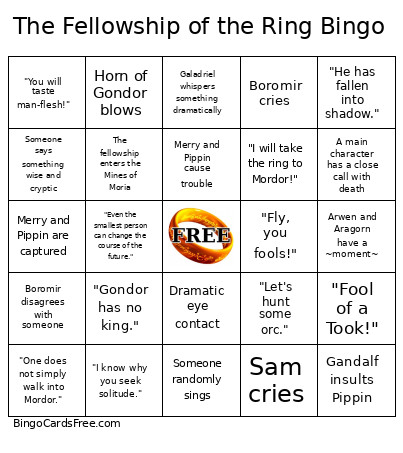
    The Fellowship of the Ring Bingo CardsThis The Fellowship of the Ring Bingo Cards Game contains following Words or Phrases: Someone says the name of the movie, Frodo cries, Gandalf insults Pippin, Eye of Sauron appears, Dramatic eye contact, Legolas looks off into the distance, Shrieking Nazgul, Sting glows, "You shall not pass!", "One does not simply walk into Mordor.", "What about second breakfast?", "Be at peace, Son of Gondor.", "A wizard is never late, Frodo Baggins.", "Nobody tosses a Dwarf!", "Fly, you fools!", "Keep it secret. Keep it safe.", Someone calls the ring "precious", Aragorn gets called something other than his real name, Close up shot of the ring, Merry and Pippin cause trouble, "Fool of a Took!", Gandalf bumps his head, Boromir looks longingly at the ring, Panoramic shot of New Zealand, "Give them a moment for pity's sake!, Hobbits arrive at the Prancing Pony, Merry or Pippin touches something they shouldn't, Frodo puts on the ring, Someone smokes a pipe, "Even the smallest person can change the course of the future.", "A wizard is never late.", Gandalf says something wise, Someone randomly sings, "You have my bow." "And my axe.", Boromir disagrees with someone, Sam says "Mr. Frodo", Peter Jackson cameo, Arwen and Aragorn have a ~moment~, Frodo is injured or falls, Horn of Gondor blows, "There's no strength left in the world of Men.", "Ride hard, don't look back.", Someone tries to take the ring from Frodo, Frodo enters the Shadow World, "He hates and loves The Ring - as he hates and loves himself.", "They will never stop hunting you.", Sam chases after Frodo, Gimli yells or grunts, "They come in pints?", "I would have followed you, my brother... my captain... my king.", Gimli flirts with Galadriel, ewww Uruk-hai goo, "I choose a mortal life.", "Bring forth the ring.", "Gondor has no king.", Bilbo gives Sting to Frodo, Creepy Bilbo jump scare, Boromir teaches Merry and Pippin to swordfight, "He's trying to bring down the mountain!", The fellowship enters the Mines of Moria, Freaky octopus tries to eat Frodo, Frodo spots Gollum in the mine, "I wish the ring had never come to me.", Sam uses a frying pan as a weapon, A main character has a close call with death, "I think there's more to this hobbit than meets the eye.", "You are full of surprises, Master Baggins.", "What is this new devilry?", The fellowship run from the Balrog, A main character sacrifices themselves for someone else, "Nobody tosses a dwarf!", Legolas grabs Gimli by the beard, Gandalf faces off with the Balrog, "Fly, you fools!", Frodo shouts another character's name while on the verge of tears, "Stay close, young hobbits!", Galadriel whispers something dramatically, "He has fallen into shadow.", Boromir cries, Boromir talks about the glory of Gondor, Galadriel passes the test, "To bear a ring of power is to be alone.", "You will taste man-flesh!", Characters travel by water, "Long have I desired to look upon the kings of old.", Someone wanders off by themselves, "I know why you seek solitude.", "Find the halfling!", Merry and Pippin distract the Uruk-Hai so Frodo can escape, Merry and Pippin are captured, "Then you did what I could not.", "Be at peace, son of Gondor.", "Let's hunt some orc.", Someone says something wise and cryptic, A hobbit gets picked up/carried/thrown, "Our business is our own.", "I will take the ring to Mordor!", Someone refers to Frodo as the "ring-bearer", Sam cries, Bilbo gives Frodo the mithril shirt.

    Advertisement