
The Snow Music Go On Bingo Cards - Print Free or Customize
Print free The Snow Music Go On bingo cards or alter them, unlimited cards! Select from 41,500+ templates or use our bingo card generator. Add numbers, phrases, pictures, or all of them. Play using printed PDF, online bingo cards, and our online bingo caller, or combine all formats.
About: This bingo card is the perfect companion for anyone watching a heartwarming holiday musical or play, especially with a community theatre vibe. Packed with classic festive tropes, backstage drama, and small-town charm, it's designed for audiences who love the magic, mishaps, and emotional moments that make Christmas shows unforgettable. Perfect for cast parties or group watch nights!
How To: To save a PDF to print, click the Print button. You can adjust the card count and other print options on the Print tab. Grid items and free space content can be changed on the Basic tab. Appearance can be entirely customized on the relevant tabs, or you can quickly search any preference on the 🔍 tab.
How to play The Snow Music Go On Bingo Cards?
- Printed Caller: Print PDF calling list & calling slips and manually draw the slips.
- Digital Players: Click on the Play button above, and then click on the 🎫 button.
- Printed Players: Print PDF bingo cards and manually scratch the cards.
- Digital Caller: Click on the Play button above.
- Combo Mode: Choose any combination above. For instance, caller can be either Paper or Digital. And players can be Paper or Digital or a combination of both.
Step-By-Step:
- Start by saving the The Snow Music Go On PDF by clicking on the "Print" button above.
- Open the PDF and print a hard copy.
- For random calling, you can print another copy of the call list, cut, fold and then draw them randomly at play time.
- Cut the bingo cards at the cut lines if there are greater than 1 bingo cards per page.
- Give one card to each player. For marking, you can use pens. Crayons are the cheapest.
- Choose one person to be the caller. If you are playing in a small group, the caller may also play along with their own Bingo card.
- The caller opens the play by randomly drawing an item from the call list and announcing it to all players.
- The players check their cards to see if they have the called word. If they do, they dab that word.
- The first player to complete a horizontal, vertical, or a diagonal line of marked items shouts "Bingo!" and wins the game.
- The caller validates that the items marked form a correct line according to the Bingo card and call list.
- You can play for different patterns or a full card blackout for an extended game.
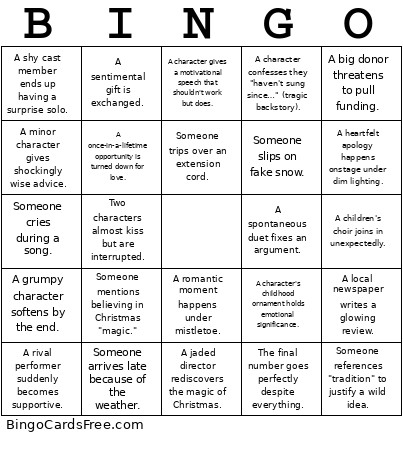 This The Snow Music Go On Bingo Cards Game contains following Words or Phrases: A big-city job offer arrives right before the show., Someone says "The show must go on!" unironically., Magical snow begins at the perfect emotional moment., A rehearsal disaster forces everyone to regroup., Two characters almost kiss but are interrupted., Someone returns to their hometown after years away., A shy cast member ends up having a surprise solo., The power goes out right before the final number., A prop breaks in a very dramatic way., A costume gets stuck during a quick change., A children's choir joins in unexpectedly., Someone drinks hot cocoa while delivering heartfelt advice., A miscommunication nearly ruins a relationship., Someone storms out of rehearsal but comes back., A jaded director rediscovers the magic of Christmas., Someone mentions a beloved relative who "always loved the holidays.", A snowstorm traps characters in the theatre., A last-minute rewrite saves the show., A rival performer suddenly becomes supportive., Someone decorates a Christmas tree while confiding their fears., The leads rehearse alone and accidentally harmonize perfectly., Someone references "tradition" to justify a wild idea., A character's childhood ornament holds emotional significance., A spontaneous duet fixes an argument., Someone dramatically rips up a script or schedule., An understudy has to go on unexpectedly., The cast rehearses in a montage with upbeat holiday music., Someone slips on fake snow., A minor character gives shockingly wise advice., A big donor threatens to pull funding., A local baker supplies cookies to the cast., Someone wears a scarf indoors for no reason., A tech rehearsal goes completely off the rails., A heartfelt apology happens onstage under dim lighting., Two characters decorate the set together and bond., Someone gasps at how beautiful the theatre looks lit up., A character confesses they "haven't sung since…" (tragic backstory)., A cheesy pun about snow or ice., A character gives a motivational speech that shouldn't work but does., The stage manager saves the day with duct tape., Someone mentions believing in Christmas "magic.", A character gets a call that changes everything., A childhood friend turns out to be the love interest., Someone dramatically shouts "Places!", The final number goes perfectly despite everything., Someone cries during a song., A romantic moment happens under mistletoe., A grumpy character softens by the end., Someone arrives late because of the weather., A rehearsal room pep talk energizes the whole cast., Someone trips over an extension cord., A sentimental gift is exchanged., A character learns the true meaning of Christmas., The audience gives a standing ovation., Someone says "I can't believe we pulled it off.", A local newspaper writes a glowing review., A once-in-a-lifetime opportunity is turned down for love., The movie ends with one more magical snowfall.