Print free Thringo bingo cards or personalize,
limitless prints! Pick from 42,200+ designs or use our bingo card generator.
Add numbers, phrases, photos, or mix them all.
Play using printed PDF, virtual bingo cards,
and our virtual bingo caller, or mix physical and digital.
About: This bingo card is perfect for anyone who loves thrifting, flea market adventures, or quirky estate sales. It captures the offbeat, nostalgic, and sometimes hilarious treasures that show up on secondhand hunts. Great for groups of friends, resellers, or collectors, it adds a fun challenge to your next trip through vintage shops or community yard sales.
How To: To download a printable PDF, click the Print button.
You can alter the card count and other
printing options on the Print tab.
Grid items and free space text can be changed on the Basic tab.
Appearance can be fully customized on the
relevant tabs, or you can easily locate any option
using the 🔍 tab.
How to play Thringo Bingo Cards?
Digital Players: Click on the Play button above, and then click on the 🎫 button.
Paper Players: Print PDF bingo cards and physically scratch the cards.
Digital Caller: Click on the Play button above.
Paper Caller: Print PDF calling list & calling slips and physically select the slips.
Hybrid Play: Select any combination above.
For example, caller can be either Offline or Digital.
And players can be Offline or Digital or a mix of both.
Step-By-Step:
Start by downloading the Thringo PDF by clicking on the "Print" button above.
Open the PDF and print it.
For random drawing, you can print another copy of the call list, cut, fold and then draw them randomly at play time.
Cut the bingo cards at the cut lines if there are greater than 1 bingo cards per page.
Give one card to each player. For marking, you can use markers. Crayons cost the least.
Select one person to be the caller. If you are playing in a small group, the caller may also play along with their own Bingo card.
The caller begins the game by randomly picking an item from the call list and announcing it to everyone.
The players check their cards to see if they have the called word. If they do, they mark that word.
The first player to finish a horizontal, vertical, or a diagonal line of crossed items shouts "Bingo!" and wins the play.
The caller checks that the items crossed off form a correct line according to the Bingo card and call list.
You can play for varied patterns or a full card blackout for a longer play.
This Thringo Bingo Cards Game contains following Words or Phrases: Soul of Victorian Child, Surprise Deity, Menswear in Women's Because it's Flashy, Tom Wouldn't Mind if Kathy Bought It, Awesome Amateur Art, Broken Item, Animal Graphic on Clothing, Not Cat/Dog/Gator, NWT Item (new with tags), Jigsaw Puzzle, not animal or landscape, New Emoji Candidate, Obvious Failed DIY, Lonely Salt or Pepper Shaker, Pre-1990 Tech Item, Little Guy, Under $1, Item for Religion other than Christianity, Item with Real Signature, Political Incorrectness, 70s Caftan, Streamer/ YouTuber Merch, Item with Gift Inscription, Mug with Double Entendre, Vase with DPS Backstamp, Pre-1970 Book, Pre-1950 Book, Child's Toy Version of Small Appliance, Framed Family Photo, Florida Gators Item, Non-Florida Collegiate Item, Creepy Clown, Packers or Brewers Item, Company Logo Mug, Hat Shaped like Not Hat, Musical Instrument, Wicker Basket, Not Oval or Rectangle, Kids Book about a Duck, Angel Figurine, "LIVE LAUGH LOVE" or Wine Mom Decor, Half-Burnt Candle, Hand-knitted or crocheted blanket, Newfangled Item Branded or Designed for an Elderly Person, Jewelry Box, Not Brown or White, Item Customized with a Person's or Pet's Name, Sports Equipment, not bat, club, ball, pads, or shoes, Teapot, Fucked Up Frying Pan, Chalk Board Surface on non-wall mounted item, Real Leather, Heels 3"+, Defunct Brand Clothing, Warriors, Rainbow Magic Fairies, or Cpt. Underpants Book.

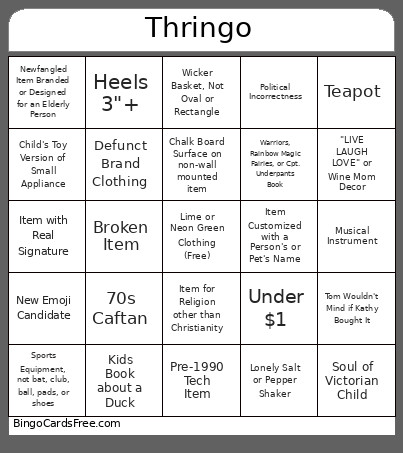 This Thringo Bingo Cards Game contains following Words or Phrases: Soul of Victorian Child, Surprise Deity, Menswear in Women's Because it's Flashy, Tom Wouldn't Mind if Kathy Bought It, Awesome Amateur Art, Broken Item, Animal Graphic on Clothing, Not Cat/Dog/Gator, NWT Item (new with tags), Jigsaw Puzzle, not animal or landscape, New Emoji Candidate, Obvious Failed DIY, Lonely Salt or Pepper Shaker, Pre-1990 Tech Item, Little Guy, Under $1, Item for Religion other than Christianity, Item with Real Signature, Political Incorrectness, 70s Caftan, Streamer/ YouTuber Merch, Item with Gift Inscription, Mug with Double Entendre, Vase with DPS Backstamp, Pre-1970 Book, Pre-1950 Book, Child's Toy Version of Small Appliance, Framed Family Photo, Florida Gators Item, Non-Florida Collegiate Item, Creepy Clown, Packers or Brewers Item, Company Logo Mug, Hat Shaped like Not Hat, Musical Instrument, Wicker Basket, Not Oval or Rectangle, Kids Book about a Duck, Angel Figurine, "LIVE LAUGH LOVE" or Wine Mom Decor, Half-Burnt Candle, Hand-knitted or crocheted blanket, Newfangled Item Branded or Designed for an Elderly Person, Jewelry Box, Not Brown or White, Item Customized with a Person's or Pet's Name, Sports Equipment, not bat, club, ball, pads, or shoes, Teapot, Fucked Up Frying Pan, Chalk Board Surface on non-wall mounted item, Real Leather, Heels 3"+, Defunct Brand Clothing, Warriors, Rainbow Magic Fairies, or Cpt. Underpants Book.