Print free tokyo bingo cards or modify,
limitless cards! Choose from 42,200+ designs or use our bingo card generator.
Add numbers, words, photos, or all of them.
Play using printed PDF, digital bingo cards,
and our digital bingo caller, or mix physical and digital.
About: This bingo card is perfect for a wild night out in Tokyo with a group of close friends who love inside jokes and shared adventures. Packed with quirky references, celebrity sightings, and the unique characters of your crew, it sets a playful tone and will keep everyone laughing as they check off memorable moments. Ideal for parties or group outings!
How To: To get a printable PDF, click the Print button.
You can change the card quantity and other
print settings on the Print tab.
Grid items and free space content can be edited on the Basic tab.
Appearance can be completely personalized on the
corresponding tabs, or you can quickly find any option
on the 🔍 tab.
How to play tokyo Bingo Cards?
Online Caller: Click on the Play button above.
Paper Players: Print PDF bingo cards and physically cross off the cards.
Paper Caller: Print PDF calling list & calling slips and physically choose the slips.
Online Players: Click on the Play button above, and then click on the 🎫 button.
Combo Play: Select any combination above.
For example, caller can be either Printed or Online.
And players can be Printed or Online or a mix of both.
Step-By-Step:
Start by getting the tokyo PDF by clicking on the "Print" button above.
Open the PDF and print it.
For random calling, you can print another copy of the call list, cut, fold and then pick them randomly at play time.
Cut the bingo cards at the cut marks if there are greater than 1 bingo cards per page.
Give one card to each player. For marking, you can use pencils. Crayons are the cheapest.
Select one person to be the caller. If you are playing in a small group, the caller can as well play along with their own Bingo card.
The caller initiates the play by randomly pulling an item from the call list and announcing it to all players.
The players look at their cards to see if they have the announced word. If they do, they cross off that word.
The first player to finish a horizontal, vertical, or a diagonal line of marked items announces "Bingo!" and wins the play.
The caller verifies that the items crossed off form a proper line according to the Bingo card and call list.
You can play for multiple patterns or a full card blackout for an extended play.
This tokyo Bingo Cards Game contains following Words or Phrases: Chris does Ozzy impression, Cute dog at Chakey's, Double spot a new friend, Have a drink with an Australian, Have a normal conversation with a tout, Have drinks in a new ward, Hear Prodigy in the wild, Kent brings up Rick Springfield, Kent makes joke about dying, Kent says "can I cry?", Maddy finds classic drink (peach roomy, honey lemon sour), Mark gets stuck talking to someone from the UK, Australia or NZ, Nao does something reckless with her car, New energy gummy, Old energy gummy, Red wine shots, Sora fondles Ted or Mark at Markland, Secretly request Prodigy, See a designer bucket hat, See a stranger trip at trippers alley, See friends wearing bucket hats, See Lily and/or Demi, See someone wearing MN sports team apparel, Tamanegi Man spotting at Cactus, Someone interacting with wild life in Kabukicho, Someone says Teddy looks like Eminem, Someone says Teddy looks like Jason Stathom, Stranger gropes anyone of us, Tamo at Chakey's, Teddy forgets his hat, Trip on stairs at Nichome Family Mart, Karaoke with other foreigners, Celebrity is in Tokyo when we are.

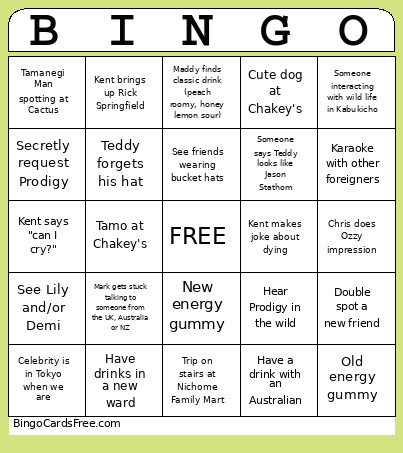 This tokyo Bingo Cards Game contains following Words or Phrases: Chris does Ozzy impression, Cute dog at Chakey's, Double spot a new friend, Have a drink with an Australian, Have a normal conversation with a tout, Have drinks in a new ward, Hear Prodigy in the wild, Kent brings up Rick Springfield, Kent makes joke about dying, Kent says "can I cry?", Maddy finds classic drink (peach roomy, honey lemon sour), Mark gets stuck talking to someone from the UK, Australia or NZ, Nao does something reckless with her car, New energy gummy, Old energy gummy, Red wine shots, Sora fondles Ted or Mark at Markland, Secretly request Prodigy, See a designer bucket hat, See a stranger trip at trippers alley, See friends wearing bucket hats, See Lily and/or Demi, See someone wearing MN sports team apparel, Tamanegi Man spotting at Cactus, Someone interacting with wild life in Kabukicho, Someone says Teddy looks like Eminem, Someone says Teddy looks like Jason Stathom, Stranger gropes anyone of us, Tamo at Chakey's, Teddy forgets his hat, Trip on stairs at Nichome Family Mart, Karaoke with other foreigners, Celebrity is in Tokyo when we are.