Print free TomWeb bingo cards or alter them,
limitless cards! Select from 42,600+ designs or use our bingo card generator.
Add numbers, phrases, photos, or all of them.
Play using PDF printouts, online bingo cards,
and our online bingo caller, or mix physical and digital.
About: This bingo card is all about the Thomasian experience, packed with fun nods to UST campus life, org culture, and student quirks. It’s perfect for welcoming new TomasinoWeb members or breaking the ice at any university gathering. Expect lots of laughs and reminiscing as everyone connects over shared memories and unique campus traditions.
How To: To get a printable PDF, click the Print button.
You can change the number of cards and other
print preferences on the Print tab.
Grid items and free space text can be edited on the Basic tab.
Appearance can be exactly customized on the
relevant tabs, or you can easily search any option
using the 🔍 tab.
How to play TomWeb Bingo Cards?
Printed Caller: Print PDF calling list & calling slips and physically pick the slips.
Digital Caller: Click on the Play button above.
Printed Players: Print PDF bingo cards and physically scratch the cards.
Digital Players: Click on the Play button above, and then click on the 🎫 button.
Mixed Play: Choose any combination above.
For example, caller can be either Printed or Digital.
And players can be Printed or Digital or a combo of both.
Step-By-Step:
Start by saving the TomWeb Bingo PDF by clicking on the "Print" button above.
Open the PDF and print a hard copy.
For random drawing, you can print another copy of the call list, cut, fold and then draw them randomly at play time.
Cut the bingo cards at the cut marks if there are more than 1 bingo cards per page.
Distribute one card per player. For marking, you can use crayons. Crayons cost the least.
Choose one person to be the caller. If you are playing in a small group, the caller can also play along with their own Bingo card.
The caller initiates the play by randomly picking an item from the call list and calling out it to everyone.
The players look at their cards to see if they have the called word. If they do, they cross off that word.
The first player to complete a horizontal, vertical, or a diagonal line of crossed items announces "Bingo!" and wins the game.
The caller checks that the items crossed off form a proper line according to the Bingo card and call list.
You can play for varied patterns or a full card blackout for an extended game.
This TomWeb Bingo Cards Game contains following Words or Phrases: Wears glasses, Naka Engineering uniform, Is wearing a watch, Is wearing a necklace, May anik-anik, Naka AB uniform, May 3+ pins sa ID, May evil eye pin sa ID, Naka hoop earrings, May hair accessory, Naka backpack, Naka shoulder bag, Commerce student, Taga Main Building, -c-, Can name UST's 3c's, Graduating Student, Knows UST's founding year, Was also a Thomasian in senior high, Has a sibling studying in UST, Is a shiftee, Is a class officer, 1st Year, 2nd Year, SWIS, 3rd Year, Executive board member, Member since PY18, Can name TomasinoWeb's president, -c-, New TomasinoWeb member, Member of more than one organization, Holds an officer position in TomasinoWeb or in another organization, Can name three TomasinoWeb departments, Has been an org member for more than a year, TomasinoWeb is their first org, From Creatives Department, From Videography Department, From WebTech Department, Plays musical instruments, Matcha Lover, Watches UAAP, Collects blind boxes, Loves horror movies, -c-, Loves karaoke, Plays roblox, May squishy, Watches anime, Owns mangas, Nanonood ng C-Dramas, Nanonood ng K-Dramas, Napanood Modern Family, Napanood Young Sheldon, Napanood Queen's Gambit, May OPM playlist (show proof), May hidden geng geng playlist (show proof), Na-ghost ng Thomasian before, Tambay sa Main Library, -c-, Nagpa-picture sa Tiger, Na-stranded dahil sa ulan/baha, Tumambay sa grandstand, Nakipag-date sa lover's lane, Naabutan ng Angelus habang naglalakad, Tried angkong or dimsum treats, Nagpa-picture sa athlete, Nabiktima ng blockcest, Bumibili sa Hadouken, Suki ng KapeKuripot, May Paskuhan date na.

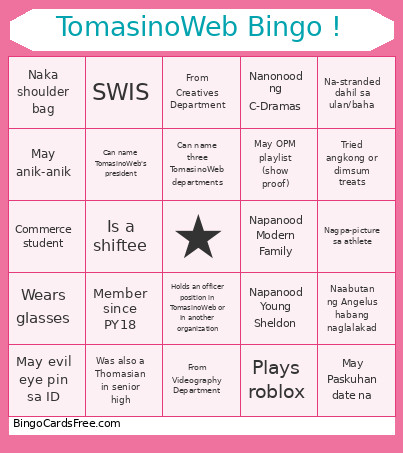 This TomWeb Bingo Cards Game contains following Words or Phrases: Wears glasses, Naka Engineering uniform, Is wearing a watch, Is wearing a necklace, May anik-anik, Naka AB uniform, May 3+ pins sa ID, May evil eye pin sa ID, Naka hoop earrings, May hair accessory, Naka backpack, Naka shoulder bag, Commerce student, Taga Main Building, -c-, Can name UST's 3c's, Graduating Student, Knows UST's founding year, Was also a Thomasian in senior high, Has a sibling studying in UST, Is a shiftee, Is a class officer, 1st Year, 2nd Year, SWIS, 3rd Year, Executive board member, Member since PY18, Can name TomasinoWeb's president, -c-, New TomasinoWeb member, Member of more than one organization, Holds an officer position in TomasinoWeb or in another organization, Can name three TomasinoWeb departments, Has been an org member for more than a year, TomasinoWeb is their first org, From Creatives Department, From Videography Department, From WebTech Department, Plays musical instruments, Matcha Lover, Watches UAAP, Collects blind boxes, Loves horror movies, -c-, Loves karaoke, Plays roblox, May squishy, Watches anime, Owns mangas, Nanonood ng C-Dramas, Nanonood ng K-Dramas, Napanood Modern Family, Napanood Young Sheldon, Napanood Queen's Gambit, May OPM playlist (show proof), May hidden geng geng playlist (show proof), Na-ghost ng Thomasian before, Tambay sa Main Library, -c-, Nagpa-picture sa Tiger, Na-stranded dahil sa ulan/baha, Tumambay sa grandstand, Nakipag-date sa lover's lane, Naabutan ng Angelus habang naglalakad, Tried angkong or dimsum treats, Nagpa-picture sa athlete, Nabiktima ng blockcest, Bumibili sa Hadouken, Suki ng KapeKuripot, May Paskuhan date na.