Print free Tony's bingo cards or customize,
limitless prints! Select from 41,500+ designs or use our bingo card generator.
Add numbers, phrases, images, or mix them all.
Play using PDF prints, virtual bingo cards,
and our virtual bingo caller, or mix physical and digital.
About: This bingo card is perfect for anyone watching the Tony Awards, especially theater lovers and fans of Pink. With its focus on memorable stage moments, heartfelt speeches, and playful celebrity antics, it invites you to join the fun of live award shows. Great for Tony viewing parties or anyone who adores Broadway's quirks and surprises!
How To: To get a PDF to print, click the Print button.
You can adjust the card count and other
print options on the Print tab.
Grid items and free space content can be changed on the Basic tab.
Appearance can be exactly personalized on the
corresponding tabs, or you can quickly search any option
using the 🔍 tab.
How to play Tony's Bingo Cards?
Online Caller: Click on the Play button above.
Online Players: Click on the Play button above, and then click on the 🎫 button.
Printed Players: Print PDF bingo cards and manually cross off the cards.
Printed Caller: Print PDF calling list & calling slips and manually choose the slips.
Combo Mode: Choose any combination above.
For example, caller can be either Paper or Online.
And players can be Paper or Online or a combination of both.
Step-By-Step:
Start by downloading the Tony's Bingo PDF by clicking on the "Print" button above.
Open the PDF and print a hard copy.
For random drawing, you can print another copy of the call list, cut, fold and then pull them randomly at play time.
Cut the bingo cards at the cut lines if there are greater than 1 bingo cards per page.
Give one card to each player. For marking, you can use pens. Crayons cost the least.
Choose one person to be the caller. If you are playing in a small group, the caller may as well play along with their own Bingo card.
The caller starts the play by randomly drawing an item from the call list and saying it to everyone.
The players check their cards to see if they have the announced word. If they do, they dab that word.
The first player to complete a horizontal, vertical, or a diagonal line of crossed items announces "Bingo!" and wins the play.
The caller verifies that the items crossed off form a proper line as per the Bingo card and call list.
You can play for multiple patterns or a full card blackout for a longer play.
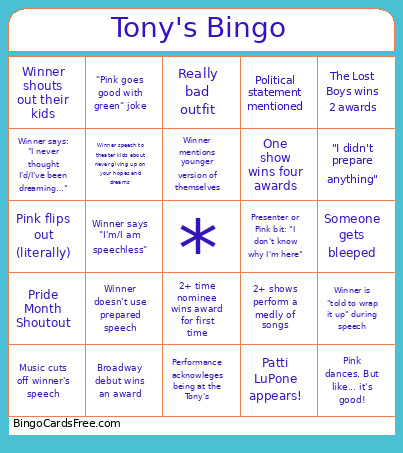
This Tony's Bingo Cards Game contains following Words or Phrases: Pink flips out (literally), Winner doesn't use prepared speech, Music cuts off winner's speech, Winner is "told to wrap it up" during speech, Pink and Willow duet (Pink's daughter), Pride Month Shoutout, "I didn't prepare anything", "Pink goes good with green" joke, Political statement mentioned, Presenter or Pink bit: "I don't know why I'm here", Patti LuPone appears!, Performance starts in the audience, Winner mentions younger version of themselves, Winner puts on reading glasses, Winner thanks others nominees, Winner says: "I never thought I'd/I've been dreaming...", Pink dances. But like... it's good!, Another nominee gives standing ovation to winner, Winner says "I'm/I am speechless", Winner speech to theater kids about never giving up on your hopes and dreams, Nominee not paying attention, Someone gets bleeped, One show wins four awards, The Lost Boys wins 2 awards, Performance acknowleges being at the Tony's, Winner shouts out their kids, Really bad outfit, 2+ shows perform a medly of songs, 2+ time nominee wins award for first time, Broadway debut wins an award.

 This Tony's Bingo Cards Game contains following Words or Phrases: Pink flips out (literally), Winner doesn't use prepared speech, Music cuts off winner's speech, Winner is "told to wrap it up" during speech, Pink and Willow duet (Pink's daughter), Pride Month Shoutout, "I didn't prepare anything", "Pink goes good with green" joke, Political statement mentioned, Presenter or Pink bit: "I don't know why I'm here", Patti LuPone appears!, Performance starts in the audience, Winner mentions younger version of themselves, Winner puts on reading glasses, Winner thanks others nominees, Winner says: "I never thought I'd/I've been dreaming...", Pink dances. But like... it's good!, Another nominee gives standing ovation to winner, Winner says "I'm/I am speechless", Winner speech to theater kids about never giving up on your hopes and dreams, Nominee not paying attention, Someone gets bleeped, One show wins four awards, The Lost Boys wins 2 awards, Performance acknowleges being at the Tony's, Winner shouts out their kids, Really bad outfit, 2+ shows perform a medly of songs, 2+ time nominee wins award for first time, Broadway debut wins an award.